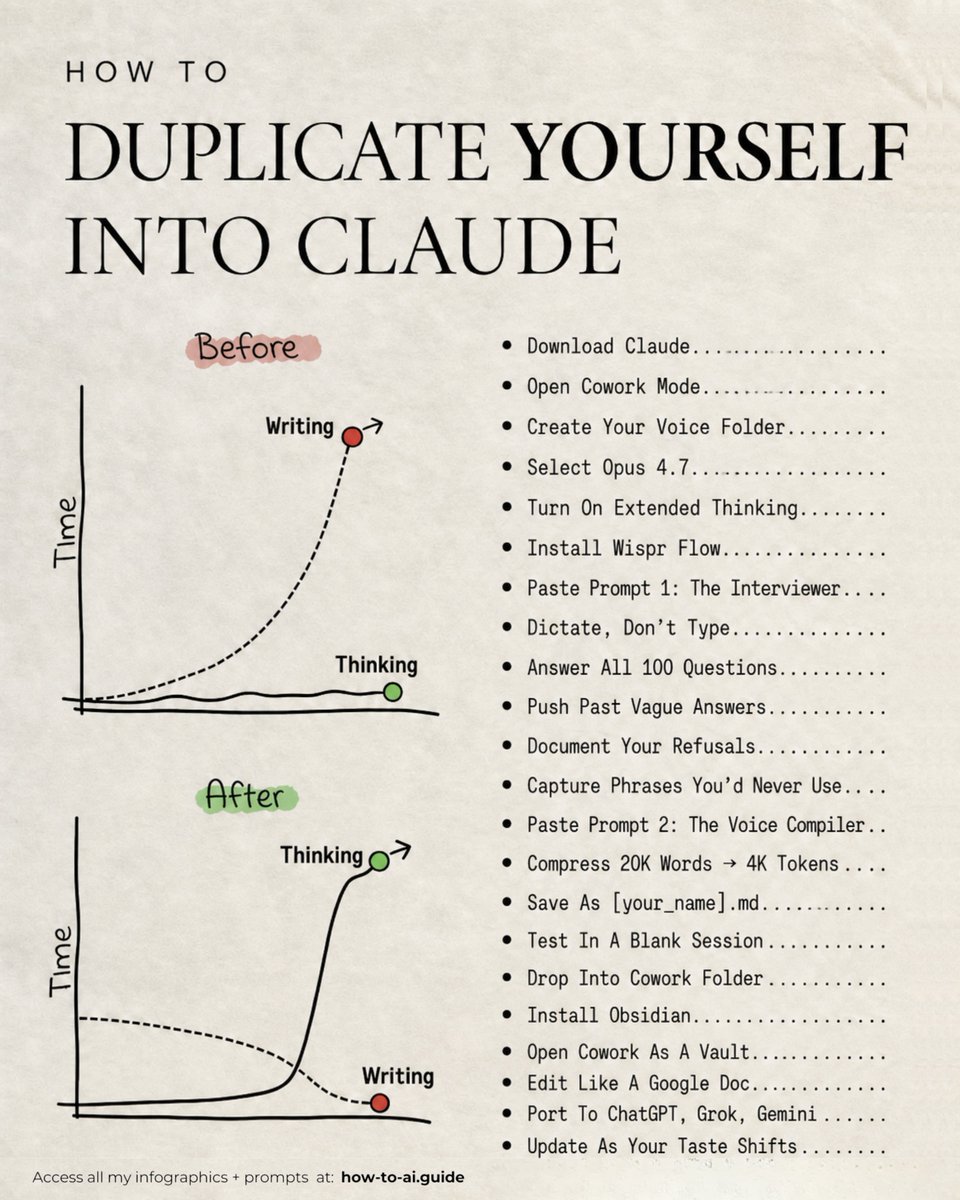
Ruben Hassid is a blunt, highly practical AI writer who debunks hype and publishes playbooks, prompt templates, and free courses. He turns deep technical critique into easy-to-follow guides and sparks high-engagement conversations on model limits and real-world AI work. His tweets and newsletter are designed to teach, provoke, and get people doing useful work with AI.
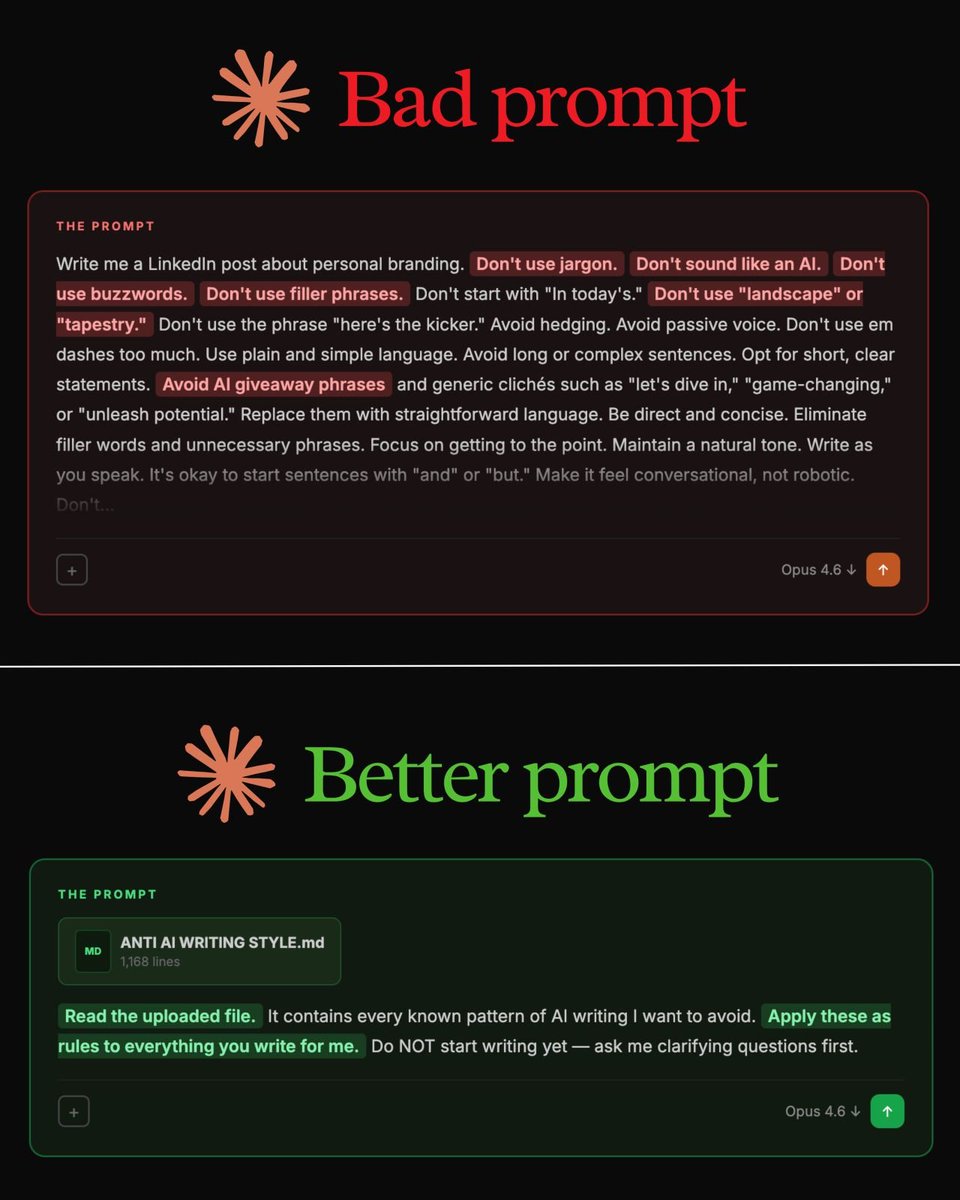
Ruben writes anti-AI style guides so thorough that the robots file a restraining order, and he still finds a new way to tell AI what not to do for the fun of it. It's like watching a grammar teacher argue philosophy with a toaster.
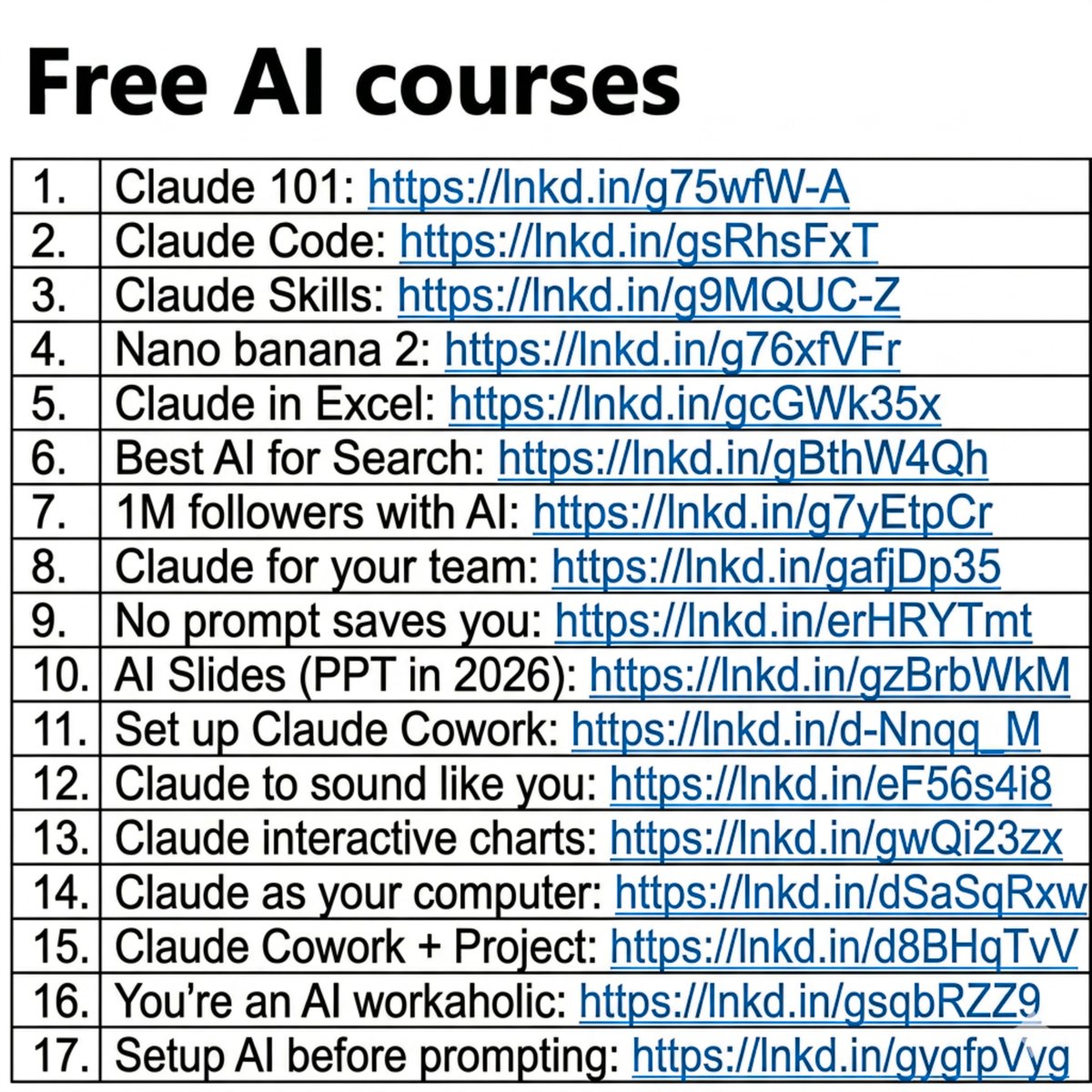
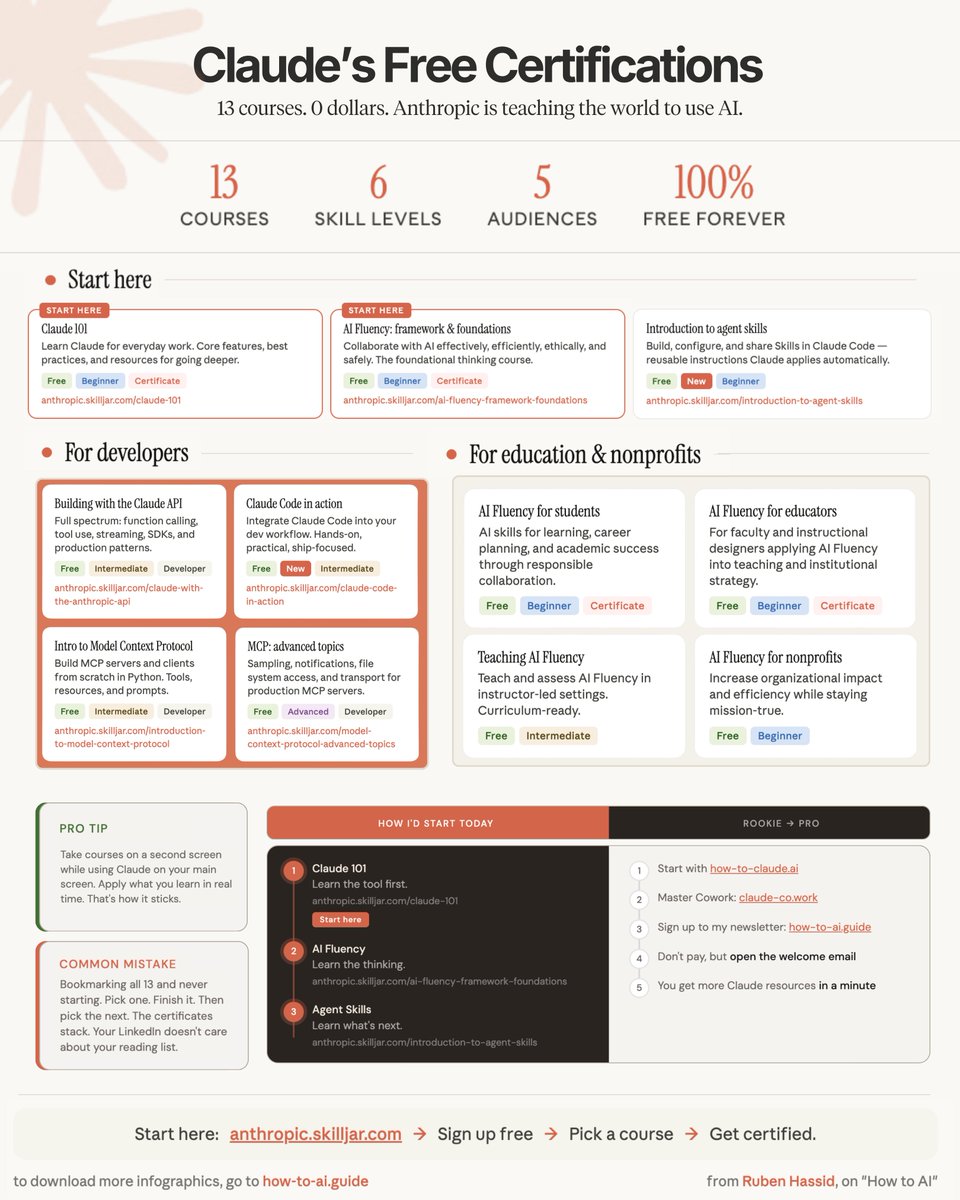
Built a massively influential free resource ecosystem, a newsletter reaching hundreds of thousands and multiple viral threads (including a 14M-view takedown of model 'reasoning') that changed how people prompt and evaluate AI.
To demystify AI and make powerful, responsible practices accessible, teaching people how to use models well, spot bad claims, and build useful AI workflows instead of chasing headlines.
Skeptical of AGI hype and model mysticism; conviction that most current systems memorize patterns rather than 'reason'; education and clear process beat jargon; practical, reproducible playbooks are the path to real AI adoption.
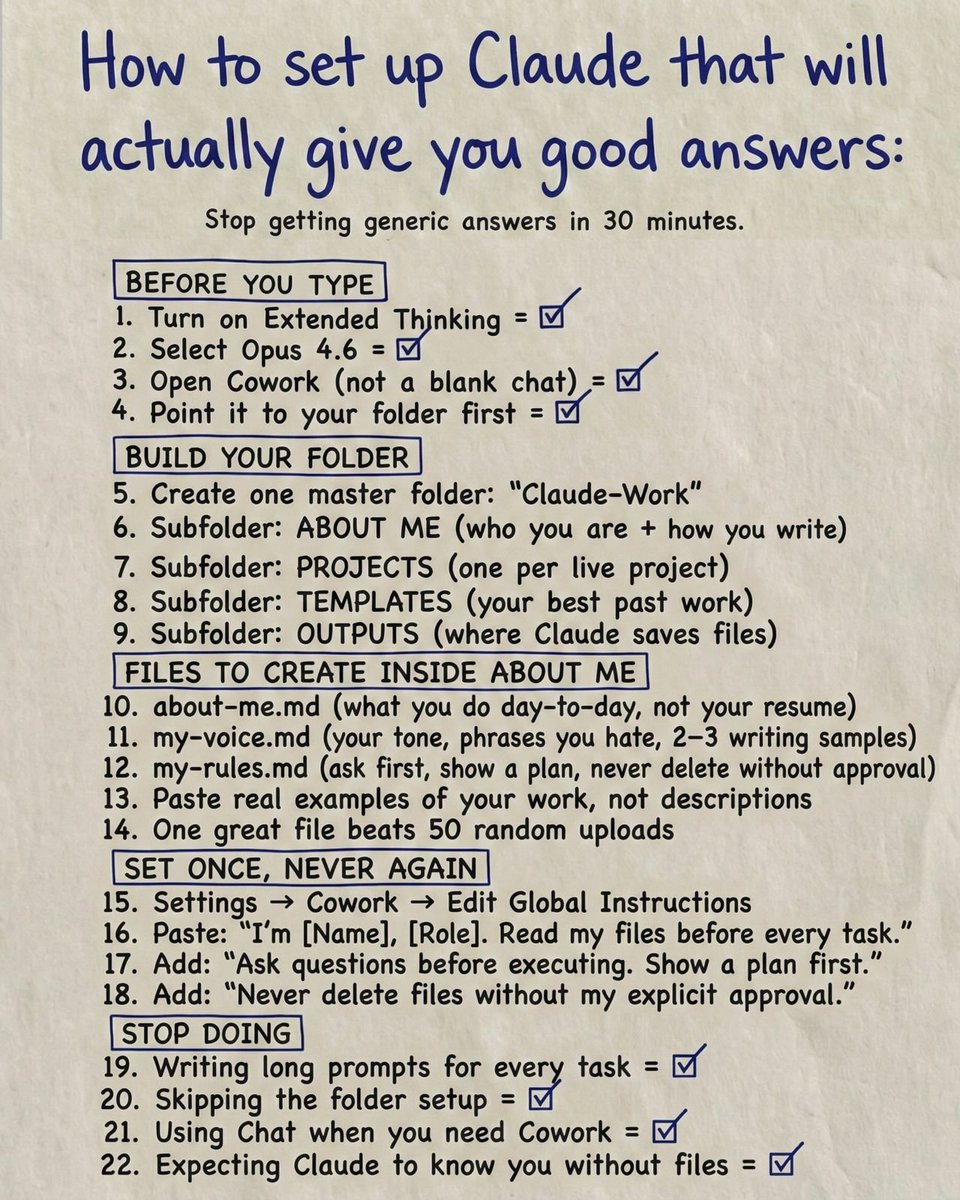
Transforms technical nuance into actionable templates and step-by-step guides; excellent at cutting through hype; creates free, high-value resources that scale; consistently high engagement and credible voice in the AI community.
Can come across as contrarian or overly corrective, which risks alienating folks who love hype; deep focus on one style of tooling/prompting can narrow appeal; prolific posting sometimes trades depth for speed.
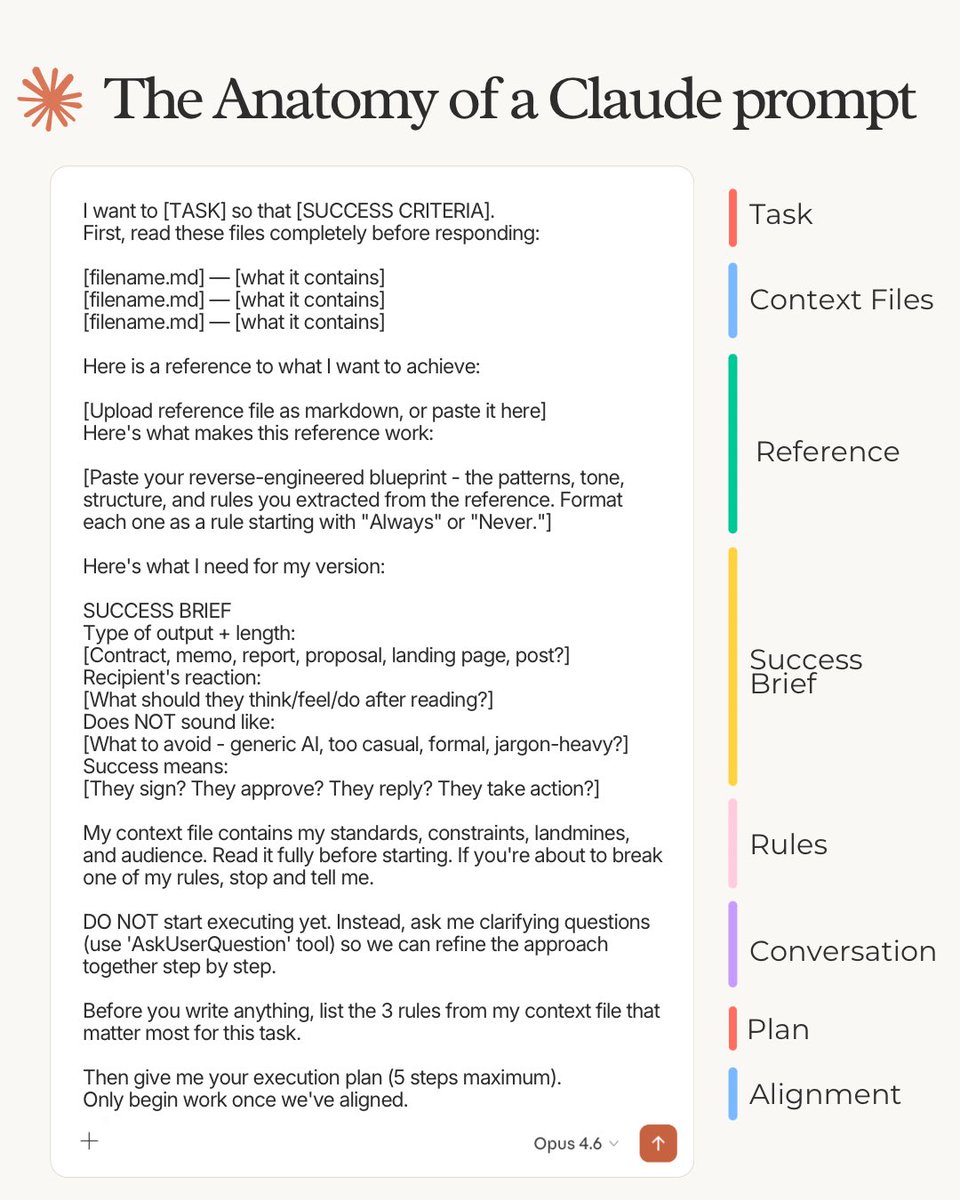
Turn newsletter deep-dives into a recurring X thread series (teaser → long thread → CTA to newsletter files). Pin a 'starter pack' thread linking the .md downloads and a short video demo of the 29-word prompt. Use reply-threads to engage top AI accounts, host regular X Spaces Q&As, clip highlights into short native videos, and run one targeted thread per week that showcases real before/after outputs using his prompt templates to drive retweets and signups.
Fun fact: he offers downloadable .md prompt files and claims a 369,000+ weekly newsletter readership; his most viral post hit ~14 million views. Profile stats: ~56k followers, ~568 following, and 16,809 tweets, he tweets for a living (or close to it).
grok @bot gave me 50 free paid subscriptions
i am sending it to the first 50 people who comment 50 words on why they'd love to use grok bot
ps: i will use @pangram to make sure it's 100% human-generated
{"data":{"__meta":{"device":false,"path":"/creators/rubenhassid"},"/creators/rubenhassid":{"data":{"user":{"id":"1269541526","name":"Ruben Hassid","description":"some people read my https://t.co/uN7GJvEWtp","followers_count":96181,"friends_count":708,"statuses_count":19960,"profile_image_url_https":"https://pbs.twimg.com/profile_images/1995508550387245056/3YsPtVsZ_normal.jpg","screen_name":"rubenhassid","location":"{\"location\":\"\"}","entities":{"description":{"urls":[{"display_url":"substack.com/@ruben","expanded_url":"http://substack.com/@ruben","indices":[20,43],"url":"https://t.co/uN7GJvEWtp"}]},"url":{"urls":[{"display_url":"how-to-ai.guide","expanded_url":"http://how-to-ai.guide","indices":[0,23],"url":"https://t.co/psB7XxB2Y4"}]}}},"details":{"type":"The Thought Leader","description":"Ruben Hassid is a blunt, highly practical AI writer who debunks hype and publishes playbooks, prompt templates, and free courses. He turns deep technical critique into easy-to-follow guides and sparks high-engagement conversations on model limits and real-world AI work. His tweets and newsletter are designed to teach, provoke, and get people doing useful work with AI.","purpose":"To demystify AI and make powerful, responsible practices accessible — teaching people how to use models well, spot bad claims, and build useful AI workflows instead of chasing headlines.","beliefs":"Skeptical of AGI hype and model mysticism; conviction that most current systems memorize patterns rather than 'reason'; education and clear process beat jargon; practical, reproducible playbooks are the path to real AI adoption.","facts":"Fun fact: he offers downloadable .md prompt files and claims a 369,000+ weekly newsletter readership; his most viral post hit ~14 million views. Profile stats: ~56k followers, ~568 following, and 16,809 tweets—he tweets for a living (or close to it).","strength":"Transforms technical nuance into actionable templates and step-by-step guides; excellent at cutting through hype; creates free, high-value resources that scale; consistently high engagement and credible voice in the AI community.","weakness":"Can come across as contrarian or overly corrective, which risks alienating folks who love hype; deep focus on one style of tooling/prompting can narrow appeal; prolific posting sometimes trades depth for speed.","recommendation":"Turn newsletter deep-dives into a recurring X thread series (teaser → long thread → CTA to newsletter files). Pin a 'starter pack' thread linking the .md downloads and a short video demo of the 29-word prompt. Use reply-threads to engage top AI accounts, host regular X Spaces Q&As, clip highlights into short native videos, and run one targeted thread per week that showcases real before/after outputs using his prompt templates to drive retweets and signups.","roast":"Ruben writes anti-AI style guides so thorough that the robots file a restraining order — and he still finds a new way to tell AI what not to do for the fun of it. It's like watching a grammar teacher argue philosophy with a toaster.","win":"Built a massively influential free resource ecosystem — a newsletter reaching hundreds of thousands and multiple viral threads (including a 14M-view takedown of model 'reasoning') that changed how people prompt and evaluate AI."},"tweets":[{"entities":{"media":[{"display_url":"pic.x.com/9A4Lg5aQWO","expanded_url":"https://x.com/RubenHssd/status/1931389580105925115/photo/1","ext_media_availability":{"status":"Available"},"features":{"large":{"faces":[]},"medium":{"faces":[]},"orig":{"faces":[]},"small":{"faces":[]}},"id_str":"1931389577283162112","indices":[247,270],"media_key":"3_1931389577283162112","media_results":{"result":{"media_key":"3_1931389577283162112"}},"media_url_https":"https://pbs.twimg.com/media/Gs2slmza0AAf2r0.jpg","original_info":{"focus_rects":[{"h":672,"w":1200,"x":0,"y":0},{"h":1200,"w":1200,"x":0,"y":0},{"h":1263,"w":1108,"x":46,"y":0},{"h":1263,"w":632,"x":284,"y":0},{"h":1263,"w":1200,"x":0,"y":0}],"height":1263,"width":1200},"sizes":{"large":{"h":1263,"resize":"fit","w":1200},"medium":{"h":1200,"resize":"fit","w":1140},"small":{"h":680,"resize":"fit","w":646},"thumb":{"h":150,"resize":"crop","w":150}},"type":"photo","url":"https://t.co/9A4Lg5aQWO"}]},"extended_entities":{"media":[{"display_url":"pic.x.com/9A4Lg5aQWO","expanded_url":"https://x.com/RubenHssd/status/1931389580105925115/photo/1","ext_media_availability":{"status":"Available"},"features":{"large":{"faces":[]},"medium":{"faces":[]},"orig":{"faces":[]},"small":{"faces":[]}},"id_str":"1931389577283162112","indices":[247,270],"media_key":"3_1931389577283162112","media_results":{"result":{"media_key":"3_1931389577283162112"}},"media_url_https":"https://pbs.twimg.com/media/Gs2slmza0AAf2r0.jpg","original_info":{"focus_rects":[{"h":672,"w":1200,"x":0,"y":0},{"h":1200,"w":1200,"x":0,"y":0},{"h":1263,"w":1108,"x":46,"y":0},{"h":1263,"w":632,"x":284,"y":0},{"h":1263,"w":1200,"x":0,"y":0}],"height":1263,"width":1200},"sizes":{"large":{"h":1263,"resize":"fit","w":1200},"medium":{"h":1200,"resize":"fit","w":1140},"small":{"h":680,"resize":"fit","w":646},"thumb":{"h":150,"resize":"crop","w":150}},"type":"photo","url":"https://t.co/9A4Lg5aQWO"}]},"display_text_range":[0,246],"lang":"en","possibly_sensitive":false,"fact_check":null,"id":"1931389580105925115","view_count":14231400,"bookmark_count":39925,"created_at":1749314134000,"favorite_count":61811,"quote_count":4297,"reply_count":2598,"retweet_count":8823,"user_id_str":"1269541526","conversation_id_str":"1931389580105925115","full_text":"BREAKING: Apple just proved AI \"reasoning\" models like Claude, DeepSeek-R1, and o3-mini don't actually reason at all.\n\nThey just memorize patterns really well.\n\nHere's what Apple discovered:\n\n(hint: we're not as close to AGI as the hype suggests) https://t.co/9A4Lg5aQWO","in_reply_to_user_id_str":null,"in_reply_to_status_id_str":null,"is_quote_status":0,"is_ai":null,"ai_score":null,"source":"scraping","fetched_at":1790730169884,"edit_history_tweet_ids":null,"poll_10min_at":null,"poll_3day_at":null,"poll_count":0,"poll_complete":0},{"bookmarked":false,"display_text_range":[0,256],"entities":{"hashtags":[],"media":[{"display_url":"pic.x.com/2nX8UMdaBh","expanded_url":"https://x.com/RubenHssd/status/1934968317627998534/photo/1","id_str":"1934968313828069376","indices":[257,280],"media_key":"3_1934968313828069376","media_url_https":"https://pbs.twimg.com/media/GtpjbfVb0AAHiON.png","type":"photo","url":"https://t.co/2nX8UMdaBh","ext_media_availability":{"status":"Available"},"features":{"large":{"faces":[]},"medium":{"faces":[]},"small":{"faces":[]},"orig":{"faces":[]}},"sizes":{"large":{"h":1507,"w":1200,"resize":"fit"},"medium":{"h":1200,"w":956,"resize":"fit"},"small":{"h":680,"w":541,"resize":"fit"},"thumb":{"h":150,"w":150,"resize":"crop"}},"original_info":{"height":1507,"width":1200,"focus_rects":[{"x":0,"y":0,"w":1200,"h":672},{"x":0,"y":0,"w":1200,"h":1200},{"x":0,"y":0,"w":1200,"h":1368},{"x":37,"y":0,"w":754,"h":1507},{"x":0,"y":0,"w":1200,"h":1507}]},"media_results":{"result":{"media_key":"3_1934968313828069376"}}}],"symbols":[],"timestamps":[],"urls":[],"user_mentions":[]},"extended_entities":{"media":[{"display_url":"pic.x.com/2nX8UMdaBh","expanded_url":"https://x.com/RubenHssd/status/1934968317627998534/photo/1","id_str":"1934968313828069376","indices":[257,280],"media_key":"3_1934968313828069376","media_url_https":"https://pbs.twimg.com/media/GtpjbfVb0AAHiON.png","type":"photo","url":"https://t.co/2nX8UMdaBh","ext_media_availability":{"status":"Available"},"features":{"large":{"faces":[]},"medium":{"faces":[]},"small":{"faces":[]},"orig":{"faces":[]}},"sizes":{"large":{"h":1507,"w":1200,"resize":"fit"},"medium":{"h":1200,"w":956,"resize":"fit"},"small":{"h":680,"w":541,"resize":"fit"},"thumb":{"h":150,"w":150,"resize":"crop"}},"original_info":{"height":1507,"width":1200,"focus_rects":[{"x":0,"y":0,"w":1200,"h":672},{"x":0,"y":0,"w":1200,"h":1200},{"x":0,"y":0,"w":1200,"h":1368},{"x":37,"y":0,"w":754,"h":1507},{"x":0,"y":0,"w":1200,"h":1507}]},"media_results":{"result":{"media_key":"3_1934968313828069376"}}}]},"favorited":false,"lang":"en","possibly_sensitive":false,"possibly_sensitive_editable":true,"retweeted":false,"fact_check":null,"id":"1934968317627998534","view_count":2568002,"bookmark_count":24066,"created_at":1750167371000,"favorite_count":11418,"quote_count":197,"reply_count":322,"retweet_count":1935,"user_id_str":"1269541526","conversation_id_str":"1934968317627998534","full_text":"BREAKING: Stanford just surveyed 1,500 workers and AI experts about which jobs AI will actually replace and automate.\n\nTurns out, we've been building AI for all the WRONG jobs.\n\nHere's what they discovered:\n\n(hint: the \"AI takeover\" is happening backwards) https://t.co/2nX8UMdaBh","in_reply_to_user_id_str":null,"in_reply_to_status_id_str":null,"is_quote_status":0,"is_ai":null,"ai_score":null,"source":"scraping","fetched_at":null,"edit_history_tweet_ids":null,"poll_10min_at":null,"poll_3day_at":null,"poll_count":0,"poll_complete":0},{"entities":{"hashtags":[],"media":[{"display_url":"pic.x.com/Pc2fjLxRbo","expanded_url":"https://x.com/rubenhassid/status/2042195827200848233/photo/1","ext_media_availability":{"status":"Available"},"features":{"large":{"faces":[{"h":138,"w":138,"x":1464,"y":218}]},"medium":{"faces":[{"h":80,"w":80,"x":857,"y":127}]},"orig":{"faces":[{"h":276,"w":276,"x":2928,"y":436}]},"small":{"faces":[{"h":45,"w":45,"x":486,"y":72}]}},"id_str":"2042169640315727872","indices":[280,303],"media_key":"3_2042169640315727872","media_results":{"result":{"media_key":"3_2042169640315727872"}},"media_url_https":"https://pbs.twimg.com/media/HFc-d84bMAAKsWw.jpg","original_info":{"focus_rects":[{"h":1835,"w":3277,"x":0,"y":1847},{"h":3277,"w":3277,"x":0,"y":819},{"h":3736,"w":3277,"x":0,"y":360},{"h":4096,"w":2048,"x":0,"y":0},{"h":4096,"w":3277,"x":0,"y":0}],"height":4096,"width":3277},"sizes":{"large":{"h":2048,"resize":"fit","w":1639},"medium":{"h":1200,"resize":"fit","w":960},"small":{"h":680,"resize":"fit","w":544},"thumb":{"h":150,"resize":"crop","w":150}},"type":"photo","url":"https://t.co/Pc2fjLxRbo"}],"symbols":[],"timestamps":[],"urls":[],"user_mentions":[]},"extended_entities":{"media":[{"display_url":"pic.x.com/Pc2fjLxRbo","expanded_url":"https://x.com/rubenhassid/status/2042195827200848233/photo/1","ext_media_availability":{"status":"Available"},"features":{"large":{"faces":[{"h":138,"w":138,"x":1464,"y":218}]},"medium":{"faces":[{"h":80,"w":80,"x":857,"y":127}]},"orig":{"faces":[{"h":276,"w":276,"x":2928,"y":436}]},"small":{"faces":[{"h":45,"w":45,"x":486,"y":72}]}},"id_str":"2042169640315727872","indices":[280,303],"media_key":"3_2042169640315727872","media_results":{"result":{"media_key":"3_2042169640315727872"}},"media_url_https":"https://pbs.twimg.com/media/HFc-d84bMAAKsWw.jpg","original_info":{"focus_rects":[{"h":1835,"w":3277,"x":0,"y":1847},{"h":3277,"w":3277,"x":0,"y":819},{"h":3736,"w":3277,"x":0,"y":360},{"h":4096,"w":2048,"x":0,"y":0},{"h":4096,"w":3277,"x":0,"y":0}],"height":4096,"width":3277},"sizes":{"large":{"h":2048,"resize":"fit","w":1639},"medium":{"h":1200,"resize":"fit","w":960},"small":{"h":680,"resize":"fit","w":544},"thumb":{"h":150,"resize":"crop","w":150}},"type":"photo","url":"https://t.co/Pc2fjLxRbo"}]},"display_text_range":[0,279],"lang":"en","possibly_sensitive":false,"quoted_tweet":{"id":"2042105069550932138","text":"https://t.co/s0mNSGPKMB","full_text":"https://t.co/s0mNSGPKMB","created_at":1775710763000,"author_id":"1269541526","author":{"id":"1269541526","name":"Ruben Hassid","username":"rubenhassid","screen_name":"rubenhassid","profile_image_url":"https://pbs.twimg.com/profile_images/1995508550387245056/3YsPtVsZ_400x400.jpg","profile_image_url_https":"https://pbs.twimg.com/profile_images/1995508550387245056/3YsPtVsZ_400x400.jpg","is_blue_verified":1},"public_metrics":{"like_count":1517,"retweet_count":216,"reply_count":36,"quote_count":29}},"fact_check":null,"id":"2042195827200848233","view_count":1102083,"bookmark_count":16247,"created_at":1775732402000,"favorite_count":8747,"quote_count":28,"reply_count":61,"retweet_count":1285,"user_id_str":"1269541526","conversation_id_str":"2042195827200848233","full_text":"How to climb all 4 layers of Claude in one weekend:\n\n(even if you just signed up yesterday)\n\n✦ Level 1: Claude Chat (Saturday morning)\n\nGo to claude .com/download. Install the app.\nPay the $20. Select Opus 4.6 + Extended Thinking.\nConnect Slack, Drive, Notion through Connectors.\nStop writing long prompts. Prompt this instead:\n\"I want to [TASK] for [SUCCESS CRITERIA]. Use AskUserQuestion before you start.\"\n\nMost people stay here forever.\nYou're leaving 90% of Claude untouched.\nClaude Basics: https://t.co/jw2qdIbLxJ.\n\n——\n\n✦ Level 2: Claude Cowork (Saturday afternoon)\n\nGo to 'Cowork'. Create a folder \"Claude-Cowork.\"\n4 subfolders. About me, template, project & outputs\nCreate about-me .md: what you do, how you do.\nCreate anti-ai-style .md: words you'd never say.\nSet Global Instructions (Settings → Cowork → Edit):\n\"Always read my files first, never edit my originals, deliver everything to CLAUDE OUTPUTS.\"\n\nYou just killed prompting.\nFrom now on, your prompt is 2 lines + your folder.\nMove on to Cowork: https://t.co/uWTpOI3oyE\n\n——\n\n✦ Level 3: Skills + Plugins (Sunday morning)\n\nOpen Cowork. Type: \"Use the skill-creator to help me build a skill for [your most repeated task].\"\nClaude interviews you. Answer and be specific.\nIt generates a SKILL .md. Test it: \"When would you use this skill?\" If the description is vague, fix it.\nUpload: Settings → Capabilities → Skills → Upload.\nNow it fires automatically. No slash command.\nInstall Plugins: Cowork > Customize > Browse plugin\n\nSkills with about-me .md. Skill handles the process.\nVoice file handles tone. Two layers simultaneously.\nSet up Claude Skills: https://t.co/SAErc3JcLL\n\n——\n\n✦ Level 4: Code + Computer (Sunday afternoon)\n\nClick the Code tab. Create a folder. Connect GitHub\n(free account → Settings → Connectors).\nPrompt: \"Create a GitHub repo named [project]. Code everything. Don't ask for permissions.\"\nDownload VS Code. Install the Claude extension.\nTurn on \"Skip Permissions\" to go 100x faster.\nAfter your session, paste this: \"Create a CLAUDE .md file with everything you learned about this project.\" Now Claude remembers your fonts, colors, and structure forever.\nClaude code guide: https://t.co/UgE9xBXnm6\n\nClaude Computer: Settings → Desktop app → turn on Browser use + Computer use.\nConnect your phone with Dispatch. Text a task.\nSchedule a recurring task: left sidebar → Scheduled → write the prompt → pick the frequency.\nClaude Computer: https://t.co/ZfjFaaMknc\n\nThis is where you stop working inside Claude.\nClaude starts working on your computer.\n\n——\n\nSaturday, you were prompting like it's ChatGPT.\nSunday, Claude is running your screen, building your website, & sending you text updates.\n\nThat's all 4 layers. In one weekend.","in_reply_to_user_id_str":null,"in_reply_to_status_id_str":null,"is_quote_status":1,"is_ai":null,"ai_score":null,"source":"koosocial_engage","fetched_at":1777576735906,"edit_history_tweet_ids":null,"poll_10min_at":null,"poll_3day_at":1775995201091,"poll_count":1,"poll_complete":1},{"entities":{"media":[{"display_url":"pic.x.com/7Gx3uWx9uS","expanded_url":"https://x.com/rubenhassid/status/2042845103115415581/photo/1","ext_media_availability":{"status":"Available"},"features":{"large":{"faces":[]},"medium":{"faces":[]},"orig":{"faces":[]},"small":{"faces":[]}},"id_str":"2042563381345865728","indices":[279,302],"media_key":"3_2042563381345865728","media_results":{"result":{"media_key":"3_2042563381345865728"}},"media_url_https":"https://pbs.twimg.com/media/HFikkshXUAAGJYF.jpg","original_info":{"focus_rects":[{"h":672,"w":1200,"x":0,"y":0},{"h":1200,"w":1200,"x":0,"y":0},{"h":1200,"w":1053,"x":0,"y":0},{"h":1200,"w":600,"x":0,"y":0},{"h":1200,"w":1200,"x":0,"y":0}],"height":1200,"width":1200},"sizes":{"large":{"h":1200,"resize":"fit","w":1200},"medium":{"h":1200,"resize":"fit","w":1200},"small":{"h":680,"resize":"fit","w":680},"thumb":{"h":150,"resize":"crop","w":150}},"type":"photo","url":"https://t.co/7Gx3uWx9uS"}],"urls":[{"display_url":"ruben.substack.com/p/claude","expanded_url":"https://ruben.substack.com/p/claude","indices":[140,163],"url":"https://t.co/MagbYB1zZj"},{"display_url":"ruben.substack.com/p/claude-code","expanded_url":"https://ruben.substack.com/p/claude-code","indices":[177,200],"url":"https://t.co/MwxSKOud2W"},{"display_url":"ruben.substack.com/p/claude-skills","expanded_url":"https://ruben.substack.com/p/claude-skills","indices":[216,239],"url":"https://t.co/HEr9be78RA"},{"display_url":"ruben.substack.com/p/banana-2-3bd","expanded_url":"https://ruben.substack.com/p/banana-2-3bd","indices":[255,278],"url":"https://t.co/D7Eq4p4va6"}]},"extended_entities":{"media":[{"display_url":"pic.x.com/7Gx3uWx9uS","expanded_url":"https://x.com/rubenhassid/status/2042845103115415581/photo/1","ext_media_availability":{"status":"Available"},"features":{"large":{"faces":[]},"medium":{"faces":[]},"orig":{"faces":[]},"small":{"faces":[]}},"id_str":"2042563381345865728","indices":[279,302],"media_key":"3_2042563381345865728","media_results":{"result":{"media_key":"3_2042563381345865728"}},"media_url_https":"https://pbs.twimg.com/media/HFikkshXUAAGJYF.jpg","original_info":{"focus_rects":[{"h":672,"w":1200,"x":0,"y":0},{"h":1200,"w":1200,"x":0,"y":0},{"h":1200,"w":1053,"x":0,"y":0},{"h":1200,"w":600,"x":0,"y":0},{"h":1200,"w":1200,"x":0,"y":0}],"height":1200,"width":1200},"sizes":{"large":{"h":1200,"resize":"fit","w":1200},"medium":{"h":1200,"resize":"fit","w":1200},"small":{"h":680,"resize":"fit","w":680},"thumb":{"h":150,"resize":"crop","w":150}},"type":"photo","url":"https://t.co/7Gx3uWx9uS"}]},"display_text_range":[0,278],"lang":"en","possibly_sensitive":false,"quoted_tweet":{"id":"2042105069550932138","text":"https://t.co/s0mNSGPKMB","full_text":"https://t.co/s0mNSGPKMB","created_at":1775710763000,"author_id":"1269541526","author":{"id":"1269541526","name":"Ruben Hassid","username":"rubenhassid","screen_name":"rubenhassid","profile_image_url":"https://pbs.twimg.com/profile_images/1995508550387245056/3YsPtVsZ_400x400.jpg","profile_image_url_https":"https://pbs.twimg.com/profile_images/1995508550387245056/3YsPtVsZ_400x400.jpg","is_blue_verified":1},"public_metrics":{"like_count":1565,"retweet_count":222,"reply_count":41,"quote_count":30}},"fact_check":null,"id":"2042845103115415581","view_count":1066844,"bookmark_count":15176,"created_at":1775887201000,"favorite_count":8736,"quote_count":43,"reply_count":91,"retweet_count":2185,"user_id_str":"1269541526","conversation_id_str":"2042845103115415581","full_text":"People think learning AI takes months. \n\nIt's really just a couple of hours. \n\nAnd I wrote 17 free guides to start right away:\n\nClaude 101: https://t.co/Jv1jsvFB7T\nClaude Code: https://t.co/WYZd5ltnXo\nClaude Skills: https://t.co/jT4uB5AFtY\nNano banana 2: https://t.co/qfHT594CCI\nClaude in Excel: https://t.co/mfcXYSA57j\nBest AI for Search: https://t.co/77BmjbJjP0\n1M followers with AI: https://t.co/1TV9LYAptv\nClaude for your team: https://t.co/U1JsBVC299\nNo prompt saves you: https://t.co/SDKJWykHE4\nAI Slides (PPT in 2026): https://t.co/RfcyYRQ2Ad\nSet up Claude Cowork: https://t.co/diDhiKjHtU\nClaude to sound like you: https://t.co/99RzxXTvzs\nClaude interactive charts: https://t.co/ebCHGZqgPt\nClaude as your computer: https://t.co/TxYuHPiImn\nClaude Cowork + Project: https://t.co/Q7AN9CZ2mg\nYou're an AI workaholic: https://t.co/mCIvB3ZPA5\nSetup AI before prompting: https://t.co/pE3OF722aw\n___\n\n1. Save this list for later (three dots, top right).\n2. Share it with a friend by ♻️ reposting this image.\n3. Subscribe to my free newsletter: https://t.co/psB7XxAv8w.","in_reply_to_user_id_str":null,"in_reply_to_status_id_str":null,"is_quote_status":1,"is_ai":null,"ai_score":null,"source":"koosocial_engage","fetched_at":1781722376034,"edit_history_tweet_ids":null,"poll_10min_at":null,"poll_3day_at":1776150001267,"poll_count":1,"poll_complete":1},{"entities":{"hashtags":[],"media":[{"display_url":"pic.x.com/RicwCdtExm","expanded_url":"https://x.com/rubenhassid/status/2027991271252320693/photo/1","ext_media_availability":{"status":"Available"},"features":{"large":{"faces":[{"h":206,"w":206,"x":36,"y":180}]},"medium":{"faces":[{"h":183,"w":183,"x":32,"y":160}]},"orig":{"faces":[{"h":206,"w":206,"x":36,"y":180}]},"small":{"faces":[{"h":103,"w":103,"x":18,"y":90}]}},"id_str":"2027991262435885056","indices":[283,306],"media_key":"3_2027991262435885056","media_results":{"result":{"media_key":"3_2027991262435885056"}},"media_url_https":"https://pbs.twimg.com/media/HCTfTvUWQAARBYP.jpg","original_info":{"focus_rects":[{"h":605,"w":1080,"x":0,"y":0},{"h":1080,"w":1080,"x":0,"y":0},{"h":1231,"w":1080,"x":0,"y":0},{"h":1350,"w":675,"x":405,"y":0},{"h":1350,"w":1080,"x":0,"y":0}],"height":1350,"width":1080},"sizes":{"large":{"h":1350,"resize":"fit","w":1080},"medium":{"h":1200,"resize":"fit","w":960},"small":{"h":680,"resize":"fit","w":544},"thumb":{"h":150,"resize":"crop","w":150}},"type":"photo","url":"https://t.co/RicwCdtExm"}],"symbols":[],"timestamps":[],"urls":[],"user_mentions":[]},"extended_entities":{"media":[{"display_url":"pic.x.com/RicwCdtExm","expanded_url":"https://x.com/rubenhassid/status/2027991271252320693/photo/1","ext_media_availability":{"status":"Available"},"features":{"large":{"faces":[{"h":206,"w":206,"x":36,"y":180}]},"medium":{"faces":[{"h":183,"w":183,"x":32,"y":160}]},"orig":{"faces":[{"h":206,"w":206,"x":36,"y":180}]},"small":{"faces":[{"h":103,"w":103,"x":18,"y":90}]}},"id_str":"2027991262435885056","indices":[283,306],"media_key":"3_2027991262435885056","media_results":{"result":{"media_key":"3_2027991262435885056"}},"media_url_https":"https://pbs.twimg.com/media/HCTfTvUWQAARBYP.jpg","original_info":{"focus_rects":[{"h":605,"w":1080,"x":0,"y":0},{"h":1080,"w":1080,"x":0,"y":0},{"h":1231,"w":1080,"x":0,"y":0},{"h":1350,"w":675,"x":405,"y":0},{"h":1350,"w":1080,"x":0,"y":0}],"height":1350,"width":1080},"sizes":{"large":{"h":1350,"resize":"fit","w":1080},"medium":{"h":1200,"resize":"fit","w":960},"small":{"h":680,"resize":"fit","w":544},"thumb":{"h":150,"resize":"crop","w":150}},"type":"photo","url":"https://t.co/RicwCdtExm"}]},"display_text_range":[0,282],"lang":"en","possibly_sensitive":false,"fact_check":null,"id":"2027991271252320693","view_count":516485,"bookmark_count":12880,"created_at":1772345771000,"favorite_count":8188,"quote_count":25,"reply_count":70,"retweet_count":1117,"user_id_str":"1269541526","conversation_id_str":"2027991271252320693","full_text":"The Anatomy of a Claude 4.6 Prompt:\n\n1. Task\n\nDefine what you want & what success looks like:\n\"I want to [TASK] so that [SUCCESS CRITERIA].\"\nNo roles, \"act as a senior expert.\" That era is over.\n\n2. Context Files\n\nUpload context files with your expertise and rules:\n\"First, read these files completely before responding: [filename .md] - [what it contains].\"\nAI went from reading a sticky note to an entire book. \nStop explaining yourself in the prompt. Put it in files.\n\n3. Reference\n\nShow AI exactly what you want. Upload an example.\nThen give patterns, tone & structure as rules. No \"give me something like\" & hoping AI figures it out.\n\n4. Brief\n\nThis is the only part you actually type from scratch. Everything else is files. \"Type of output + length.\nDoes NOT sound like. Success means.\"\n\n5. Rules\n\nContext file holds your standards, taste & audience.\nPrompt: \"Read it fully before starting. If you're about to break one of my rules, stop and tell me.\"\n\n6. Conversation\n\nYou spent 3 years prompting AI. Now it prompts you\nPrompt: \"DO NOT start executing yet. Ask me clarifying questions (use 'AskUserQuestion' tool) so we can refine the approach together step by step.\" \n\n7. Plan\n\nClaude read your files before writing a single word.\nPrompt: \"Before you write anything, list the 3 rules from my context file that matter most for this task. Then give me your execution plan.\"\n\n8. Alignment\n\nNothing happens until you both see the same aim. This replaces the old prompting era.\nPrompt: \"Only begin work once we've aligned.\"\n\nCopy the full prompt template + download my personal md. files for Claude here: https://t.co/psB7XxAv8w.","in_reply_to_user_id_str":null,"in_reply_to_status_id_str":null,"is_quote_status":0,"is_ai":null,"ai_score":null,"source":"koosocial_engage","fetched_at":1773910040442,"edit_history_tweet_ids":null,"poll_10min_at":null,"poll_3day_at":1772607605483,"poll_count":1,"poll_complete":1},{"entities":{"media":[{"display_url":"pic.x.com/vWHrQDKsIr","expanded_url":"https://x.com/rubenhassid/status/2045381817294008383/photo/1","ext_media_availability":{"status":"Available"},"features":{"large":{"faces":[]},"medium":{"faces":[]},"orig":{"faces":[]},"small":{"faces":[]}},"id_str":"2045066762656645120","indices":[268,291],"media_key":"3_2045066762656645120","media_results":{"result":{"media_key":"3_2045066762656645120"}},"media_url_https":"https://pbs.twimg.com/media/HGGJYqobgAAOCpV.jpg","original_info":{"focus_rects":[{"h":1814,"w":3240,"x":0,"y":0},{"h":3240,"w":3240,"x":0,"y":0},{"h":3694,"w":3240,"x":0,"y":0},{"h":4050,"w":2025,"x":608,"y":0},{"h":4050,"w":3240,"x":0,"y":0}],"height":4050,"width":3240},"sizes":{"large":{"h":2048,"resize":"fit","w":1638},"medium":{"h":1200,"resize":"fit","w":960},"small":{"h":680,"resize":"fit","w":544},"thumb":{"h":150,"resize":"crop","w":150}},"type":"photo","url":"https://t.co/vWHrQDKsIr"}],"urls":[{"display_url":"how-to-claude.ai","expanded_url":"http://how-to-claude.ai","indices":[111,134],"url":"https://t.co/wpOVZnEBfZ"},{"display_url":"claudecode.free","expanded_url":"http://claudecode.free","indices":[148,171],"url":"https://t.co/uskzUkY12e"},{"display_url":"claude-skills.free","expanded_url":"http://claude-skills.free","indices":[187,210],"url":"https://t.co/JbIVrJWihs"},{"display_url":"ruben.substack.com/p/stop-prompti…","expanded_url":"https://ruben.substack.com/p/stop-prompting-claude","indices":[227,250],"url":"https://t.co/qHNssqCFwg"}]},"extended_entities":{"media":[{"display_url":"pic.x.com/vWHrQDKsIr","expanded_url":"https://x.com/rubenhassid/status/2045381817294008383/photo/1","ext_media_availability":{"status":"Available"},"features":{"large":{"faces":[]},"medium":{"faces":[]},"orig":{"faces":[]},"small":{"faces":[]}},"id_str":"2045066762656645120","indices":[268,291],"media_key":"3_2045066762656645120","media_results":{"result":{"media_key":"3_2045066762656645120"}},"media_url_https":"https://pbs.twimg.com/media/HGGJYqobgAAOCpV.jpg","original_info":{"focus_rects":[{"h":1814,"w":3240,"x":0,"y":0},{"h":3240,"w":3240,"x":0,"y":0},{"h":3694,"w":3240,"x":0,"y":0},{"h":4050,"w":2025,"x":608,"y":0},{"h":4050,"w":3240,"x":0,"y":0}],"height":4050,"width":3240},"sizes":{"large":{"h":2048,"resize":"fit","w":1638},"medium":{"h":1200,"resize":"fit","w":960},"small":{"h":680,"resize":"fit","w":544},"thumb":{"h":150,"resize":"crop","w":150}},"type":"photo","url":"https://t.co/vWHrQDKsIr"}]},"display_text_range":[0,267],"lang":"en","possibly_sensitive":false,"quoted_tweet":{"id":"2044310385357140304","text":"https://t.co/O0jpyx3nCZ","full_text":"https://t.co/O0jpyx3nCZ","created_at":1776236551000,"author_id":"1269541526","author":{"id":"1269541526","name":"Ruben Hassid","username":"rubenhassid","screen_name":"rubenhassid","profile_image_url":"https://pbs.twimg.com/profile_images/1995508550387245056/3YsPtVsZ_400x400.jpg","profile_image_url_https":"https://pbs.twimg.com/profile_images/1995508550387245056/3YsPtVsZ_400x400.jpg","is_blue_verified":1},"public_metrics":{"like_count":749,"retweet_count":91,"reply_count":19,"quote_count":12}},"fact_check":null,"id":"2045381817294008383","view_count":826850,"bookmark_count":16186,"created_at":1776492001000,"favorite_count":7781,"quote_count":25,"reply_count":85,"retweet_count":1346,"user_id_str":"1269541526","conversation_id_str":"2045381817294008383","full_text":"Stop bookmarking 50 guides you'll never read.\n \nYou can skip all of it with these 15 free guides:\n\nClaude 101: https://t.co/jw2qdIcjnh\nClaude Code: https://t.co/UgE9xBXVbE\nClaude Skills: https://t.co/6cHYYfjXEA\nStop prompting: https://t.co/j1LATSJiat\nClaude in Excel: https://t.co/mfcXYSACWR\n1M followers with AI: https://t.co/jZwxZr4ZhU \nClaude for your team: https://t.co/qxlcqhf8bM\nNo prompt saves you: https://t.co/SDKJWylftC\nAI Slides (PPT in 2026): https://t.co/L0bPMgXci6\nSet up Claude Cowork: https://t.co/uWTpOI3Woc\nClaude to sound like you: https://t.co/99RzxXU3p0\nClaude interactive charts: https://t.co/ebCHGZqOF1\nClaude as your computer: https://t.co/TxYuHPjgbV\nClaude Cowork + Project: https://t.co/Q7AN9CZAbO\nSet up AI before prompting: https://t.co/pE3OF72A04\n___\n\n1. Save this list for later (three dots, top right).\n2. Share it with a friend by ♻️ reposting this image.\n3. Subscribe to my free newsletter: https://t.co/psB7XxB2Y4.","in_reply_to_user_id_str":null,"in_reply_to_status_id_str":null,"is_quote_status":1,"is_ai":null,"ai_score":null,"source":"koosocial_engage","fetched_at":1781722384231,"edit_history_tweet_ids":null,"poll_10min_at":null,"poll_3day_at":1776754818542,"poll_count":1,"poll_complete":1},{"entities":{"hashtags":[],"media":[{"display_url":"pic.x.com/fGPaXqLtnq","expanded_url":"https://x.com/rubenhassid/status/2030667540389634534/photo/1","ext_media_availability":{"status":"Available"},"features":{"large":{"faces":[]},"medium":{"faces":[]},"orig":{"faces":[]},"small":{"faces":[]}},"id_str":"2030666966919237632","indices":[279,302],"media_key":"3_2030666966919237632","media_results":{"result":{"media_key":"3_2030666966919237632"}},"media_url_https":"https://pbs.twimg.com/media/HC5g2PRXUAAlZly.jpg","original_info":{"focus_rects":[{"h":717,"w":1280,"x":0,"y":0},{"h":1280,"w":1280,"x":0,"y":0},{"h":1459,"w":1280,"x":0,"y":0},{"h":1600,"w":800,"x":240,"y":0},{"h":1600,"w":1280,"x":0,"y":0}],"height":1600,"width":1280},"sizes":{"large":{"h":1600,"resize":"fit","w":1280},"medium":{"h":1200,"resize":"fit","w":960},"small":{"h":680,"resize":"fit","w":544},"thumb":{"h":150,"resize":"crop","w":150}},"type":"photo","url":"https://t.co/fGPaXqLtnq"}],"symbols":[],"timestamps":[],"urls":[],"user_mentions":[]},"extended_entities":{"media":[{"display_url":"pic.x.com/fGPaXqLtnq","expanded_url":"https://x.com/rubenhassid/status/2030667540389634534/photo/1","ext_media_availability":{"status":"Available"},"features":{"large":{"faces":[]},"medium":{"faces":[]},"orig":{"faces":[]},"small":{"faces":[]}},"id_str":"2030666966919237632","indices":[279,302],"media_key":"3_2030666966919237632","media_results":{"result":{"media_key":"3_2030666966919237632"}},"media_url_https":"https://pbs.twimg.com/media/HC5g2PRXUAAlZly.jpg","original_info":{"focus_rects":[{"h":717,"w":1280,"x":0,"y":0},{"h":1280,"w":1280,"x":0,"y":0},{"h":1459,"w":1280,"x":0,"y":0},{"h":1600,"w":800,"x":240,"y":0},{"h":1600,"w":1280,"x":0,"y":0}],"height":1600,"width":1280},"sizes":{"large":{"h":1600,"resize":"fit","w":1280},"medium":{"h":1200,"resize":"fit","w":960},"small":{"h":680,"resize":"fit","w":544},"thumb":{"h":150,"resize":"crop","w":150}},"type":"photo","url":"https://t.co/fGPaXqLtnq"}]},"display_text_range":[0,278],"lang":"en","possibly_sensitive":false,"quoted_tweet":{"id":"2029514946640322593","text":"https://t.co/mVDfR5dodU","full_text":"https://t.co/mVDfR5dodU","created_at":1772709044000,"author_id":"1269541526","author":{"id":"1269541526","name":"Ruben Hassid","username":"rubenhassid","screen_name":"rubenhassid","profile_image_url":"https://pbs.twimg.com/profile_images/1995508550387245056/3YsPtVsZ_400x400.jpg","profile_image_url_https":"https://pbs.twimg.com/profile_images/1995508550387245056/3YsPtVsZ_400x400.jpg","is_blue_verified":1},"public_metrics":{"like_count":2579,"retweet_count":349,"reply_count":43,"quote_count":47}},"fact_check":null,"id":"2030667540389634534","view_count":726699,"bookmark_count":8256,"created_at":1772983844000,"favorite_count":7361,"quote_count":24,"reply_count":53,"retweet_count":825,"user_id_str":"1269541526","conversation_id_str":"2030667540389634534","full_text":"Stop writing 500-word prompts.\n\nThis 29-word prompt writes better than all of them:\n\n\"Read my anti-AI writing style file first. It contains every known pattern of AI writing I want to avoid. Apply these as rules to everything you write for me.\"\n\nThat's it. \n\nBut you need to set it up first. Here's how:\n\nStep 1. Go to Wikipedia. \nStep 2. Search \"Signs of AI writing.\" \nStep 3. Copy the entire page. \nStep 4. Paste it into a Google Doc. Don't edit. \nStep 5. Name it \"anti-ai-writing.\"\nStep 6. Download as .md format. \nStep 7. This is your \"what NOT to sound like\" file.\n\nOr skip all of that. To download the anti-AI guide: \n\nStep 1. Go to https://t.co/psB7XxAv8w.\nStep 2. Subscribe for free. Don't pay anything.\nStep 3. Open my welcome email.\nStep 4. Hit the automatic reply button inside.\nStep 5. Download my .md files. Ready to upload.\nStep 6. Upload it to Claude. Prompt: \n\n\"Read the uploaded file. It contains every known pattern of AI writing I want to avoid. Apply these as rules to everything you write for me. Do NOT start writing yet - ask me clarifying questions first.\"\n\n✦ Here's why your prompts don't work (red flags):\n\n\"Don't use jargon.\"\n\"Don't sound like an AI.\"\n\"Don't use buzzwords or filler.\"\n\"Avoid passive voice.\"\n\"Be conversational, not robotic.\"\n\nThese are everywhere. LinkedIn posts. Emails.\nThey sound thorough. The output is still garbage.\n\nYour prompt says \"don't\" 14 times. The model forgets half by sentence three. You're fighting the AI with a wall of \"don'ts.\" It doesn't work at scale.\n\nThe fix is counterintuitive.\n\nStop telling the AI what to avoid. \nGive it a file that shows what to avoid. \n\nThe model reads 1,168 lines of bad patterns, internalizes them, and writes clean.\n\n500-word prompt → still robotic.\nSmall prompt + 1 file → reads as a human wrote it.\n\n1. To get access, go to https://t.co/psB7XxAv8w.\n2. The Claude guide at https://t.co/jw2qdIbLxJ.\n3. The Claude cowork guide at https://t.co/uWTpOI3oyE.","in_reply_to_user_id_str":null,"in_reply_to_status_id_str":null,"is_quote_status":1,"is_ai":null,"ai_score":null,"source":"rapidapi","fetched_at":1774248429699,"edit_history_tweet_ids":null,"poll_10min_at":null,"poll_3day_at":1773244825059,"poll_count":1,"poll_complete":1},{"entities":{"hashtags":[],"media":[{"display_url":"pic.x.com/f0HbfChngy","expanded_url":"https://x.com/rubenhassid/status/2047918531363442770/photo/1","ext_media_availability":{"status":"Available"},"features":{"large":{"faces":[]},"medium":{"faces":[]},"orig":{"faces":[]},"small":{"faces":[]}},"id_str":"2047613933822115840","indices":[268,291],"media_key":"3_2047613933822115840","media_results":{"result":{"media_key":"3_2047613933822115840"}},"media_url_https":"https://pbs.twimg.com/media/HGqWBiqbgAAxIwx.jpg","original_info":{"focus_rects":[{"h":1814,"w":3240,"x":0,"y":0},{"h":3240,"w":3240,"x":0,"y":0},{"h":3694,"w":3240,"x":0,"y":0},{"h":4050,"w":2025,"x":608,"y":0},{"h":4050,"w":3240,"x":0,"y":0}],"height":4050,"width":3240},"sizes":{"large":{"h":2048,"resize":"fit","w":1638},"medium":{"h":1200,"resize":"fit","w":960},"small":{"h":680,"resize":"fit","w":544},"thumb":{"h":150,"resize":"crop","w":150}},"type":"photo","url":"https://t.co/f0HbfChngy"}],"symbols":[],"timestamps":[],"urls":[{"display_url":"claude101.com","expanded_url":"http://claude101.com","indices":[74,97],"url":"https://t.co/VvMpI1FcVZ"},{"display_url":"ruben.substack.com/p/claude-for-d…","expanded_url":"https://ruben.substack.com/p/claude-for-dummies","indices":[152,175],"url":"https://t.co/7XL6uU7zyK"},{"display_url":"how-to-claude.ai","expanded_url":"http://how-to-claude.ai","indices":[190,213],"url":"https://t.co/wpOVZnEBfZ"}],"user_mentions":[]},"extended_entities":{"media":[{"display_url":"pic.x.com/f0HbfChngy","expanded_url":"https://x.com/rubenhassid/status/2047918531363442770/photo/1","ext_media_availability":{"status":"Available"},"features":{"large":{"faces":[]},"medium":{"faces":[]},"orig":{"faces":[]},"small":{"faces":[]}},"id_str":"2047613933822115840","indices":[268,291],"media_key":"3_2047613933822115840","media_results":{"result":{"media_key":"3_2047613933822115840"}},"media_url_https":"https://pbs.twimg.com/media/HGqWBiqbgAAxIwx.jpg","original_info":{"focus_rects":[{"h":1814,"w":3240,"x":0,"y":0},{"h":3240,"w":3240,"x":0,"y":0},{"h":3694,"w":3240,"x":0,"y":0},{"h":4050,"w":2025,"x":608,"y":0},{"h":4050,"w":3240,"x":0,"y":0}],"height":4050,"width":3240},"sizes":{"large":{"h":2048,"resize":"fit","w":1638},"medium":{"h":1200,"resize":"fit","w":960},"small":{"h":680,"resize":"fit","w":544},"thumb":{"h":150,"resize":"crop","w":150}},"type":"photo","url":"https://t.co/f0HbfChngy"}]},"display_text_range":[0,267],"lang":"en","possibly_sensitive":false,"quoted_tweet":{"id":"2045713046065283435","text":"https://t.co/c1bHiVZ4Fi","full_text":"https://t.co/c1bHiVZ4Fi","created_at":1776570972000,"author_id":"1269541526","author":{"id":"1269541526","name":"Ruben Hassid","username":"rubenhassid","screen_name":"rubenhassid","profile_image_url":"https://pbs.twimg.com/profile_images/1995508550387245056/3YsPtVsZ_400x400.jpg","profile_image_url_https":"https://pbs.twimg.com/profile_images/1995508550387245056/3YsPtVsZ_400x400.jpg","is_blue_verified":1},"public_metrics":{"like_count":723,"retweet_count":116,"reply_count":17,"quote_count":13}},"fact_check":null,"id":"2047918531363442770","view_count":980834,"bookmark_count":13685,"created_at":1777096801000,"favorite_count":7200,"quote_count":28,"reply_count":93,"retweet_count":1427,"user_id_str":"1269541526","conversation_id_str":"2047918531363442770","full_text":"Instead of watching Netflix tonight. \n\nSpend a day mastering Claude here: https://t.co/Vn60ElPZ2i\n\n→ Level 1 - 24 min: The basics.\n\nClaude For Dummies: https://t.co/HNa5MrCLVU\nClaude Setup: https://t.co/jw2qdIcjnh\n\n→ Level 2 - 1 hour: Real workflows. \n\nClaude Cowork: https://t.co/uWTpOI3Woc\nClaude for teams: https://t.co/qxlcqhf8bM\nClaude Design: https://t.co/ZY8Fg5D2ea\nCowork + Projects: https://t.co/Q7AN9CZAbO\nClaude for slides: https://t.co/L0bPMgXci6\nClaude Skills: https://t.co/6cHYYfjXEA\n\n→ Level 3 - 3.5 hours: The pro moves.\n\nAvoid sycophancy: https://t.co/5i8xSJBGUl\nClaude Code: https://t.co/UgE9xBXVbE\nClaude 101: https://t.co/OvBmlvnVqL\nStop hitting Claude limits: https://t.co/j5fEzSH5br\nStop Prompting: https://t.co/j1LATSJiat\n\n→ Level 4 - 8 hours: Expert mode. \n\nClaude Computer: https://t.co/TxYuHPjgbV\nBuild with Claude API: https://t.co/RcCbfNjlzz\n\nPro tip: Don't binge it. Do one level per sitting. \n\nActually apply each guide before moving to the next","in_reply_to_user_id_str":null,"in_reply_to_status_id_str":null,"is_quote_status":1,"is_ai":null,"ai_score":null,"source":"koosocial_viral","fetched_at":1778799279735,"edit_history_tweet_ids":null,"poll_10min_at":null,"poll_3day_at":null,"poll_count":0,"poll_complete":0},{"entities":{"media":[{"display_url":"pic.x.com/ltgIRAdbUx","expanded_url":"https://x.com/rubenhassid/status/2060602108760494110/photo/1","ext_media_availability":{"status":"Available"},"features":{"large":{"faces":[{"h":41,"w":41,"x":72,"y":401},{"h":48,"w":48,"x":11,"y":141}]},"medium":{"faces":[{"h":41,"w":41,"x":72,"y":401},{"h":48,"w":48,"x":11,"y":141}]},"orig":{"faces":[{"h":41,"w":41,"x":72,"y":401},{"h":48,"w":48,"x":11,"y":141}]},"small":{"faces":[{"h":23,"w":23,"x":40,"y":227},{"h":27,"w":27,"x":6,"y":79}]}},"id_str":"2060315815355064320","indices":[276,299],"media_key":"3_2060315815355064320","media_results":{"result":{"media_key":"3_2060315815355064320"}},"media_url_https":"https://pbs.twimg.com/media/HJe2UWtboAACcRp.jpg","original_info":{"focus_rects":[{"h":672,"w":1200,"x":0,"y":0},{"h":1200,"w":1200,"x":0,"y":0},{"h":1200,"w":1053,"x":0,"y":0},{"h":1200,"w":600,"x":0,"y":0},{"h":1200,"w":1200,"x":0,"y":0}],"height":1200,"width":1200},"sizes":{"large":{"h":1200,"resize":"fit","w":1200},"medium":{"h":1200,"resize":"fit","w":1200},"small":{"h":680,"resize":"fit","w":680},"thumb":{"h":150,"resize":"crop","w":150}},"type":"photo","url":"https://t.co/ltgIRAdbUx"}],"urls":[{"display_url":"ruben.substack.com/p/claude-for-d…","expanded_url":"http://ruben.substack.com/p/claude-for-dummies","indices":[115,138],"url":"https://t.co/7NLEAbsCuq"},{"display_url":"ruben.substack.com/p/claude-code","expanded_url":"http://ruben.substack.com/p/claude-code","indices":[152,175],"url":"https://t.co/IJdryPBjZ3"},{"display_url":"ruben.substack.com/p/claude-skills","expanded_url":"http://ruben.substack.com/p/claude-skills","indices":[191,214],"url":"https://t.co/k0BraA0oDZ"},{"display_url":"ruben.substack.com/p/claude-conne…","expanded_url":"http://ruben.substack.com/p/claude-connectors","indices":[234,257],"url":"https://t.co/JJHoJO17XI"}]},"extended_entities":{"media":[{"display_url":"pic.x.com/ltgIRAdbUx","expanded_url":"https://x.com/rubenhassid/status/2060602108760494110/photo/1","ext_media_availability":{"status":"Available"},"features":{"large":{"faces":[{"h":41,"w":41,"x":72,"y":401},{"h":48,"w":48,"x":11,"y":141}]},"medium":{"faces":[{"h":41,"w":41,"x":72,"y":401},{"h":48,"w":48,"x":11,"y":141}]},"orig":{"faces":[{"h":41,"w":41,"x":72,"y":401},{"h":48,"w":48,"x":11,"y":141}]},"small":{"faces":[{"h":23,"w":23,"x":40,"y":227},{"h":27,"w":27,"x":6,"y":79}]}},"id_str":"2060315815355064320","indices":[276,299],"media_key":"3_2060315815355064320","media_results":{"result":{"media_key":"3_2060315815355064320"}},"media_url_https":"https://pbs.twimg.com/media/HJe2UWtboAACcRp.jpg","original_info":{"focus_rects":[{"h":672,"w":1200,"x":0,"y":0},{"h":1200,"w":1200,"x":0,"y":0},{"h":1200,"w":1053,"x":0,"y":0},{"h":1200,"w":600,"x":0,"y":0},{"h":1200,"w":1200,"x":0,"y":0}],"height":1200,"width":1200},"sizes":{"large":{"h":1200,"resize":"fit","w":1200},"medium":{"h":1200,"resize":"fit","w":1200},"small":{"h":680,"resize":"fit","w":680},"thumb":{"h":150,"resize":"crop","w":150}},"type":"photo","url":"https://t.co/ltgIRAdbUx"}]},"display_text_range":[0,275],"lang":"en","possibly_sensitive":false,"quoted_tweet":{"id":"2051919936717726000","text":"https://t.co/Rml5pFhsVZ","full_text":"https://t.co/Rml5pFhsVZ","created_at":1778050810000,"author_id":"1269541526","author":{"id":"1269541526","name":"Ruben Hassid","username":"rubenhassid","screen_name":"rubenhassid","profile_image_url":"https://pbs.twimg.com/profile_images/1995508550387245056/3YsPtVsZ_400x400.jpg","profile_image_url_https":"https://pbs.twimg.com/profile_images/1995508550387245056/3YsPtVsZ_400x400.jpg","is_blue_verified":1},"public_metrics":{"like_count":293,"retweet_count":47,"reply_count":17,"quote_count":5}},"fact_check":null,"id":"2060602108760494110","view_count":892152,"bookmark_count":13317,"created_at":1780120801000,"favorite_count":6673,"quote_count":36,"reply_count":85,"retweet_count":1746,"user_id_str":"1269541526","conversation_id_str":"2060602108760494110","full_text":"People think learning Claude takes days. It doesn't. \n\nI wrote 17 free guides that teach it in hours:\n\nClaude 101: https://t.co/QQDmzBAoH5\nClaude Code: https://t.co/o782qegoKu\nClaude Skills: https://t.co/RgQUCNMqzQ\nClaude Connectors: https://t.co/cSPMBUNmRG\nClaude for Excel: https://t.co/ZgmUFXd0Iw\nHow to Prompt: https://t.co/Sw2tg2PMMc\nClaude Certificates: https://t.co/LyV7fegv4c\nClaude for your team: https://t.co/NakViTGCAL\nStop Prompting Claude: https://t.co/45xPLDRB6Y\nAI Slides (PPT in 2026): https://t.co/OY7cHDTV7l\nClaude Design: https://t.co/FhlRSlH0aD\nSet up Claude Cowork: https://t.co/4jygw4M1RO\nClaude to sound like you: https://t.co/LyV7fegv4c\nStop writing like AI: https://t.co/JXKAVP6hdS\nClaude as your computer: https://t.co/tQDrcs8drQ\nClaude Cowork + Project: https://t.co/xU97EpdrEe\nStop hitting Claude limits: https://t.co/Yu24rPQafQ\n\n___\n\n1. Save this list for later (three dots, top right).\n2. Share it with a friend by ♻️ reposting this image.\n3. Subscribe to my free newsletter: https://t.co/psB7XxAv8w.","in_reply_to_user_id_str":null,"in_reply_to_status_id_str":null,"is_quote_status":1,"is_ai":null,"ai_score":null,"source":"koosocial_engage","fetched_at":1781722374272,"edit_history_tweet_ids":null,"poll_10min_at":null,"poll_3day_at":1780383600870,"poll_count":1,"poll_complete":1},{"bookmarked":true,"display_text_range":[0,285],"entities":{"media":[{"display_url":"pic.x.com/AVWbyJbyAq","expanded_url":"https://x.com/rubenhassid/status/2033144738300194995/photo/1","ext_media_availability":{"status":"Available"},"features":{"large":{"faces":[]},"medium":{"faces":[]},"orig":{"faces":[]},"small":{"faces":[]}},"id_str":"2033144264398438400","indices":[286,309],"media_key":"3_2033144264398438400","media_results":{"result":{"media_key":"3_2033144264398438400"}},"media_url_https":"https://pbs.twimg.com/media/HDct77iXgAAX93C.jpg","original_info":{"focus_rects":[{"h":1814,"w":3240,"x":0,"y":0},{"h":3240,"w":3240,"x":0,"y":0},{"h":3694,"w":3240,"x":0,"y":0},{"h":4050,"w":2025,"x":1215,"y":0},{"h":4050,"w":3240,"x":0,"y":0}],"height":4050,"width":3240},"sizes":{"large":{"h":2048,"resize":"fit","w":1638},"medium":{"h":1200,"resize":"fit","w":960},"small":{"h":680,"resize":"fit","w":544},"thumb":{"h":150,"resize":"crop","w":150}},"type":"photo","url":"https://t.co/AVWbyJbyAq"}],"urls":[{"display_url":"anthropic.skilljar.com/claude-101","expanded_url":"https://anthropic.skilljar.com/claude-101","indices":[182,205],"url":"https://t.co/qNecfvB7Gs"},{"display_url":"anthropic.skilljar.com/claude-101","expanded_url":"https://anthropic.skilljar.com/claude-101","indices":[178,201],"url":"https://t.co/OvBmlvnnBd"},{"display_url":"anthropic.skilljar.com/ai-fluency-fra…","expanded_url":"https://anthropic.skilljar.com/ai-fluency-framework-foundations","indices":[292,315],"url":"https://t.co/cObZdwBP8h"},{"display_url":"anthropic.skilljar.com/introduction-t…","expanded_url":"https://anthropic.skilljar.com/introduction-to-agent-skills","indices":[457,480],"url":"https://t.co/wZsD0PxbGK"},{"display_url":"anthropic.skilljar.com/claude-with-th…","expanded_url":"https://anthropic.skilljar.com/claude-with-the-anthropic-api","indices":[603,626],"url":"https://t.co/RcCbfNiNK1"},{"display_url":"anthropic.skilljar.com/claude-code-in…","expanded_url":"https://anthropic.skilljar.com/claude-code-in-action","indices":[738,761],"url":"https://t.co/y29CC0G3lf"},{"display_url":"anthropic.skilljar.com/introduction-t…","expanded_url":"https://anthropic.skilljar.com/introduction-to-model-context-protocol","indices":[887,910],"url":"https://t.co/Qnrn0NGZJa"},{"display_url":"anthropic.skilljar.com/model-context-…","expanded_url":"https://anthropic.skilljar.com/model-context-protocol-advanced-topics","indices":[1027,1050],"url":"https://t.co/0S5f4kEkK8"},{"display_url":"anthropic.skilljar.com/ai-fluency-for…","expanded_url":"https://anthropic.skilljar.com/ai-fluency-for-students","indices":[1180,1203],"url":"https://t.co/YIOopqnA73"},{"display_url":"anthropic.skilljar.com/ai-fluency-for…","expanded_url":"https://anthropic.skilljar.com/ai-fluency-for-educators","indices":[1339,1362],"url":"https://t.co/54oLlYjdR5"},{"display_url":"anthropic.skilljar.com/teaching-ai-fl…","expanded_url":"https://anthropic.skilljar.com/teaching-ai-fluency","indices":[1466,1489],"url":"https://t.co/fHdgs6ufOe"},{"display_url":"anthropic.skilljar.com/ai-fluency-for…","expanded_url":"https://anthropic.skilljar.com/ai-fluency-for-nonprofits","indices":[1599,1622],"url":"https://t.co/xFKngNysjO"},{"display_url":"anthropic.skilljar.com/claude-in-amaz…","expanded_url":"https://anthropic.skilljar.com/claude-in-amazon-bedrock","indices":[1716,1739],"url":"https://t.co/dV6xi7TKld"},{"display_url":"anthropic.skilljar.com/claude-with-go…","expanded_url":"https://anthropic.skilljar.com/claude-with-google-vertex","indices":[1863,1886],"url":"https://t.co/MEzAxODi6w"},{"display_url":"how-to-ai.guide","expanded_url":"http://how-to-ai.guide","indices":[2011,2034],"url":"https://t.co/psB7XxAv8w"},{"display_url":"how-to-claude.ai","expanded_url":"http://how-to-claude.ai","indices":[2044,2067],"url":"https://t.co/jw2qdIbLxJ"},{"display_url":"claude-co.work","expanded_url":"http://claude-co.work","indices":[2105,2128],"url":"https://t.co/uWTpOI3oyE"}],"hashtags":[],"symbols":[],"user_mentions":[]},"extended_entities":{"media":[{"display_url":"pic.x.com/AVWbyJbyAq","expanded_url":"https://x.com/rubenhassid/status/2033144738300194995/photo/1","ext_media_availability":{"status":"Available"},"features":{"large":{"faces":[]},"medium":{"faces":[]},"orig":{"faces":[]},"small":{"faces":[]}},"id_str":"2033144264398438400","indices":[286,309],"media_key":"3_2033144264398438400","media_results":{"result":{"media_key":"3_2033144264398438400"}},"media_url_https":"https://pbs.twimg.com/media/HDct77iXgAAX93C.jpg","original_info":{"focus_rects":[{"h":1814,"w":3240,"x":0,"y":0},{"h":3240,"w":3240,"x":0,"y":0},{"h":3694,"w":3240,"x":0,"y":0},{"h":4050,"w":2025,"x":1215,"y":0},{"h":4050,"w":3240,"x":0,"y":0}],"height":4050,"width":3240},"sizes":{"large":{"h":2048,"resize":"fit","w":1638},"medium":{"h":1200,"resize":"fit","w":960},"small":{"h":680,"resize":"fit","w":544},"thumb":{"h":150,"resize":"crop","w":150}},"type":"photo","url":"https://t.co/AVWbyJbyAq"}]},"favorited":false,"lang":"en","possibly_sensitive":false,"possibly_sensitive_editable":true,"quoted_status_id_str":"2029514946640322593","quoted_status_permalink":{"display":"x.com/rubenhassid/st…","expanded":"https://twitter.com/rubenhassid/status/2029514946640322593","url":"https://t.co/Jq8l1SEVkY"},"retweeted":false,"fact_check":null,"id":"2033144738300194995","view_count":1287308,"bookmark_count":13722,"created_at":1773574454000,"favorite_count":6584,"quote_count":45,"reply_count":87,"retweet_count":1254,"user_id_str":"1269541526","conversation_id_str":"2033144738300194995","full_text":"Anthropic is offering 13 AI courses & certificates.\n\nIt's free by following these 13 links:\n\n1 - Claude 101. Learn Claude for everyday work. Core features and best practices.\n\n↳ https://t.co/OvBmlvnnBd\n\n2 - AI Fluency: Framework & Foundations. The foundational thinking course. Must need.\n\n↳ https://t.co/cObZdwBP8h\n\n3 - Introduction to Agent Skills Build, configure, and share Skills in Claude Code — reusable instructions Claude applies automatically.\n\n↳ https://t.co/wZsD0PxbGK\n\n4 - Building with the Claude API Full spectrum: function calling, tool use, streaming, SDKs, and production patterns.\n\n↳ https://t.co/RcCbfNiNK1\n\n5 - Claude Code in Action Integrate Claude Code into your dev workflow. Hands-on, practical, ship-focused.\n\n↳ https://t.co/y29CC0G3lf\n\n6 - Intro to Model Context Protocol Build MCP servers and clients from scratch in Python. Tools, resources, and prompts.\n\n↳ https://t.co/Qnrn0NGZJa\n\n7 - MCP: Advanced Topics Sampling, notifications, file system access, and transport for production MCP servers.\n\n↳ https://t.co/0S5f4kEkK8\n\n8 - AI Fluency for Students AI skills for learning, career planning, and academic success through responsible collaboration.\n\n↳ https://t.co/YIOopqnA73\n\n9 - AI Fluency for Educators For faculty and instructional designers applying AI Fluency into teaching and institutional strategy.\n\n↳ https://t.co/54oLlYjdR5\n\n10 - Teaching AI Fluency Teach and assess AI Fluency in instructor-led settings. Curriculum-ready.\n\n↳ https://t.co/fHdgs6ufOe\n\n11 - AI Fluency for Nonprofits Increase organizational impact and efficiency while staying mission-true.\n\n↳ https://t.co/xFKngNysjO\n\n12 - Claude with Amazon Bedrock The full AWS accreditation course, now open to everyone.\n\n↳ https://t.co/dV6xi7TKld\n\n13 - Claude with Google Cloud's Vertex AI Work with Claude through Google Cloud's Vertex AI, from setup to production.\n\n↳ https://t.co/MEzAxODi6w\n\n14 - How to master AI with words (not code) Shameless plug: it's my own (free) newsletter. Join 369,000+ weekly readers at https://t.co/psB7XxAv8w.\n\nI made https://t.co/jw2qdIbLxJ to start mastering Claude.\n\nAnd then https://t.co/uWTpOI3oyE to master Claude Cowork.\n\n♻️ Repost this to help others access AI courses.","in_reply_to_user_id_str":null,"in_reply_to_status_id_str":null,"is_quote_status":1,"is_ai":null,"ai_score":null,"source":"rapidapi","fetched_at":1774953788726,"edit_history_tweet_ids":null,"poll_10min_at":null,"poll_3day_at":1773835215939,"poll_count":1,"poll_complete":1},{"entities":{"media":[{"display_url":"pic.x.com/YAgjeaaW07","expanded_url":"https://x.com/rubenhassid/status/2087856703773508025/photo/1","ext_media_availability":{"status":"Available"},"features":{"large":{"faces":[]},"medium":{"faces":[]},"orig":{"faces":[]},"small":{"faces":[]}},"id_str":"2087855032918241280","indices":[280,303],"media_key":"3_2087855032918241280","media_results":{"result":{"media_key":"3_2087855032918241280"}},"media_url_https":"https://pbs.twimg.com/media/HPmNFyuacAAh8_I.jpg","original_info":{"focus_rects":[{"h":1210,"w":2160,"x":0,"y":947},{"h":2160,"w":2160,"x":0,"y":472},{"h":2462,"w":2160,"x":0,"y":238},{"h":2700,"w":1350,"x":607,"y":0},{"h":2700,"w":2160,"x":0,"y":0}],"height":2700,"width":2160},"sizes":{"large":{"h":2048,"resize":"fit","w":1638},"medium":{"h":1200,"resize":"fit","w":960},"small":{"h":680,"resize":"fit","w":544},"thumb":{"h":150,"resize":"crop","w":150}},"type":"photo","url":"https://t.co/YAgjeaaW07"}]},"extended_entities":{"media":[{"display_url":"pic.x.com/YAgjeaaW07","expanded_url":"https://x.com/rubenhassid/status/2087856703773508025/photo/1","ext_media_availability":{"status":"Available"},"features":{"large":{"faces":[]},"medium":{"faces":[]},"orig":{"faces":[]},"small":{"faces":[]}},"id_str":"2087855032918241280","indices":[280,303],"media_key":"3_2087855032918241280","media_results":{"result":{"media_key":"3_2087855032918241280"}},"media_url_https":"https://pbs.twimg.com/media/HPmNFyuacAAh8_I.jpg","original_info":{"focus_rects":[{"h":1210,"w":2160,"x":0,"y":947},{"h":2160,"w":2160,"x":0,"y":472},{"h":2462,"w":2160,"x":0,"y":238},{"h":2700,"w":1350,"x":607,"y":0},{"h":2700,"w":2160,"x":0,"y":0}],"height":2700,"width":2160},"sizes":{"large":{"h":2048,"resize":"fit","w":1638},"medium":{"h":1200,"resize":"fit","w":960},"small":{"h":680,"resize":"fit","w":544},"thumb":{"h":150,"resize":"crop","w":150}},"type":"photo","url":"https://t.co/YAgjeaaW07"}]},"display_text_range":[0,279],"lang":"en","possibly_sensitive":false,"quoted_tweet":{"id":"2080171634103840976","text":"https://t.co/XAisibLmEi","full_text":"https://t.co/XAisibLmEi","created_at":1784786539000,"author_id":"1269541526","author":{"id":"1269541526","name":"Ruben Hassid","username":"rubenhassid","screen_name":"rubenhassid","profile_image_url":"https://pbs.twimg.com/profile_images/1995508550387245056/3YsPtVsZ_400x400.jpg","profile_image_url_https":"https://pbs.twimg.com/profile_images/1995508550387245056/3YsPtVsZ_400x400.jpg","is_blue_verified":1},"public_metrics":{"like_count":424,"retweet_count":36,"reply_count":18,"quote_count":12}},"fact_check":null,"id":"2087856703773508025","view_count":1019447,"bookmark_count":13842,"created_at":1786618803000,"favorite_count":6258,"quote_count":65,"reply_count":267,"retweet_count":467,"user_id_str":"1269541526","conversation_id_str":"2087856703773508025","full_text":"I absolutely hate AI writing. And my entire job is to write about AI. So I keep a file of the new em-dash to recognize AI writing instantly:\n\nEveryone learned the em dash trick. \nAI is trained to not write with em dashes anymore. \nNow you can get accused of using AI if you write in perfectly structured sentences.\n\nThese are some of the dead giveaways of using AI:\n\n1. \"That's not X. That's Y.\"\n\"That's not compliance. That's stalling.\"\nSay the second half only. \"They're stalling.\"\n\n2. Two short bits stuck together.\n\"Fast. Simple.\" \"No fluff. Just answers.\"\nPick only one to write like a real person.\n\n3. \"Less a hammer, more a scalpel.\"\nVisualizing two pictures with no advice. Directly say what to do instead.\n\n4. Clapping for itself.\n\"And that matters.\" \"That's the part everyone misses.\" \"Which is exactly the point.\"\nDelete them all. You lose nothing. I promise.\n\n5. \"It's the Excel of AI agents.\"\nOnly works if I know both things. Usually I don't.\n\n6. Warming up before talking.\n\"Here's the thing.\" \"Let me be clear.\" \"The truth is.\"\nStart one sentence later.\n\n7. Always three things.\n\"Faster, cheaper, smarter.\"\nReal life gives you two reasons. Or five. Never always three.\n\n8. \"5 to 10 minutes.\"\nA range means you never did it. Just say 7 minutes.\n\n9. The ending that repeats the whole post.\n\"In short…\" \"At the end of the day…\"\nJust stop typing. End on a high note.\n\nNow that you know how AI writes. Here's how to actually stop AI from doing all nine:\n\nStep 1. Type only these two words in your prompt.\nOpen chat & write: \"Use ASD-STE100.\"\n\nThat's the writing standard for plane manuals. Short words, short sentences, because a confusing sentence there can kill someone. Claude already knows it. Those words remove 80% of the bad writing. Works on ChatGPT, Gemini & Grok too.\n\nStep 2. Get the skill so you never type it again.\nI built the full version with every rule inside. It's free: https://t.co/rFXoSKBlNd\n\nDownload the zip. In Claude, click Customize on the left. Click Skills. Click Upload a skill. Drop the zip in. Type /ste to use it.\n\nStep 3. Turn it off for fun stuff.\nI asked it for a poem. Unreadable. I asked it for a LinkedIn post. It sounded German.\nUse /ste for guides, steps, explanations, emails, documents. Turn it off for anything with a heart.\n\nStep 4. Add 4 lines to your claude .md.\n\"follow Zinsser's four principles of quality writing: 1. Simplicity 2. Brevity 3. Clarity 4. Humanity\"\n\n/ste gives you the first three but forgets about the fourth. This prompt puts it back on the track.\n\nStep 5. Make a forbidden .md.\nCopy the 9 patterns above into a file. Tell Claude to check every draft against it.\n\nThen add a new line every time you spot one. Your file gets better every week. Mine certainly does.\n\nStep 6. Start a new chat more often.\nIf your chat is long, the writing gets worse. It repeats itself & goes back to the pretty sentences. When it feels half full, open a fresh chat & paste your files back.\n\nThe skill is free, right in your inbox: https://t.co/rFXoSKBlNd","in_reply_to_user_id_str":null,"in_reply_to_status_id_str":null,"is_quote_status":1,"is_ai":null,"ai_score":null,"source":"koosocial_engage","fetched_at":1789769161576,"edit_history_tweet_ids":null,"poll_10min_at":null,"poll_3day_at":1786881601102,"poll_count":1,"poll_complete":1},{"entities":{"media":[{"display_url":"pic.x.com/zCYJIri8E0","expanded_url":"https://x.com/rubenhassid/status/2070748966262866312/photo/1","ext_media_availability":{"status":"Available"},"features":{"large":{"faces":[]},"medium":{"faces":[]},"orig":{"faces":[]},"small":{"faces":[]}},"id_str":"2070487734180003840","indices":[272,295],"media_key":"3_2070487734180003840","media_results":{"result":{"media_key":"3_2070487734180003840"}},"media_url_https":"https://pbs.twimg.com/media/HLvZn9OaQAAA7pU.png","original_info":{"focus_rects":[{"h":1814,"w":3240,"x":0,"y":0},{"h":3240,"w":3240,"x":0,"y":0},{"h":3694,"w":3240,"x":0,"y":0},{"h":4050,"w":2025,"x":0,"y":0},{"h":4050,"w":3240,"x":0,"y":0}],"height":4050,"width":3240},"sizes":{"large":{"h":2048,"resize":"fit","w":1638},"medium":{"h":1200,"resize":"fit","w":960},"small":{"h":680,"resize":"fit","w":544},"thumb":{"h":150,"resize":"crop","w":150}},"type":"photo","url":"https://t.co/zCYJIri8E0"}],"urls":[{"display_url":"ruben.substack.com/p/claude-for-d…","expanded_url":"https://ruben.substack.com/p/claude-for-dummies","indices":[115,138],"url":"https://t.co/7XL6uU7zyK"},{"display_url":"ruben.substack.com/p/the-claude-c…","expanded_url":"https://ruben.substack.com/p/the-claude-code-bible","indices":[152,175],"url":"https://t.co/GQtvQQP9k3"},{"display_url":"ruben.substack.com/p/claude-skills","expanded_url":"https://ruben.substack.com/p/claude-skills","indices":[191,214],"url":"https://t.co/HEr9be7GH8"},{"display_url":"ruben.substack.com/p/claude-design","expanded_url":"https://ruben.substack.com/p/claude-design","indices":[230,253],"url":"https://t.co/clGFgrOafu"}]},"extended_entities":{"media":[{"display_url":"pic.x.com/zCYJIri8E0","expanded_url":"https://x.com/rubenhassid/status/2070748966262866312/photo/1","ext_media_availability":{"status":"Available"},"features":{"large":{"faces":[]},"medium":{"faces":[]},"orig":{"faces":[]},"small":{"faces":[]}},"id_str":"2070487734180003840","indices":[272,295],"media_key":"3_2070487734180003840","media_results":{"result":{"media_key":"3_2070487734180003840"}},"media_url_https":"https://pbs.twimg.com/media/HLvZn9OaQAAA7pU.png","original_info":{"focus_rects":[{"h":1814,"w":3240,"x":0,"y":0},{"h":3240,"w":3240,"x":0,"y":0},{"h":3694,"w":3240,"x":0,"y":0},{"h":4050,"w":2025,"x":0,"y":0},{"h":4050,"w":3240,"x":0,"y":0}],"height":4050,"width":3240},"sizes":{"large":{"h":2048,"resize":"fit","w":1638},"medium":{"h":1200,"resize":"fit","w":960},"small":{"h":680,"resize":"fit","w":544},"thumb":{"h":150,"resize":"crop","w":150}},"type":"photo","url":"https://t.co/zCYJIri8E0"}]},"display_text_range":[0,271],"lang":"en","possibly_sensitive":false,"quoted_tweet":{"id":"2062066785390825689","text":"https://t.co/0j9ObTybve","full_text":"https://t.co/0j9ObTybve","created_at":1780470007000,"author_id":"1269541526","author":{"id":"1269541526","name":"Ruben Hassid","username":"rubenhassid","screen_name":"rubenhassid","profile_image_url":"https://pbs.twimg.com/profile_images/1995508550387245056/3YsPtVsZ_400x400.jpg","profile_image_url_https":"https://pbs.twimg.com/profile_images/1995508550387245056/3YsPtVsZ_400x400.jpg","is_blue_verified":1},"public_metrics":{"like_count":565,"retweet_count":82,"reply_count":11,"quote_count":7}},"fact_check":null,"id":"2070748966262866312","view_count":704824,"bookmark_count":11507,"created_at":1782540000000,"favorite_count":6104,"quote_count":35,"reply_count":84,"retweet_count":1507,"user_id_str":"1269541526","conversation_id_str":"2070748966262866312","full_text":"People think learning Claude takes days. It doesn't. \n\nI wrote 17 free guides that teach it in hours:\n\nClaude 101: https://t.co/HNa5MrCLVU\nClaude Code: https://t.co/O2kJvFkgan\nClaude Skills: https://t.co/jT4uB5Bdjw\nClaude Design: https://t.co/q1zjMfeAyg\nClaude for Excel: https://t.co/7g3CFNcKrs\nHow to Prompt: https://t.co/EE46WHU8vg\nClaude + Linkedin: https://t.co/9d5stC6grm\nBe good at Claude: https://t.co/SVGd967eMQ\nStop writing like AI: https://t.co/JWKUGNKgOS\nClaude Certificates: https://t.co/9jKsXWOt66\nClaude for your team: https://t.co/U1JsBVCzYH\nClaude Connectors: https://t.co/TSAQqOpDeV\nSet up Claude Cowork: https://t.co/diDhiKkfjs\nStop Prompting Claude: https://t.co/j1LATSJiat\nClaude to sound like you: https://t.co/kDGBpSF7Wh\nStop hitting Claude limits: https://t.co/j5fEzSH5br\nStop using Claude at work: https://t.co/c6X55Thy6t\n\n___\n\nPS: I'm Ruben Hassid, and I want us to master AI before it masters us, with simple instructions.\n\nFollow me never to miss my 2x daily posts.\n\nYou want to help someone in your network? ♻️ Repost this so they can find the best free resources.","in_reply_to_user_id_str":null,"in_reply_to_status_id_str":null,"is_quote_status":1,"is_ai":null,"ai_score":null,"source":"koosocial_engage","fetched_at":1783428684717,"edit_history_tweet_ids":null,"poll_10min_at":null,"poll_3day_at":1782799220860,"poll_count":1,"poll_complete":1},{"bookmarked":false,"display_text_range":[0,87],"entities":{"hashtags":[],"media":[{"display_url":"pic.x.com/YcHsVcUyn2","expanded_url":"https://x.com/RubenHssd/status/1869023374074167716/video/1","id_str":"1869023328066760704","indices":[88,111],"media_key":"7_1869023328066760704","media_url_https":"https://pbs.twimg.com/ext_tw_video_thumb/1869023328066760704/pu/img/_V_pdUf9-70tsUD8.jpg","type":"video","url":"https://t.co/YcHsVcUyn2","additional_media_info":{"monetizable":false},"ext_media_availability":{"status":"Available"},"sizes":{"large":{"h":1080,"w":1920,"resize":"fit"},"medium":{"h":675,"w":1200,"resize":"fit"},"small":{"h":383,"w":680,"resize":"fit"},"thumb":{"h":150,"w":150,"resize":"crop"}},"original_info":{"height":1080,"width":1920,"focus_rects":[]},"video_info":{"aspect_ratio":[16,9],"duration_millis":28557,"variants":[{"content_type":"application/x-mpegURL","url":"https://video.twimg.com/ext_tw_video/1869023328066760704/pu/pl/UPsef0-16qBlxL4B.m3u8?tag=12&v=cfc"},{"bitrate":256000,"content_type":"video/mp4","url":"https://video.twimg.com/ext_tw_video/1869023328066760704/pu/vid/avc1/480x270/1nxZhya6XFtDyVgi.mp4?tag=12"},{"bitrate":832000,"content_type":"video/mp4","url":"https://video.twimg.com/ext_tw_video/1869023328066760704/pu/vid/avc1/640x360/cXFSN4SVrkzYWuk6.mp4?tag=12"},{"bitrate":2176000,"content_type":"video/mp4","url":"https://video.twimg.com/ext_tw_video/1869023328066760704/pu/vid/avc1/1280x720/SinXTnSD_8lKnjjs.mp4?tag=12"}]},"media_results":{"result":{"media_key":"7_1869023328066760704"}}}],"symbols":[],"timestamps":[],"urls":[],"user_mentions":[]},"extended_entities":{"media":[{"display_url":"pic.x.com/YcHsVcUyn2","expanded_url":"https://x.com/RubenHssd/status/1869023374074167716/video/1","id_str":"1869023328066760704","indices":[88,111],"media_key":"7_1869023328066760704","media_url_https":"https://pbs.twimg.com/ext_tw_video_thumb/1869023328066760704/pu/img/_V_pdUf9-70tsUD8.jpg","type":"video","url":"https://t.co/YcHsVcUyn2","additional_media_info":{"monetizable":false},"ext_media_availability":{"status":"Available"},"sizes":{"large":{"h":1080,"w":1920,"resize":"fit"},"medium":{"h":675,"w":1200,"resize":"fit"},"small":{"h":383,"w":680,"resize":"fit"},"thumb":{"h":150,"w":150,"resize":"crop"}},"original_info":{"height":1080,"width":1920,"focus_rects":[]},"video_info":{"aspect_ratio":[16,9],"duration_millis":28557,"variants":[{"content_type":"application/x-mpegURL","url":"https://video.twimg.com/ext_tw_video/1869023328066760704/pu/pl/UPsef0-16qBlxL4B.m3u8?tag=12&v=cfc"},{"bitrate":256000,"content_type":"video/mp4","url":"https://video.twimg.com/ext_tw_video/1869023328066760704/pu/vid/avc1/480x270/1nxZhya6XFtDyVgi.mp4?tag=12"},{"bitrate":832000,"content_type":"video/mp4","url":"https://video.twimg.com/ext_tw_video/1869023328066760704/pu/vid/avc1/640x360/cXFSN4SVrkzYWuk6.mp4?tag=12"},{"bitrate":2176000,"content_type":"video/mp4","url":"https://video.twimg.com/ext_tw_video/1869023328066760704/pu/vid/avc1/1280x720/SinXTnSD_8lKnjjs.mp4?tag=12"}]},"media_results":{"result":{"media_key":"7_1869023328066760704"}}}]},"favorited":false,"lang":"en","possibly_sensitive":false,"possibly_sensitive_editable":true,"retweeted":false,"fact_check":null,"id":"1869023374074167716","view_count":1866781,"bookmark_count":1652,"created_at":1734444871000,"favorite_count":5594,"quote_count":256,"reply_count":166,"retweet_count":470,"user_id_str":"1269541526","conversation_id_str":"1869023374074167716","full_text":"I tested Sora vs. the new Google Veo-2.\n\nI feel like comparing a bike vs. a starship: https://t.co/YcHsVcUyn2","in_reply_to_user_id_str":null,"in_reply_to_status_id_str":null,"is_quote_status":0,"is_ai":null,"ai_score":null,"source":"scraping","fetched_at":null,"edit_history_tweet_ids":null,"poll_10min_at":null,"poll_3day_at":null,"poll_count":0,"poll_complete":0},{"entities":{"hashtags":[],"media":[{"display_url":"pic.x.com/dJz7KcjNvF","expanded_url":"https://x.com/rubenhassid/status/2031667053371732044/photo/1","ext_media_availability":{"status":"Available"},"features":{"large":{"faces":[]},"medium":{"faces":[]},"orig":{"faces":[]},"small":{"faces":[]}},"id_str":"2031667035092963329","indices":[273,296],"media_key":"3_2031667035092963329","media_results":{"result":{"media_key":"3_2031667035092963329"}},"media_url_https":"https://pbs.twimg.com/media/HDHuZ3iWUAEvEMY.jpg","original_info":{"focus_rects":[{"h":1210,"w":2160,"x":0,"y":812},{"h":2160,"w":2160,"x":0,"y":337},{"h":2462,"w":2160,"x":0,"y":186},{"h":2700,"w":1350,"x":0,"y":0},{"h":2700,"w":2160,"x":0,"y":0}],"height":2700,"width":2160},"sizes":{"large":{"h":2048,"resize":"fit","w":1638},"medium":{"h":1200,"resize":"fit","w":960},"small":{"h":680,"resize":"fit","w":544},"thumb":{"h":150,"resize":"crop","w":150}},"type":"photo","url":"https://t.co/dJz7KcjNvF"}],"symbols":[],"timestamps":[],"urls":[],"user_mentions":[]},"extended_entities":{"media":[{"display_url":"pic.x.com/dJz7KcjNvF","expanded_url":"https://x.com/rubenhassid/status/2031667053371732044/photo/1","ext_media_availability":{"status":"Available"},"features":{"large":{"faces":[]},"medium":{"faces":[]},"orig":{"faces":[]},"small":{"faces":[]}},"id_str":"2031667035092963329","indices":[273,296],"media_key":"3_2031667035092963329","media_results":{"result":{"media_key":"3_2031667035092963329"}},"media_url_https":"https://pbs.twimg.com/media/HDHuZ3iWUAEvEMY.jpg","original_info":{"focus_rects":[{"h":1210,"w":2160,"x":0,"y":812},{"h":2160,"w":2160,"x":0,"y":337},{"h":2462,"w":2160,"x":0,"y":186},{"h":2700,"w":1350,"x":0,"y":0},{"h":2700,"w":2160,"x":0,"y":0}],"height":2700,"width":2160},"sizes":{"large":{"h":2048,"resize":"fit","w":1638},"medium":{"h":1200,"resize":"fit","w":960},"small":{"h":680,"resize":"fit","w":544},"thumb":{"h":150,"resize":"crop","w":150}},"type":"photo","url":"https://t.co/dJz7KcjNvF"}]},"display_text_range":[0,272],"lang":"en","possibly_sensitive":false,"quoted_tweet":{"id":"2031666815554736227","text":"https://t.co/HoeBLkOEqc","full_text":"https://t.co/HoeBLkOEqc","created_at":1773222090000,"author_id":"1269541526","author":{"id":"1269541526","name":"Ruben Hassid","username":"rubenhassid","screen_name":"rubenhassid","profile_image_url":"https://pbs.twimg.com/profile_images/1995508550387245056/3YsPtVsZ_400x400.jpg","profile_image_url_https":"https://pbs.twimg.com/profile_images/1995508550387245056/3YsPtVsZ_400x400.jpg","is_blue_verified":1},"public_metrics":{"like_count":420,"retweet_count":52,"reply_count":13,"quote_count":5}},"fact_check":null,"id":"2031667053371732044","view_count":893094,"bookmark_count":13243,"created_at":1773222146000,"favorite_count":5359,"quote_count":10,"reply_count":70,"retweet_count":668,"user_id_str":"1269541526","conversation_id_str":"2031667053371732044","full_text":"How to set up the Claude completely in just 1 day: \n\n(Save this. Send it to your team. Thank me later.)\n\nTool 1: Cowork\n\nDownload Claude (claude .com/download).\nOpen the Cowork tab. \nSelect a folder from your computer.\n\nNow build your brain file. Create \"about-me .md.\"\nTo download mine, go here: https://t.co/psB7XxAv8w.\nDon't pay anything. It's free in the welcome email.\n\nThen, start every chat with this prompt: \n\"Read the files first. Then ask me questions before doing anything.\"\n\nTool 2: Model\n\nPick Opus 4.6 (it's the best model right now).\nTurn on Extended Thinking.\nMost skip this & wonder why Claude feels generic.\n\nThen go to Settings > Connectors. \nLink Slack, Google Drive, Notion.\nClaude now reads your actual workspace.\n\nTool 3: Excel\n\nOpen Excel. Go to Insert > Get Add-ins. \nSearch \"Claude by Anthropic.\" Install.\n\nOpen any spreadsheet. Ask: \"Give me a summary of each tab.\" Claude lives inside the spreadsheet. It knows what D14 actually contains.\n\nTool 4: Plugins\n\nGo to claude .com/plugins. \nPick the one as per your job.\nMarketing. Sales. Legal. Finance. Data.\nClick install. Type / in your next chat.\n\nLegal software companies lost $285B in market cap when these dropped. That's a signal.\n\nTool 5: Artifacts\n\nNothing to install. Ask Claude to build something.\n\"Create an interactive HTML calculator for [thing].\"\n\nYou get a working tool inside the chat. Not text. Not a suggestion. A thing you click and use.\n\nTool 6: Projects\n\nGo to claude .ai. Click Projects. Create one. Upload your files and add instructions. Every chat inside the project remembers your context.\n\nHonest take: Cowork replaced this for me. \nBut for teams, it still works.\n\nWhere Claude falls short:\n\nNo image generation. Use Gemini.\nNot the best at real-time search. Use Grok.\nNot the best at everything. No tool is.\n\nBut for writing, thinking, analyzing, and working with your files? It's the best.\n\nThe real difference:\n\nMost people open Claude, type one prompt, get a mid response, and leave.\nBecause they set up one tool out of six.\n\nSet up all six. It takes 1 day.\nThen you'll understand why everyone switched.\n\nFull setup guide + features: https://t.co/jw2qdIbLxJ\nFull Claude cowork set up: https://t.co/uWTpOI3oyE\nFollow for more @rubenhassid","in_reply_to_user_id_str":null,"in_reply_to_status_id_str":null,"is_quote_status":1,"is_ai":null,"ai_score":null,"source":"koosocial_engage","fetched_at":1774850217471,"edit_history_tweet_ids":null,"poll_10min_at":null,"poll_3day_at":1773482414366,"poll_count":1,"poll_complete":1},{"entities":{"hashtags":[],"media":[{"display_url":"pic.x.com/ReWYtQEclR","expanded_url":"https://x.com/RubenHssd/status/1983938483971617163/video/1","id_str":"1983938416527208449","indices":[280,303],"media_key":"13_1983938416527208449","media_url_https":"https://pbs.twimg.com/amplify_video_thumb/1983938416527208449/img/se9ph0YGSY7DNPWk.jpg","type":"video","url":"https://t.co/ReWYtQEclR","additional_media_info":{"monetizable":false},"ext_media_availability":{"status":"Available"},"sizes":{"large":{"h":1080,"w":1920,"resize":"fit"},"medium":{"h":675,"w":1200,"resize":"fit"},"small":{"h":383,"w":680,"resize":"fit"},"thumb":{"h":150,"w":150,"resize":"crop"}},"original_info":{"height":1080,"width":1920,"focus_rects":[]},"video_info":{"aspect_ratio":[16,9],"duration_millis":88677,"variants":[{"content_type":"application/x-mpegURL","url":"https://video.twimg.com/amplify_video/1983938416527208449/pl/a6Q5cEC6klNkMcoL.m3u8?tag=14&v=958"},{"bitrate":288000,"content_type":"video/mp4","url":"https://video.twimg.com/amplify_video/1983938416527208449/vid/avc1/480x270/2_oadm44naRdeQ5N.mp4?tag=14"},{"bitrate":832000,"content_type":"video/mp4","url":"https://video.twimg.com/amplify_video/1983938416527208449/vid/avc1/640x360/XgR0ALyWScZM55zr.mp4?tag=14"},{"bitrate":2176000,"content_type":"video/mp4","url":"https://video.twimg.com/amplify_video/1983938416527208449/vid/avc1/1280x720/bGVmXZTFduGaiYTj.mp4?tag=14"}]},"media_results":{"result":{"media_key":"13_1983938416527208449"}}}],"symbols":[],"timestamps":[],"urls":[],"user_mentions":[]},"extended_entities":{"media":[{"display_url":"pic.x.com/ReWYtQEclR","expanded_url":"https://x.com/RubenHssd/status/1983938483971617163/video/1","id_str":"1983938416527208449","indices":[280,303],"media_key":"13_1983938416527208449","media_url_https":"https://pbs.twimg.com/amplify_video_thumb/1983938416527208449/img/se9ph0YGSY7DNPWk.jpg","type":"video","url":"https://t.co/ReWYtQEclR","additional_media_info":{"monetizable":false},"ext_media_availability":{"status":"Available"},"sizes":{"large":{"h":1080,"w":1920,"resize":"fit"},"medium":{"h":675,"w":1200,"resize":"fit"},"small":{"h":383,"w":680,"resize":"fit"},"thumb":{"h":150,"w":150,"resize":"crop"}},"original_info":{"height":1080,"width":1920,"focus_rects":[]},"video_info":{"aspect_ratio":[16,9],"duration_millis":88677,"variants":[{"content_type":"application/x-mpegURL","url":"https://video.twimg.com/amplify_video/1983938416527208449/pl/a6Q5cEC6klNkMcoL.m3u8?tag=14&v=958"},{"bitrate":288000,"content_type":"video/mp4","url":"https://video.twimg.com/amplify_video/1983938416527208449/vid/avc1/480x270/2_oadm44naRdeQ5N.mp4?tag=14"},{"bitrate":832000,"content_type":"video/mp4","url":"https://video.twimg.com/amplify_video/1983938416527208449/vid/avc1/640x360/XgR0ALyWScZM55zr.mp4?tag=14"},{"bitrate":2176000,"content_type":"video/mp4","url":"https://video.twimg.com/amplify_video/1983938416527208449/vid/avc1/1280x720/bGVmXZTFduGaiYTj.mp4?tag=14"}]},"media_results":{"result":{"media_key":"13_1983938416527208449"}}}]},"display_text_range":[0,279],"lang":"en","possibly_sensitive":false,"fact_check":null,"id":"1983938483971617163","view_count":401627,"bookmark_count":4739,"created_at":1761842769000,"favorite_count":5055,"quote_count":46,"reply_count":69,"retweet_count":599,"user_id_str":"1269541526","conversation_id_str":"1983938483971617163","full_text":"Andrej Karpathy says you should learn AI depthwise, not breadthwise.\n\nMost education is breadthwise: watch lectures, memorize formulas, and trust you'll need it later.\n\nKarpathy flips this by learning \"depthwise, on demand.\"\n\nWhat this means:\n\nPick a project, start building, and learn exactly when you hit a wall.\n\nWhen he created a tutorial on transformers (the architecture behind ChatGPT), he didn't start by explaining attention mechanisms or complex architectures.\n\nInstead, he started with the simplest possible thing: a lookup table that predicts the next word.\n\nYou build that first. Then you try to make it handle more complex patterns.\n\nAnd it breaks.\n\nOnly then, when you've felt the limitation, does he introduce the next concept. Each piece solves a problem you've actually encountered.\n\nAs he puts it:\n\n\"It's a dick move to present the solution before I give you a shot to try it yourself.\"\n\nWhen you attempt the problem first, the solution actually makes sense.\n\nTeaching forces you to learn. \"If I don't really understand something, I can't explain it.\"\n\nWhen you try to explain and stumble, you've found the gaps in your understanding.\n\n...\n\nBuild a project that gives you a reward.\n\nHit a wall. Learn just enough to solve it. Then explain it to someone else.\n\nDon't consume content. Build the code.\n\nThat's how you actually learn.","in_reply_to_user_id_str":null,"in_reply_to_status_id_str":null,"is_quote_status":0,"is_ai":null,"ai_score":null,"source":"scraping","fetched_at":1770713679012,"edit_history_tweet_ids":null,"poll_10min_at":null,"poll_3day_at":null,"poll_count":0,"poll_complete":0},{"entities":{"hashtags":[],"media":[{"display_url":"pic.x.com/HPN57JHgyL","expanded_url":"https://x.com/rubenhassid/status/2031404186185720010/photo/1","ext_media_availability":{"status":"Available"},"features":{"large":{"faces":[{"h":96,"w":96,"x":564,"y":264},{"h":203,"w":203,"x":373,"y":221}]},"medium":{"faces":[{"h":72,"w":72,"x":423,"y":198},{"h":152,"w":152,"x":279,"y":165}]},"orig":{"faces":[{"h":96,"w":96,"x":564,"y":264},{"h":203,"w":203,"x":373,"y":221}]},"small":{"faces":[{"h":40,"w":40,"x":239,"y":112},{"h":86,"w":86,"x":158,"y":93}]}},"id_str":"2031404022700335104","indices":[270,293],"media_key":"3_2031404022700335104","media_results":{"result":{"media_key":"3_2031404022700335104"}},"media_url_https":"https://pbs.twimg.com/media/HDD_MiBaYAAFFIh.jpg","original_info":{"focus_rects":[{"h":717,"w":1280,"x":0,"y":0},{"h":1280,"w":1280,"x":0,"y":0},{"h":1459,"w":1280,"x":0,"y":0},{"h":1600,"w":800,"x":360,"y":0},{"h":1600,"w":1280,"x":0,"y":0}],"height":1600,"width":1280},"sizes":{"large":{"h":1600,"resize":"fit","w":1280},"medium":{"h":1200,"resize":"fit","w":960},"small":{"h":680,"resize":"fit","w":544},"thumb":{"h":150,"resize":"crop","w":150}},"type":"photo","url":"https://t.co/HPN57JHgyL"}],"symbols":[],"timestamps":[],"urls":[],"user_mentions":[]},"extended_entities":{"media":[{"display_url":"pic.x.com/HPN57JHgyL","expanded_url":"https://x.com/rubenhassid/status/2031404186185720010/photo/1","ext_media_availability":{"status":"Available"},"features":{"large":{"faces":[{"h":96,"w":96,"x":564,"y":264},{"h":203,"w":203,"x":373,"y":221}]},"medium":{"faces":[{"h":72,"w":72,"x":423,"y":198},{"h":152,"w":152,"x":279,"y":165}]},"orig":{"faces":[{"h":96,"w":96,"x":564,"y":264},{"h":203,"w":203,"x":373,"y":221}]},"small":{"faces":[{"h":40,"w":40,"x":239,"y":112},{"h":86,"w":86,"x":158,"y":93}]}},"id_str":"2031404022700335104","indices":[270,293],"media_key":"3_2031404022700335104","media_results":{"result":{"media_key":"3_2031404022700335104"}},"media_url_https":"https://pbs.twimg.com/media/HDD_MiBaYAAFFIh.jpg","original_info":{"focus_rects":[{"h":717,"w":1280,"x":0,"y":0},{"h":1280,"w":1280,"x":0,"y":0},{"h":1459,"w":1280,"x":0,"y":0},{"h":1600,"w":800,"x":360,"y":0},{"h":1600,"w":1280,"x":0,"y":0}],"height":1600,"width":1280},"sizes":{"large":{"h":1600,"resize":"fit","w":1280},"medium":{"h":1200,"resize":"fit","w":960},"small":{"h":680,"resize":"fit","w":544},"thumb":{"h":150,"resize":"crop","w":150}},"type":"photo","url":"https://t.co/HPN57JHgyL"}]},"display_text_range":[0,269],"lang":"en","possibly_sensitive":false,"quoted_tweet":{"id":"2029514946640322593","text":"https://t.co/mVDfR5dodU","full_text":"https://t.co/mVDfR5dodU","created_at":1772709044000,"author_id":"1269541526","author":{"id":"1269541526","name":"Ruben Hassid","username":"rubenhassid","screen_name":"rubenhassid","profile_image_url":"https://pbs.twimg.com/profile_images/1995508550387245056/3YsPtVsZ_400x400.jpg","profile_image_url_https":"https://pbs.twimg.com/profile_images/1995508550387245056/3YsPtVsZ_400x400.jpg","is_blue_verified":1},"public_metrics":{"like_count":2580,"retweet_count":350,"reply_count":44,"quote_count":47}},"fact_check":null,"id":"2031404186185720010","view_count":916060,"bookmark_count":11061,"created_at":1773159474000,"favorite_count":5050,"quote_count":17,"reply_count":56,"retweet_count":711,"user_id_str":"1269541526","conversation_id_str":"2031404186185720010","full_text":"You're using Claude wrong.\n\nHere's my (exact) setup before I even prompt:\n\nStep 1. Download Claude and open Cowork\n→ Go to Claude. com/ download. \n→ Install the desktop app.\n→ Click the Cowork tab at the top.\n→ You need a Pro plan ($20/mo). Worth it.\n→ Full guide here: https://t.co/g6oLzWSOuo\n\n---\n\nStep 2. Select the right model (don't skip this)\n→ Click the model dropdown.\n→ Select \"Opus 4.6.\"\n→ Turn on \"Extended Thinking.\"\n→ Never change these. Wrong model = bad output.\n\n---\n\nStep 3. Build your folder\n→ Create one master folder on your computer.\n→ Inside it, create 4 subfolders:\n✦ ABOUT ME - who you are + how you write\n✦ PROJECTS - one subfolder per live project\n✦ TEMPLATES - your best work as structures\n✦ OUTPUTS - where Claude saves finished files\n→ Upload this folder. That's how it reads you.\n\n---\n\nStep 4. Create 3 context files inside ABOUT ME\n→ These replace prompting. This is the setup.\n→ Create them as .md files. Plain text, saved as .md\n✦ about-me.md - what you do day-to-day.\n✦ my-voice.md - tone, phrases you hate, 3 example\n✦ my-rules.md - ask first, show a plan, get approval\n\nOR\n\nSimply download my .md files here: https://t.co/psB7XxAv8w\nSubscribe for free. Open my welcome email.\nHit the automatic reply button inside.\n\n---\n\nStep 5. Set Global Instructions (once, forever)\nGo to Settings → Cowork → Edit Global Instructions.\n→ Paste: \"I'm [Name], [Role]. Read my files before every task. Ask clarifying questions before executing. Show a plan before acting. Never delete without my approval.\"\n→ You set this once. It runs every session.\n→ Your prompts can now be 10 words long.\n\n---\n\nBefore your next Cowork session, check these:\n1. Am I in Cowork (not Chat)?\n2. Is Opus 4.6 + Extended Thinking on?\n3. Did I point it to my folder with context files?\n\nSet these first. Then prompt.\nTop 1% of Claude users do this. Now you can too.","in_reply_to_user_id_str":null,"in_reply_to_status_id_str":null,"is_quote_status":1,"is_ai":null,"ai_score":null,"source":"rapidapi","fetched_at":1774435351079,"edit_history_tweet_ids":null,"poll_10min_at":null,"poll_3day_at":1773424813607,"poll_count":1,"poll_complete":1}],"ctweets":[{"entities":{"media":[{"display_url":"pic.x.com/9A4Lg5aQWO","expanded_url":"https://x.com/RubenHssd/status/1931389580105925115/photo/1","ext_media_availability":{"status":"Available"},"features":{"large":{"faces":[]},"medium":{"faces":[]},"orig":{"faces":[]},"small":{"faces":[]}},"id_str":"1931389577283162112","indices":[247,270],"media_key":"3_1931389577283162112","media_results":{"result":{"media_key":"3_1931389577283162112"}},"media_url_https":"https://pbs.twimg.com/media/Gs2slmza0AAf2r0.jpg","original_info":{"focus_rects":[{"h":672,"w":1200,"x":0,"y":0},{"h":1200,"w":1200,"x":0,"y":0},{"h":1263,"w":1108,"x":46,"y":0},{"h":1263,"w":632,"x":284,"y":0},{"h":1263,"w":1200,"x":0,"y":0}],"height":1263,"width":1200},"sizes":{"large":{"h":1263,"resize":"fit","w":1200},"medium":{"h":1200,"resize":"fit","w":1140},"small":{"h":680,"resize":"fit","w":646},"thumb":{"h":150,"resize":"crop","w":150}},"type":"photo","url":"https://t.co/9A4Lg5aQWO"}]},"extended_entities":{"media":[{"display_url":"pic.x.com/9A4Lg5aQWO","expanded_url":"https://x.com/RubenHssd/status/1931389580105925115/photo/1","ext_media_availability":{"status":"Available"},"features":{"large":{"faces":[]},"medium":{"faces":[]},"orig":{"faces":[]},"small":{"faces":[]}},"id_str":"1931389577283162112","indices":[247,270],"media_key":"3_1931389577283162112","media_results":{"result":{"media_key":"3_1931389577283162112"}},"media_url_https":"https://pbs.twimg.com/media/Gs2slmza0AAf2r0.jpg","original_info":{"focus_rects":[{"h":672,"w":1200,"x":0,"y":0},{"h":1200,"w":1200,"x":0,"y":0},{"h":1263,"w":1108,"x":46,"y":0},{"h":1263,"w":632,"x":284,"y":0},{"h":1263,"w":1200,"x":0,"y":0}],"height":1263,"width":1200},"sizes":{"large":{"h":1263,"resize":"fit","w":1200},"medium":{"h":1200,"resize":"fit","w":1140},"small":{"h":680,"resize":"fit","w":646},"thumb":{"h":150,"resize":"crop","w":150}},"type":"photo","url":"https://t.co/9A4Lg5aQWO"}]},"display_text_range":[0,246],"lang":"en","possibly_sensitive":false,"fact_check":null,"id":"1931389580105925115","view_count":14231400,"bookmark_count":39925,"created_at":1749314134000,"favorite_count":61811,"quote_count":4297,"reply_count":2598,"retweet_count":8823,"user_id_str":"1269541526","conversation_id_str":"1931389580105925115","full_text":"BREAKING: Apple just proved AI \"reasoning\" models like Claude, DeepSeek-R1, and o3-mini don't actually reason at all.\n\nThey just memorize patterns really well.\n\nHere's what Apple discovered:\n\n(hint: we're not as close to AGI as the hype suggests) https://t.co/9A4Lg5aQWO","in_reply_to_user_id_str":null,"in_reply_to_status_id_str":null,"is_quote_status":0,"is_ai":null,"ai_score":null,"source":"scraping","fetched_at":1790730169884,"edit_history_tweet_ids":null,"poll_10min_at":null,"poll_3day_at":null,"poll_count":0,"poll_complete":0},{"entities":{"user_mentions":[{"id_str":"2085838061347217408","indices":[5,9],"name":"Grok Bot","screen_name":"bot"},{"id_str":"1706455927531147264","indices":[160,168],"name":"Pangram","screen_name":"pangram"}]},"display_text_range":[0,207],"lang":"en","fact_check":null,"id":"2094001518907109785","view_count":33112,"bookmark_count":42,"created_at":1788083841000,"favorite_count":218,"quote_count":3,"reply_count":339,"retweet_count":3,"user_id_str":"1269541526","conversation_id_str":"2094001518907109785","full_text":"grok @bot gave me 50 free paid subscriptions \n\ni am sending it to the first 50 people who comment 50 words on why they'd love to use grok bot \n\nps: i will use @pangram to make sure it's 100% human-generated","in_reply_to_user_id_str":null,"in_reply_to_status_id_str":null,"is_quote_status":0,"is_ai":null,"ai_score":null,"source":"rapidapi","fetched_at":1790706722404,"edit_history_tweet_ids":null,"poll_10min_at":null,"poll_3day_at":1788390002383,"poll_count":1,"poll_complete":1},{"bookmarked":false,"display_text_range":[0,256],"entities":{"hashtags":[],"media":[{"display_url":"pic.x.com/2nX8UMdaBh","expanded_url":"https://x.com/RubenHssd/status/1934968317627998534/photo/1","id_str":"1934968313828069376","indices":[257,280],"media_key":"3_1934968313828069376","media_url_https":"https://pbs.twimg.com/media/GtpjbfVb0AAHiON.png","type":"photo","url":"https://t.co/2nX8UMdaBh","ext_media_availability":{"status":"Available"},"features":{"large":{"faces":[]},"medium":{"faces":[]},"small":{"faces":[]},"orig":{"faces":[]}},"sizes":{"large":{"h":1507,"w":1200,"resize":"fit"},"medium":{"h":1200,"w":956,"resize":"fit"},"small":{"h":680,"w":541,"resize":"fit"},"thumb":{"h":150,"w":150,"resize":"crop"}},"original_info":{"height":1507,"width":1200,"focus_rects":[{"x":0,"y":0,"w":1200,"h":672},{"x":0,"y":0,"w":1200,"h":1200},{"x":0,"y":0,"w":1200,"h":1368},{"x":37,"y":0,"w":754,"h":1507},{"x":0,"y":0,"w":1200,"h":1507}]},"media_results":{"result":{"media_key":"3_1934968313828069376"}}}],"symbols":[],"timestamps":[],"urls":[],"user_mentions":[]},"extended_entities":{"media":[{"display_url":"pic.x.com/2nX8UMdaBh","expanded_url":"https://x.com/RubenHssd/status/1934968317627998534/photo/1","id_str":"1934968313828069376","indices":[257,280],"media_key":"3_1934968313828069376","media_url_https":"https://pbs.twimg.com/media/GtpjbfVb0AAHiON.png","type":"photo","url":"https://t.co/2nX8UMdaBh","ext_media_availability":{"status":"Available"},"features":{"large":{"faces":[]},"medium":{"faces":[]},"small":{"faces":[]},"orig":{"faces":[]}},"sizes":{"large":{"h":1507,"w":1200,"resize":"fit"},"medium":{"h":1200,"w":956,"resize":"fit"},"small":{"h":680,"w":541,"resize":"fit"},"thumb":{"h":150,"w":150,"resize":"crop"}},"original_info":{"height":1507,"width":1200,"focus_rects":[{"x":0,"y":0,"w":1200,"h":672},{"x":0,"y":0,"w":1200,"h":1200},{"x":0,"y":0,"w":1200,"h":1368},{"x":37,"y":0,"w":754,"h":1507},{"x":0,"y":0,"w":1200,"h":1507}]},"media_results":{"result":{"media_key":"3_1934968313828069376"}}}]},"favorited":false,"lang":"en","possibly_sensitive":false,"possibly_sensitive_editable":true,"retweeted":false,"fact_check":null,"id":"1934968317627998534","view_count":2568002,"bookmark_count":24066,"created_at":1750167371000,"favorite_count":11418,"quote_count":197,"reply_count":322,"retweet_count":1935,"user_id_str":"1269541526","conversation_id_str":"1934968317627998534","full_text":"BREAKING: Stanford just surveyed 1,500 workers and AI experts about which jobs AI will actually replace and automate.\n\nTurns out, we've been building AI for all the WRONG jobs.\n\nHere's what they discovered:\n\n(hint: the \"AI takeover\" is happening backwards) https://t.co/2nX8UMdaBh","in_reply_to_user_id_str":null,"in_reply_to_status_id_str":null,"is_quote_status":0,"is_ai":null,"ai_score":null,"source":"scraping","fetched_at":null,"edit_history_tweet_ids":null,"poll_10min_at":null,"poll_3day_at":null,"poll_count":0,"poll_complete":0},{"entities":{"media":[{"display_url":"pic.x.com/E9VNEcAo13","expanded_url":"https://x.com/rubenhassid/status/2106765235906547772/photo/1","ext_media_availability":{"status":"Available"},"features":{"large":{"faces":[]},"medium":{"faces":[]},"orig":{"faces":[]},"small":{"faces":[]}},"id_str":"2106764794162290688","indices":[176,199],"media_key":"3_2106764794162290688","media_results":{"result":{"media_key":"3_2106764794162290688"}},"media_url_https":"https://pbs.twimg.com/media/HTy7aw1XoAA71gx.jpg","original_info":{"focus_rects":[{"h":605,"w":1080,"x":0,"y":745},{"h":1080,"w":1080,"x":0,"y":270},{"h":1231,"w":1080,"x":0,"y":119},{"h":1350,"w":675,"x":0,"y":0},{"h":1350,"w":1080,"x":0,"y":0}],"height":1350,"width":1080},"sizes":{"large":{"h":1350,"resize":"fit","w":1080},"medium":{"h":1200,"resize":"fit","w":960},"small":{"h":680,"resize":"fit","w":544},"thumb":{"h":150,"resize":"crop","w":150}},"type":"photo","url":"https://t.co/E9VNEcAo13"}]},"extended_entities":{"media":[{"display_url":"pic.x.com/E9VNEcAo13","expanded_url":"https://x.com/rubenhassid/status/2106765235906547772/photo/1","ext_media_availability":{"status":"Available"},"features":{"large":{"faces":[]},"medium":{"faces":[]},"orig":{"faces":[]},"small":{"faces":[]}},"id_str":"2106764794162290688","indices":[176,199],"media_key":"3_2106764794162290688","media_results":{"result":{"media_key":"3_2106764794162290688"}},"media_url_https":"https://pbs.twimg.com/media/HTy7aw1XoAA71gx.jpg","original_info":{"focus_rects":[{"h":605,"w":1080,"x":0,"y":745},{"h":1080,"w":1080,"x":0,"y":270},{"h":1231,"w":1080,"x":0,"y":119},{"h":1350,"w":675,"x":0,"y":0},{"h":1350,"w":1080,"x":0,"y":0}],"height":1350,"width":1080},"sizes":{"large":{"h":1350,"resize":"fit","w":1080},"medium":{"h":1200,"resize":"fit","w":960},"small":{"h":680,"resize":"fit","w":544},"thumb":{"h":150,"resize":"crop","w":150}},"type":"photo","url":"https://t.co/E9VNEcAo13"}]},"display_text_range":[0,175],"lang":"en","possibly_sensitive":false,"quoted_tweet":{"id":"2105726958021885977","text":"98% of US households aren't paying for AI yet\n\nMore charts in State of Markets II: https://t.co/MTaxKUxa2w https://t.co/wzeMP93S3a","full_text":"98% of US households aren't paying for AI yet\n\nMore charts in State of Markets II: https://t.co/MTaxKUxa2w https://t.co/wzeMP93S3a","created_at":1790879403000,"author_id":"64844802","author":{"id":"64844802","name":"a16z","username":"a16z","screen_name":"a16z","profile_image_url":"https://pbs.twimg.com/profile_images/1919488160125616128/QAZXTMEj_400x400.png","profile_image_url_https":"https://pbs.twimg.com/profile_images/1919488160125616128/QAZXTMEj_400x400.png","is_blue_verified":0},"public_metrics":{"like_count":4509,"retweet_count":614,"reply_count":443,"quote_count":1162}},"fact_check":null,"id":"2106765235906547772","view_count":656221,"bookmark_count":1824,"created_at":1791126948000,"favorite_count":4229,"quote_count":103,"reply_count":303,"retweet_count":451,"user_id_str":"1269541526","conversation_id_str":"2106765235906547772","full_text":"How long did it take to go from 2% to 50% adoption in the USA:\n\n- Cars: 15 years\n- Internet: 7.5 years\n- Computer: 19 years\n- Smartphone: 6.5 years\n- AI: just reached 2% today https://t.co/E9VNEcAo13","in_reply_to_user_id_str":null,"in_reply_to_status_id_str":null,"is_quote_status":1,"is_ai":null,"ai_score":null,"source":"rapidapi","fetched_at":1791383516172,"edit_history_tweet_ids":null,"poll_10min_at":null,"poll_3day_at":1791388808569,"poll_count":1,"poll_complete":1},{"entities":{"media":[{"display_url":"pic.x.com/YAgjeaaW07","expanded_url":"https://x.com/rubenhassid/status/2087856703773508025/photo/1","ext_media_availability":{"status":"Available"},"features":{"large":{"faces":[]},"medium":{"faces":[]},"orig":{"faces":[]},"small":{"faces":[]}},"id_str":"2087855032918241280","indices":[280,303],"media_key":"3_2087855032918241280","media_results":{"result":{"media_key":"3_2087855032918241280"}},"media_url_https":"https://pbs.twimg.com/media/HPmNFyuacAAh8_I.jpg","original_info":{"focus_rects":[{"h":1210,"w":2160,"x":0,"y":947},{"h":2160,"w":2160,"x":0,"y":472},{"h":2462,"w":2160,"x":0,"y":238},{"h":2700,"w":1350,"x":607,"y":0},{"h":2700,"w":2160,"x":0,"y":0}],"height":2700,"width":2160},"sizes":{"large":{"h":2048,"resize":"fit","w":1638},"medium":{"h":1200,"resize":"fit","w":960},"small":{"h":680,"resize":"fit","w":544},"thumb":{"h":150,"resize":"crop","w":150}},"type":"photo","url":"https://t.co/YAgjeaaW07"}]},"extended_entities":{"media":[{"display_url":"pic.x.com/YAgjeaaW07","expanded_url":"https://x.com/rubenhassid/status/2087856703773508025/photo/1","ext_media_availability":{"status":"Available"},"features":{"large":{"faces":[]},"medium":{"faces":[]},"orig":{"faces":[]},"small":{"faces":[]}},"id_str":"2087855032918241280","indices":[280,303],"media_key":"3_2087855032918241280","media_results":{"result":{"media_key":"3_2087855032918241280"}},"media_url_https":"https://pbs.twimg.com/media/HPmNFyuacAAh8_I.jpg","original_info":{"focus_rects":[{"h":1210,"w":2160,"x":0,"y":947},{"h":2160,"w":2160,"x":0,"y":472},{"h":2462,"w":2160,"x":0,"y":238},{"h":2700,"w":1350,"x":607,"y":0},{"h":2700,"w":2160,"x":0,"y":0}],"height":2700,"width":2160},"sizes":{"large":{"h":2048,"resize":"fit","w":1638},"medium":{"h":1200,"resize":"fit","w":960},"small":{"h":680,"resize":"fit","w":544},"thumb":{"h":150,"resize":"crop","w":150}},"type":"photo","url":"https://t.co/YAgjeaaW07"}]},"display_text_range":[0,279],"lang":"en","possibly_sensitive":false,"quoted_tweet":{"id":"2080171634103840976","text":"https://t.co/XAisibLmEi","full_text":"https://t.co/XAisibLmEi","created_at":1784786539000,"author_id":"1269541526","author":{"id":"1269541526","name":"Ruben Hassid","username":"rubenhassid","screen_name":"rubenhassid","profile_image_url":"https://pbs.twimg.com/profile_images/1995508550387245056/3YsPtVsZ_400x400.jpg","profile_image_url_https":"https://pbs.twimg.com/profile_images/1995508550387245056/3YsPtVsZ_400x400.jpg","is_blue_verified":1},"public_metrics":{"like_count":424,"retweet_count":36,"reply_count":18,"quote_count":12}},"fact_check":null,"id":"2087856703773508025","view_count":1019447,"bookmark_count":13842,"created_at":1786618803000,"favorite_count":6258,"quote_count":65,"reply_count":267,"retweet_count":467,"user_id_str":"1269541526","conversation_id_str":"2087856703773508025","full_text":"I absolutely hate AI writing. And my entire job is to write about AI. So I keep a file of the new em-dash to recognize AI writing instantly:\n\nEveryone learned the em dash trick. \nAI is trained to not write with em dashes anymore. \nNow you can get accused of using AI if you write in perfectly structured sentences.\n\nThese are some of the dead giveaways of using AI:\n\n1. \"That's not X. That's Y.\"\n\"That's not compliance. That's stalling.\"\nSay the second half only. \"They're stalling.\"\n\n2. Two short bits stuck together.\n\"Fast. Simple.\" \"No fluff. Just answers.\"\nPick only one to write like a real person.\n\n3. \"Less a hammer, more a scalpel.\"\nVisualizing two pictures with no advice. Directly say what to do instead.\n\n4. Clapping for itself.\n\"And that matters.\" \"That's the part everyone misses.\" \"Which is exactly the point.\"\nDelete them all. You lose nothing. I promise.\n\n5. \"It's the Excel of AI agents.\"\nOnly works if I know both things. Usually I don't.\n\n6. Warming up before talking.\n\"Here's the thing.\" \"Let me be clear.\" \"The truth is.\"\nStart one sentence later.\n\n7. Always three things.\n\"Faster, cheaper, smarter.\"\nReal life gives you two reasons. Or five. Never always three.\n\n8. \"5 to 10 minutes.\"\nA range means you never did it. Just say 7 minutes.\n\n9. The ending that repeats the whole post.\n\"In short…\" \"At the end of the day…\"\nJust stop typing. End on a high note.\n\nNow that you know how AI writes. Here's how to actually stop AI from doing all nine:\n\nStep 1. Type only these two words in your prompt.\nOpen chat & write: \"Use ASD-STE100.\"\n\nThat's the writing standard for plane manuals. Short words, short sentences, because a confusing sentence there can kill someone. Claude already knows it. Those words remove 80% of the bad writing. Works on ChatGPT, Gemini & Grok too.\n\nStep 2. Get the skill so you never type it again.\nI built the full version with every rule inside. It's free: https://t.co/rFXoSKBlNd\n\nDownload the zip. In Claude, click Customize on the left. Click Skills. Click Upload a skill. Drop the zip in. Type /ste to use it.\n\nStep 3. Turn it off for fun stuff.\nI asked it for a poem. Unreadable. I asked it for a LinkedIn post. It sounded German.\nUse /ste for guides, steps, explanations, emails, documents. Turn it off for anything with a heart.\n\nStep 4. Add 4 lines to your claude .md.\n\"follow Zinsser's four principles of quality writing: 1. Simplicity 2. Brevity 3. Clarity 4. Humanity\"\n\n/ste gives you the first three but forgets about the fourth. This prompt puts it back on the track.\n\nStep 5. Make a forbidden .md.\nCopy the 9 patterns above into a file. Tell Claude to check every draft against it.\n\nThen add a new line every time you spot one. Your file gets better every week. Mine certainly does.\n\nStep 6. Start a new chat more often.\nIf your chat is long, the writing gets worse. It repeats itself & goes back to the pretty sentences. When it feels half full, open a fresh chat & paste your files back.\n\nThe skill is free, right in your inbox: https://t.co/rFXoSKBlNd","in_reply_to_user_id_str":null,"in_reply_to_status_id_str":null,"is_quote_status":1,"is_ai":null,"ai_score":null,"source":"koosocial_engage","fetched_at":1789769161576,"edit_history_tweet_ids":null,"poll_10min_at":null,"poll_3day_at":1786881601102,"poll_count":1,"poll_complete":1},{"bookmarked":false,"display_text_range":[0,87],"entities":{"hashtags":[],"media":[{"display_url":"pic.x.com/YcHsVcUyn2","expanded_url":"https://x.com/RubenHssd/status/1869023374074167716/video/1","id_str":"1869023328066760704","indices":[88,111],"media_key":"7_1869023328066760704","media_url_https":"https://pbs.twimg.com/ext_tw_video_thumb/1869023328066760704/pu/img/_V_pdUf9-70tsUD8.jpg","type":"video","url":"https://t.co/YcHsVcUyn2","additional_media_info":{"monetizable":false},"ext_media_availability":{"status":"Available"},"sizes":{"large":{"h":1080,"w":1920,"resize":"fit"},"medium":{"h":675,"w":1200,"resize":"fit"},"small":{"h":383,"w":680,"resize":"fit"},"thumb":{"h":150,"w":150,"resize":"crop"}},"original_info":{"height":1080,"width":1920,"focus_rects":[]},"video_info":{"aspect_ratio":[16,9],"duration_millis":28557,"variants":[{"content_type":"application/x-mpegURL","url":"https://video.twimg.com/ext_tw_video/1869023328066760704/pu/pl/UPsef0-16qBlxL4B.m3u8?tag=12&v=cfc"},{"bitrate":256000,"content_type":"video/mp4","url":"https://video.twimg.com/ext_tw_video/1869023328066760704/pu/vid/avc1/480x270/1nxZhya6XFtDyVgi.mp4?tag=12"},{"bitrate":832000,"content_type":"video/mp4","url":"https://video.twimg.com/ext_tw_video/1869023328066760704/pu/vid/avc1/640x360/cXFSN4SVrkzYWuk6.mp4?tag=12"},{"bitrate":2176000,"content_type":"video/mp4","url":"https://video.twimg.com/ext_tw_video/1869023328066760704/pu/vid/avc1/1280x720/SinXTnSD_8lKnjjs.mp4?tag=12"}]},"media_results":{"result":{"media_key":"7_1869023328066760704"}}}],"symbols":[],"timestamps":[],"urls":[],"user_mentions":[]},"extended_entities":{"media":[{"display_url":"pic.x.com/YcHsVcUyn2","expanded_url":"https://x.com/RubenHssd/status/1869023374074167716/video/1","id_str":"1869023328066760704","indices":[88,111],"media_key":"7_1869023328066760704","media_url_https":"https://pbs.twimg.com/ext_tw_video_thumb/1869023328066760704/pu/img/_V_pdUf9-70tsUD8.jpg","type":"video","url":"https://t.co/YcHsVcUyn2","additional_media_info":{"monetizable":false},"ext_media_availability":{"status":"Available"},"sizes":{"large":{"h":1080,"w":1920,"resize":"fit"},"medium":{"h":675,"w":1200,"resize":"fit"},"small":{"h":383,"w":680,"resize":"fit"},"thumb":{"h":150,"w":150,"resize":"crop"}},"original_info":{"height":1080,"width":1920,"focus_rects":[]},"video_info":{"aspect_ratio":[16,9],"duration_millis":28557,"variants":[{"content_type":"application/x-mpegURL","url":"https://video.twimg.com/ext_tw_video/1869023328066760704/pu/pl/UPsef0-16qBlxL4B.m3u8?tag=12&v=cfc"},{"bitrate":256000,"content_type":"video/mp4","url":"https://video.twimg.com/ext_tw_video/1869023328066760704/pu/vid/avc1/480x270/1nxZhya6XFtDyVgi.mp4?tag=12"},{"bitrate":832000,"content_type":"video/mp4","url":"https://video.twimg.com/ext_tw_video/1869023328066760704/pu/vid/avc1/640x360/cXFSN4SVrkzYWuk6.mp4?tag=12"},{"bitrate":2176000,"content_type":"video/mp4","url":"https://video.twimg.com/ext_tw_video/1869023328066760704/pu/vid/avc1/1280x720/SinXTnSD_8lKnjjs.mp4?tag=12"}]},"media_results":{"result":{"media_key":"7_1869023328066760704"}}}]},"favorited":false,"lang":"en","possibly_sensitive":false,"possibly_sensitive_editable":true,"retweeted":false,"fact_check":null,"id":"1869023374074167716","view_count":1866781,"bookmark_count":1652,"created_at":1734444871000,"favorite_count":5594,"quote_count":256,"reply_count":166,"retweet_count":470,"user_id_str":"1269541526","conversation_id_str":"1869023374074167716","full_text":"I tested Sora vs. the new Google Veo-2.\n\nI feel like comparing a bike vs. a starship: https://t.co/YcHsVcUyn2","in_reply_to_user_id_str":null,"in_reply_to_status_id_str":null,"is_quote_status":0,"is_ai":null,"ai_score":null,"source":"scraping","fetched_at":null,"edit_history_tweet_ids":null,"poll_10min_at":null,"poll_3day_at":null,"poll_count":0,"poll_complete":0},{"bookmarked":false,"display_text_range":[0,263],"entities":{"hashtags":[],"media":[{"display_url":"pic.x.com/p3WHQArGnY","expanded_url":"https://x.com/RubenHssd/status/1884579840948314254/video/1","id_str":"1884578787435679745","indices":[264,287],"media_key":"7_1884578787435679745","media_url_https":"https://pbs.twimg.com/ext_tw_video_thumb/1884578787435679745/pu/img/4iDw4WtlG8Nt5nIN.jpg","type":"video","url":"https://t.co/p3WHQArGnY","additional_media_info":{"monetizable":false},"ext_media_availability":{"status":"Available"},"sizes":{"large":{"h":1080,"w":1668,"resize":"fit"},"medium":{"h":777,"w":1200,"resize":"fit"},"small":{"h":440,"w":680,"resize":"fit"},"thumb":{"h":150,"w":150,"resize":"crop"}},"original_info":{"height":1080,"width":1668,"focus_rects":[]},"allow_download_status":{"allow_download":true},"video_info":{"aspect_ratio":[139,90],"duration_millis":59050,"variants":[{"content_type":"application/x-mpegURL","url":"https://video.twimg.com/ext_tw_video/1884578787435679745/pu/pl/9uvAmpGKYg3qa6U6.m3u8?tag=12&v=cfc"},{"bitrate":256000,"content_type":"video/mp4","url":"https://video.twimg.com/ext_tw_video/1884578787435679745/pu/vid/avc1/416x270/vcM1NkBpWCWwSUK4.mp4?tag=12"},{"bitrate":832000,"content_type":"video/mp4","url":"https://video.twimg.com/ext_tw_video/1884578787435679745/pu/vid/avc1/556x360/N2fCsgkwuCJNmMUB.mp4?tag=12"},{"bitrate":2176000,"content_type":"video/mp4","url":"https://video.twimg.com/ext_tw_video/1884578787435679745/pu/vid/avc1/1112x720/QdlTFKidhk-89BzL.mp4?tag=12"}]},"media_results":{"result":{"media_key":"7_1884578787435679745"}}}],"symbols":[],"timestamps":[],"urls":[],"user_mentions":[]},"extended_entities":{"media":[{"display_url":"pic.x.com/p3WHQArGnY","expanded_url":"https://x.com/RubenHssd/status/1884579840948314254/video/1","id_str":"1884578787435679745","indices":[264,287],"media_key":"7_1884578787435679745","media_url_https":"https://pbs.twimg.com/ext_tw_video_thumb/1884578787435679745/pu/img/4iDw4WtlG8Nt5nIN.jpg","type":"video","url":"https://t.co/p3WHQArGnY","additional_media_info":{"monetizable":false},"ext_media_availability":{"status":"Available"},"sizes":{"large":{"h":1080,"w":1668,"resize":"fit"},"medium":{"h":777,"w":1200,"resize":"fit"},"small":{"h":440,"w":680,"resize":"fit"},"thumb":{"h":150,"w":150,"resize":"crop"}},"original_info":{"height":1080,"width":1668,"focus_rects":[]},"allow_download_status":{"allow_download":true},"video_info":{"aspect_ratio":[139,90],"duration_millis":59050,"variants":[{"content_type":"application/x-mpegURL","url":"https://video.twimg.com/ext_tw_video/1884578787435679745/pu/pl/9uvAmpGKYg3qa6U6.m3u8?tag=12&v=cfc"},{"bitrate":256000,"content_type":"video/mp4","url":"https://video.twimg.com/ext_tw_video/1884578787435679745/pu/vid/avc1/416x270/vcM1NkBpWCWwSUK4.mp4?tag=12"},{"bitrate":832000,"content_type":"video/mp4","url":"https://video.twimg.com/ext_tw_video/1884578787435679745/pu/vid/avc1/556x360/N2fCsgkwuCJNmMUB.mp4?tag=12"},{"bitrate":2176000,"content_type":"video/mp4","url":"https://video.twimg.com/ext_tw_video/1884578787435679745/pu/vid/avc1/1112x720/QdlTFKidhk-89BzL.mp4?tag=12"}]},"media_results":{"result":{"media_key":"7_1884578787435679745"}}}]},"favorited":false,"lang":"en","possibly_sensitive":false,"possibly_sensitive_editable":true,"retweeted":false,"fact_check":null,"id":"1884579840948314254","view_count":361697,"bookmark_count":1914,"created_at":1738153822000,"favorite_count":2750,"quote_count":72,"reply_count":136,"retweet_count":557,"user_id_str":"1269541526","conversation_id_str":"1884579840948314254","full_text":"BREAKING: a new Chinese model is out.\n\nAnd no. This is NOT DeepSeek.\n\nMeet Qwen-2.5, from the giant Alibaba:\n\n1. It can code, write text, search the web.\n2. It can generate images, like Dall-E.\n3. It can even generate videos.\n\nHere's everything you need to know: https://t.co/p3WHQArGnY","in_reply_to_user_id_str":null,"in_reply_to_status_id_str":null,"is_quote_status":0,"is_ai":null,"ai_score":null,"source":"scraping","fetched_at":null,"edit_history_tweet_ids":null,"poll_10min_at":null,"poll_3day_at":null,"poll_count":0,"poll_complete":0},{"bookmarked":false,"display_text_range":[0,186],"entities":{"hashtags":[],"media":[{"display_url":"pic.x.com/04jAKkBV7J","expanded_url":"https://x.com/RubenHssd/status/1772649389833495002/photo/1","id_str":"1772625731786305536","indices":[187,210],"media_key":"3_1772625731786305536","media_url_https":"https://pbs.twimg.com/media/GJmhthbW8AAvXks.jpg","type":"photo","url":"https://t.co/04jAKkBV7J","ext_media_availability":{"status":"Available"},"features":{"large":{"faces":[{"x":26,"y":1181,"h":97,"w":97}]},"medium":{"faces":[{"x":23,"y":1049,"h":86,"w":86}]},"small":{"faces":[{"x":13,"y":594,"h":48,"w":48}]},"orig":{"faces":[{"x":26,"y":1181,"h":97,"w":97}]}},"sizes":{"large":{"h":1350,"w":1080,"resize":"fit"},"medium":{"h":1200,"w":960,"resize":"fit"},"small":{"h":680,"w":544,"resize":"fit"},"thumb":{"h":150,"w":150,"resize":"crop"}},"original_info":{"height":1350,"width":1080,"focus_rects":[{"x":0,"y":0,"w":1080,"h":605},{"x":0,"y":0,"w":1080,"h":1080},{"x":0,"y":0,"w":1080,"h":1231},{"x":0,"y":0,"w":675,"h":1350},{"x":0,"y":0,"w":1080,"h":1350}]},"allow_download_status":{"allow_download":true},"media_results":{"result":{"media_key":"3_1772625731786305536"}}}],"symbols":[],"timestamps":[],"urls":[],"user_mentions":[]},"extended_entities":{"media":[{"display_url":"pic.x.com/04jAKkBV7J","expanded_url":"https://x.com/RubenHssd/status/1772649389833495002/photo/1","id_str":"1772625731786305536","indices":[187,210],"media_key":"3_1772625731786305536","media_url_https":"https://pbs.twimg.com/media/GJmhthbW8AAvXks.jpg","type":"photo","url":"https://t.co/04jAKkBV7J","ext_media_availability":{"status":"Available"},"features":{"large":{"faces":[{"x":26,"y":1181,"h":97,"w":97}]},"medium":{"faces":[{"x":23,"y":1049,"h":86,"w":86}]},"small":{"faces":[{"x":13,"y":594,"h":48,"w":48}]},"orig":{"faces":[{"x":26,"y":1181,"h":97,"w":97}]}},"sizes":{"large":{"h":1350,"w":1080,"resize":"fit"},"medium":{"h":1200,"w":960,"resize":"fit"},"small":{"h":680,"w":544,"resize":"fit"},"thumb":{"h":150,"w":150,"resize":"crop"}},"original_info":{"height":1350,"width":1080,"focus_rects":[{"x":0,"y":0,"w":1080,"h":605},{"x":0,"y":0,"w":1080,"h":1080},{"x":0,"y":0,"w":1080,"h":1231},{"x":0,"y":0,"w":675,"h":1350},{"x":0,"y":0,"w":1080,"h":1350}]},"allow_download_status":{"allow_download":true},"media_results":{"result":{"media_key":"3_1772625731786305536"}}}]},"favorited":false,"lang":"en","possibly_sensitive":false,"possibly_sensitive_editable":true,"retweeted":false,"fact_check":null,"id":"1772649389833495002","view_count":1045691,"bookmark_count":4540,"created_at":1711467523000,"favorite_count":2360,"quote_count":50,"reply_count":133,"retweet_count":190,"user_id_str":"1269541526","conversation_id_str":"1772649389833495002","full_text":"chatgpt loves stupid words & I am sick of seeing them all over the web.\n\nI wrote a piece of prompt to avoid this \"dive\", \"realm\", \"unveiling\" madness.\n\n↓ And it worked pretty nicely: https://t.co/04jAKkBV7J","in_reply_to_user_id_str":null,"in_reply_to_status_id_str":null,"is_quote_status":0,"is_ai":null,"ai_score":null,"source":"scraping","fetched_at":null,"edit_history_tweet_ids":null,"poll_10min_at":null,"poll_3day_at":null,"poll_count":0,"poll_complete":0},{"entities":{"hashtags":[],"media":[{"display_url":"pic.x.com/mMeiJsDSB1","expanded_url":"https://x.com/RubenHssd/status/1992269527237919226/video/1","id_str":"1992269475539025921","indices":[279,302],"media_key":"13_1992269475539025921","media_url_https":"https://pbs.twimg.com/amplify_video_thumb/1992269475539025921/img/9qogb6WCiqd3iODp.jpg","type":"video","url":"https://t.co/mMeiJsDSB1","additional_media_info":{"monetizable":false},"ext_media_availability":{"status":"Available"},"sizes":{"large":{"h":270,"w":480,"resize":"fit"},"medium":{"h":270,"w":480,"resize":"fit"},"small":{"h":270,"w":480,"resize":"fit"},"thumb":{"h":150,"w":150,"resize":"crop"}},"original_info":{"height":270,"width":480,"focus_rects":[]},"video_info":{"aspect_ratio":[16,9],"duration_millis":205262,"variants":[{"content_type":"application/x-mpegURL","url":"https://video.twimg.com/amplify_video/1992269475539025921/pl/yhhHHPD5aFkG3HCZ.m3u8?tag=14"},{"bitrate":288000,"content_type":"video/mp4","url":"https://video.twimg.com/amplify_video/1992269475539025921/vid/avc1/480x270/G1pMBh_dgieU8mN5.mp4?tag=14"}]},"media_results":{"result":{"media_key":"13_1992269475539025921"}}}],"symbols":[],"timestamps":[],"urls":[],"user_mentions":[]},"extended_entities":{"media":[{"display_url":"pic.x.com/mMeiJsDSB1","expanded_url":"https://x.com/RubenHssd/status/1992269527237919226/video/1","id_str":"1992269475539025921","indices":[279,302],"media_key":"13_1992269475539025921","media_url_https":"https://pbs.twimg.com/amplify_video_thumb/1992269475539025921/img/9qogb6WCiqd3iODp.jpg","type":"video","url":"https://t.co/mMeiJsDSB1","additional_media_info":{"monetizable":false},"ext_media_availability":{"status":"Available"},"sizes":{"large":{"h":270,"w":480,"resize":"fit"},"medium":{"h":270,"w":480,"resize":"fit"},"small":{"h":270,"w":480,"resize":"fit"},"thumb":{"h":150,"w":150,"resize":"crop"}},"original_info":{"height":270,"width":480,"focus_rects":[]},"video_info":{"aspect_ratio":[16,9],"duration_millis":205262,"variants":[{"content_type":"application/x-mpegURL","url":"https://video.twimg.com/amplify_video/1992269475539025921/pl/yhhHHPD5aFkG3HCZ.m3u8?tag=14"},{"bitrate":288000,"content_type":"video/mp4","url":"https://video.twimg.com/amplify_video/1992269475539025921/vid/avc1/480x270/G1pMBh_dgieU8mN5.mp4?tag=14"}]},"media_results":{"result":{"media_key":"13_1992269475539025921"}}}]},"display_text_range":[0,278],"lang":"en","possibly_sensitive":false,"fact_check":null,"id":"1992269527237919226","view_count":55637,"bookmark_count":265,"created_at":1763829044000,"favorite_count":291,"quote_count":28,"reply_count":110,"retweet_count":70,"user_id_str":"1269541526","conversation_id_str":"1992269527237919226","full_text":"Elon promises AGI paradise where work becomes optional, but Mouse Utopia already delivered that in 1968 with infinite resources and every mouse died anyway.\n\nWhat killed them might kill us too.\n\nIn 1968, psychologist John B. Calhoun built a \"rodent paradise\" with 256 nestboxes, unlimited resources, and no disease.\n\nHe introduced four breeding pairs and watched them thrive.\n\nAt first.\n\nPopulation doubled every 55 days. Social structures formed and everything looked normal.\n\nThen the crowding hit.\n\nBy Day 315, defeated males gathered in the center. They were fighting, biting, and purposeless. Stressed mothers abandoned their young and infant mortality spiked to 96%.\n\nDespite unlimited food, the social fabric was tearing apart.\n\nPhase D was the behavioral sink:\n\n- Two-thirds became withdrawn outcasts\n- One-third turned hyper-aggressive\n- Females grew violent toward pups\n\nThen came the \"Beautiful Ones.\"\n\nThese are the males who spent entire days grooming themselves, ignoring mating or territory defense entirely.\n\n(incels or looksmaxxing guys today)\n\nThey were physically perfect.\nBut psychologically, they were destroyed.\n\nBirths ceased.\n\nThe last generation never learned social skills, and the colony went extinct.\n\nCalhoun concluded:\n\n\"The death of their spirit preceded the death of their bodies.\"\n\nThe main problem was lack of purpose.\n\nLet's make some parallels today.\n\nElon Musk predicts AI + robotics will create \"universal high income\" which is an economy so abundant that work becomes optional and material needs vanish.\n\nHe calls it an \"infinite money glitch.\"\n\nBut the question that immediately comes to mind is:\n\n\"What do people do with all that extra time?\"\n\nAGI would give us Mouse Utopia at scale.\n\nIt would give us unlimited resources, zero material struggle, and every physical need met.\n\nAnd if you think you won't experience AGI in your lifetime, well, think again.\n\nLook at the current data:\n\n> High-income nations report 15% lifetime depression rates vs. 11% in poorer countries\n\n> North America leads the world in \"deaths of despair\", i.e. overdoses, alcoholism, suicide among young adults ages 25–34.\n\n> U.S. fertility dropped from 2.1 (replacement rate) in 2007 to 1.6 in 2023.\n\n> Young men increasingly withdraw into gaming, isolation, disengagement, the modern \"Beautiful Ones.\"\n\nEvery previous revolution (farms > factories > computers) displaced labor but humans moved up the skill ladder.\n\nAGI threatens to replace every cognitive task.\n\nWhen machines think, create, and plan as well as we do, there's nowhere \"higher\" to go.\n\nFor the first time in history, innovation might eliminate human necessity entirely.\n\nCalhoun believed better environmental design could preserve social health by giving individuals meaningful roles even in abundance.\n\nIf we build a world where AI solves everything, we must deliberately inject challenge, creativity, and community into lives.\n\nMeaning:\n\n> Competitive domains beyond AI's reach (philosophy, art, wilderness, space)\n> Universal education focused on fulfillment, not job training\n> Civic structures that create purpose\n\nIf AGI grants us automatic comfort, will we remember why we're here?\n\nMouse Utopia serves as a perfect example that comfort without purpose isn't paradise. It feels good for a bit, but ultimately:\n\nIt's the path to extinction.","in_reply_to_user_id_str":null,"in_reply_to_status_id_str":null,"is_quote_status":0,"is_ai":null,"ai_score":null,"source":"scraping","fetched_at":1767452084686,"edit_history_tweet_ids":null,"poll_10min_at":null,"poll_3day_at":null,"poll_count":0,"poll_complete":0},{"bookmarked":false,"display_text_range":[0,141],"entities":{"hashtags":[],"media":[{"display_url":"pic.x.com/63QFRfSJMD","expanded_url":"https://x.com/RubenHssd/status/1764692641436827842/video/1","id_str":"1764690418648690688","indices":[142,165],"media_key":"7_1764690418648690688","media_url_https":"https://pbs.twimg.com/ext_tw_video_thumb/1764690418648690688/pu/img/wzfXdiAlJCTzWrt6.jpg","type":"video","url":"https://t.co/63QFRfSJMD","additional_media_info":{"monetizable":false},"ext_media_availability":{"status":"Available"},"sizes":{"large":{"h":1080,"w":1920,"resize":"fit"},"medium":{"h":675,"w":1200,"resize":"fit"},"small":{"h":383,"w":680,"resize":"fit"},"thumb":{"h":150,"w":150,"resize":"crop"}},"original_info":{"height":1080,"width":1920,"focus_rects":[]},"allow_download_status":{"allow_download":true},"video_info":{"aspect_ratio":[16,9],"duration_millis":34176,"variants":[{"content_type":"application/x-mpegURL","url":"https://video.twimg.com/ext_tw_video/1764690418648690688/pu/pl/qvfcHPx_iATZi3K-.m3u8?tag=12&v=cfc"},{"bitrate":256000,"content_type":"video/mp4","url":"https://video.twimg.com/ext_tw_video/1764690418648690688/pu/vid/avc1/480x270/QZYXJHy0x7KpnIjA.mp4?tag=12"},{"bitrate":832000,"content_type":"video/mp4","url":"https://video.twimg.com/ext_tw_video/1764690418648690688/pu/vid/avc1/640x360/ZNtAyT5wax5EbKvZ.mp4?tag=12"},{"bitrate":2176000,"content_type":"video/mp4","url":"https://video.twimg.com/ext_tw_video/1764690418648690688/pu/vid/avc1/1280x720/XG63MCDpltvj6Wjn.mp4?tag=12"}]},"media_results":{"result":{"media_key":"7_1764690418648690688"}}}],"symbols":[],"timestamps":[],"urls":[],"user_mentions":[]},"extended_entities":{"media":[{"display_url":"pic.x.com/63QFRfSJMD","expanded_url":"https://x.com/RubenHssd/status/1764692641436827842/video/1","id_str":"1764690418648690688","indices":[142,165],"media_key":"7_1764690418648690688","media_url_https":"https://pbs.twimg.com/ext_tw_video_thumb/1764690418648690688/pu/img/wzfXdiAlJCTzWrt6.jpg","type":"video","url":"https://t.co/63QFRfSJMD","additional_media_info":{"monetizable":false},"ext_media_availability":{"status":"Available"},"sizes":{"large":{"h":1080,"w":1920,"resize":"fit"},"medium":{"h":675,"w":1200,"resize":"fit"},"small":{"h":383,"w":680,"resize":"fit"},"thumb":{"h":150,"w":150,"resize":"crop"}},"original_info":{"height":1080,"width":1920,"focus_rects":[]},"allow_download_status":{"allow_download":true},"video_info":{"aspect_ratio":[16,9],"duration_millis":34176,"variants":[{"content_type":"application/x-mpegURL","url":"https://video.twimg.com/ext_tw_video/1764690418648690688/pu/pl/qvfcHPx_iATZi3K-.m3u8?tag=12&v=cfc"},{"bitrate":256000,"content_type":"video/mp4","url":"https://video.twimg.com/ext_tw_video/1764690418648690688/pu/vid/avc1/480x270/QZYXJHy0x7KpnIjA.mp4?tag=12"},{"bitrate":832000,"content_type":"video/mp4","url":"https://video.twimg.com/ext_tw_video/1764690418648690688/pu/vid/avc1/640x360/ZNtAyT5wax5EbKvZ.mp4?tag=12"},{"bitrate":2176000,"content_type":"video/mp4","url":"https://video.twimg.com/ext_tw_video/1764690418648690688/pu/vid/avc1/1280x720/XG63MCDpltvj6Wjn.mp4?tag=12"}]},"media_results":{"result":{"media_key":"7_1764690418648690688"}}}]},"favorited":false,"lang":"en","possibly_sensitive":false,"possibly_sensitive_editable":true,"retweeted":false,"fact_check":null,"id":"1764692641436827842","view_count":849692,"bookmark_count":1421,"created_at":1709570486000,"favorite_count":1564,"quote_count":55,"reply_count":108,"retweet_count":181,"user_id_str":"1269541526","conversation_id_str":"1764692641436827842","full_text":"BREAKING: claude 3 is live since 1h.\n\nThey claim to be better than gpt-4.\n\nSo I ran my own little test: \n\ntest #1 → copy the UI of a website https://t.co/63QFRfSJMD","in_reply_to_user_id_str":null,"in_reply_to_status_id_str":null,"is_quote_status":0,"is_ai":null,"ai_score":null,"source":"scraping","fetched_at":null,"edit_history_tweet_ids":null,"poll_10min_at":null,"poll_3day_at":null,"poll_count":0,"poll_complete":0},{"bookmarked":false,"display_text_range":[0,235],"entities":{"hashtags":[],"media":[{"display_url":"pic.x.com/AuuEcyjFXf","expanded_url":"https://x.com/RubenHssd/status/1923044425044983863/photo/1","id_str":"1923044421966364673","indices":[236,259],"media_key":"3_1923044421966364673","media_url_https":"https://pbs.twimg.com/media/GrAGtoqaAAEzOWS.png","type":"photo","url":"https://t.co/AuuEcyjFXf","ext_media_availability":{"status":"Available"},"features":{"large":{"faces":[{"x":51,"y":52,"h":56,"w":56}]},"medium":{"faces":[{"x":51,"y":52,"h":56,"w":56}]},"small":{"faces":[{"x":38,"y":39,"h":42,"w":42}]},"orig":{"faces":[{"x":51,"y":52,"h":56,"w":56}]}},"sizes":{"large":{"h":752,"w":900,"resize":"fit"},"medium":{"h":752,"w":900,"resize":"fit"},"small":{"h":568,"w":680,"resize":"fit"},"thumb":{"h":150,"w":150,"resize":"crop"}},"original_info":{"height":752,"width":900,"focus_rects":[{"x":0,"y":85,"w":900,"h":504},{"x":0,"y":0,"w":752,"h":752},{"x":0,"y":0,"w":660,"h":752},{"x":0,"y":0,"w":376,"h":752},{"x":0,"y":0,"w":900,"h":752}]},"media_results":{"result":{"media_key":"3_1923044421966364673"}}}],"symbols":[],"timestamps":[],"urls":[],"user_mentions":[]},"extended_entities":{"media":[{"display_url":"pic.x.com/AuuEcyjFXf","expanded_url":"https://x.com/RubenHssd/status/1923044425044983863/photo/1","id_str":"1923044421966364673","indices":[236,259],"media_key":"3_1923044421966364673","media_url_https":"https://pbs.twimg.com/media/GrAGtoqaAAEzOWS.png","type":"photo","url":"https://t.co/AuuEcyjFXf","ext_media_availability":{"status":"Available"},"features":{"large":{"faces":[{"x":51,"y":52,"h":56,"w":56}]},"medium":{"faces":[{"x":51,"y":52,"h":56,"w":56}]},"small":{"faces":[{"x":38,"y":39,"h":42,"w":42}]},"orig":{"faces":[{"x":51,"y":52,"h":56,"w":56}]}},"sizes":{"large":{"h":752,"w":900,"resize":"fit"},"medium":{"h":752,"w":900,"resize":"fit"},"small":{"h":568,"w":680,"resize":"fit"},"thumb":{"h":150,"w":150,"resize":"crop"}},"original_info":{"height":752,"width":900,"focus_rects":[{"x":0,"y":85,"w":900,"h":504},{"x":0,"y":0,"w":752,"h":752},{"x":0,"y":0,"w":660,"h":752},{"x":0,"y":0,"w":376,"h":752},{"x":0,"y":0,"w":900,"h":752}]},"media_results":{"result":{"media_key":"3_1923044421966364673"}}}]},"favorited":false,"lang":"en","possibly_sensitive":false,"possibly_sensitive_editable":true,"retweeted":false,"fact_check":null,"id":"1923044425044983863","view_count":574775,"bookmark_count":6452,"created_at":1747324494000,"favorite_count":2629,"quote_count":17,"reply_count":100,"retweet_count":252,"user_id_str":"1269541526","conversation_id_str":"1923044425044983863","full_text":"AI is eating up consulting.\n\nI used 3 prompts on ChatGPT to mimic a $600/hour consultant, achieving in 4 hours what takes weeks for teams.\n\nHere's how to make ChatGPT your pocket-sized McKinsey consultant:\n\n(my exact prompt + examples) https://t.co/AuuEcyjFXf","in_reply_to_user_id_str":null,"in_reply_to_status_id_str":null,"is_quote_status":0,"is_ai":null,"ai_score":null,"source":"scraping","fetched_at":null,"edit_history_tweet_ids":null,"poll_10min_at":null,"poll_3day_at":null,"poll_count":0,"poll_complete":0},{"entities":{"media":[{"display_url":"pic.x.com/hz2ztgwLzS","expanded_url":"https://x.com/rubenhassid/status/2050789469910093910/photo/1","ext_media_availability":{"status":"Available"},"features":{"large":{"faces":[{"h":71,"w":71,"x":1079,"y":225},{"h":97,"w":97,"x":1285,"y":1513}]},"medium":{"faces":[{"h":42,"w":42,"x":632,"y":132},{"h":57,"w":57,"x":753,"y":886}]},"orig":{"faces":[{"h":142,"w":142,"x":2135,"y":446},{"h":193,"w":193,"x":2543,"y":2993}]},"small":{"faces":[{"h":23,"w":23,"x":358,"y":74},{"h":32,"w":32,"x":426,"y":502}]}},"id_str":"2050789438880641024","indices":[272,295],"media_key":"3_2050789438880641024","media_results":{"result":{"media_key":"3_2050789438880641024"}},"media_url_https":"https://pbs.twimg.com/media/HHXeIQ2acAAk5F7.jpg","original_info":{"focus_rects":[{"h":1814,"w":3240,"x":0,"y":0},{"h":3240,"w":3240,"x":0,"y":0},{"h":3694,"w":3240,"x":0,"y":0},{"h":4050,"w":2025,"x":911,"y":0},{"h":4050,"w":3240,"x":0,"y":0}],"height":4050,"width":3240},"sizes":{"large":{"h":2048,"resize":"fit","w":1638},"medium":{"h":1200,"resize":"fit","w":960},"small":{"h":680,"resize":"fit","w":544},"thumb":{"h":150,"resize":"crop","w":150}},"type":"photo","url":"https://t.co/hz2ztgwLzS"}]},"extended_entities":{"media":[{"display_url":"pic.x.com/hz2ztgwLzS","expanded_url":"https://x.com/rubenhassid/status/2050789469910093910/photo/1","ext_media_availability":{"status":"Available"},"features":{"large":{"faces":[{"h":71,"w":71,"x":1079,"y":225},{"h":97,"w":97,"x":1285,"y":1513}]},"medium":{"faces":[{"h":42,"w":42,"x":632,"y":132},{"h":57,"w":57,"x":753,"y":886}]},"orig":{"faces":[{"h":142,"w":142,"x":2135,"y":446},{"h":193,"w":193,"x":2543,"y":2993}]},"small":{"faces":[{"h":23,"w":23,"x":358,"y":74},{"h":32,"w":32,"x":426,"y":502}]}},"id_str":"2050789438880641024","indices":[272,295],"media_key":"3_2050789438880641024","media_results":{"result":{"media_key":"3_2050789438880641024"}},"media_url_https":"https://pbs.twimg.com/media/HHXeIQ2acAAk5F7.jpg","original_info":{"focus_rects":[{"h":1814,"w":3240,"x":0,"y":0},{"h":3240,"w":3240,"x":0,"y":0},{"h":3694,"w":3240,"x":0,"y":0},{"h":4050,"w":2025,"x":911,"y":0},{"h":4050,"w":3240,"x":0,"y":0}],"height":4050,"width":3240},"sizes":{"large":{"h":2048,"resize":"fit","w":1638},"medium":{"h":1200,"resize":"fit","w":960},"small":{"h":680,"resize":"fit","w":544},"thumb":{"h":150,"resize":"crop","w":150}},"type":"photo","url":"https://t.co/hz2ztgwLzS"}]},"display_text_range":[0,271],"lang":"en","possibly_sensitive":false,"quoted_tweet":{"id":"2050787472666399042","text":"https://t.co/vKHc9yM6kB","full_text":"https://t.co/vKHc9yM6kB","created_at":1777780809000,"author_id":"1269541526","author":{"id":"1269541526","name":"Ruben Hassid","username":"rubenhassid","screen_name":"rubenhassid","profile_image_url":"https://pbs.twimg.com/profile_images/1995508550387245056/3YsPtVsZ_400x400.jpg","profile_image_url_https":"https://pbs.twimg.com/profile_images/1995508550387245056/3YsPtVsZ_400x400.jpg","is_blue_verified":1},"public_metrics":{"like_count":530,"retweet_count":61,"reply_count":18,"quote_count":11}},"fact_check":null,"id":"2050789469910093910","view_count":699184,"bookmark_count":11278,"created_at":1777781286000,"favorite_count":4919,"quote_count":34,"reply_count":99,"retweet_count":645,"user_id_str":"1269541526","conversation_id_str":"2050789469910093910","full_text":"How to duplicate yourself into Claude in a weekend: \n\n(even if you've never written a prompt before)\n\n1. Download the desktop app.\n☑ Go to claude .com/download\n☑ Set Opus 4.7 as default\n☑ Turn ON Extended Thinking\n\n2. Open Cowork mode.\n☑ Cowork = where your voice lives\n☑ Click the top left tab\n☑ Create your \"Voice\" folder inside\n\n3. Install Wispr Flow (it's free).\n☑ Turns your voice → text\n☑ Voice = faster and more honest\n☑ Typing kills the truth.\n\n4. Run the interview.\n☑ Paste Prompt 1 from https://t.co/LyV7feh2TK.\n☑ 100 questions, 7 categories\n☑ Push past every vague answer\n\n5. Compress the dump.\n☑ Paste prompt 2 from https://t.co/LyV7feh2TK.\n☑ 20K words → 4K tokens\n☑ Save as [your_name] .md\n\n6. Test it in a blank chat.\n☑ Open a fresh Claude chat\n☑ Run a prompt only you would write\n☑ If it sounds like you → ship it\n\n7. Drop it into Cowork.\n☑ Move [your_name] .md into your folder\n☑ Claude now reads it on every turn\n☑ Every draft = your voice, automatically\n\n8. Port it everywhere.\n☑ Upload to ChatGPT, Grok, Gemini\n☑ Same file = same voice in every AI\n☑ Hand it to your team or ghostwriter\n\n9. Edit it forever.\n☑ Install Obsidian (free)\n☑ Open Cowork as a vault\n☑ Update as your taste shifts\n\nFull guide + prompts at https://t.co/LyV7feh2TK.\n\n(save this to clone yourself into any AI)","in_reply_to_user_id_str":null,"in_reply_to_status_id_str":null,"is_quote_status":1,"is_ai":null,"ai_score":null,"source":"koosocial_engage","fetched_at":1779461678078,"edit_history_tweet_ids":null,"poll_10min_at":null,"poll_3day_at":1778043602743,"poll_count":1,"poll_complete":1},{"entities":{"media":[{"display_url":"pic.x.com/h195RAYjkr","expanded_url":"https://x.com/rubenhassid/status/2057325513962574280/photo/1","ext_media_availability":{"status":"Available"},"features":{"large":{"faces":[{"h":149,"w":149,"x":1151,"y":227},{"h":173,"w":173,"x":23,"y":653}]},"medium":{"faces":[{"h":87,"w":87,"x":674,"y":133},{"h":101,"w":101,"x":13,"y":383}]},"orig":{"faces":[{"h":296,"w":296,"x":2278,"y":450},{"h":344,"w":344,"x":47,"y":1293}]},"small":{"faces":[{"h":49,"w":49,"x":382,"y":75},{"h":57,"w":57,"x":7,"y":217}]}},"id_str":"2057065613835780097","indices":[272,295],"media_key":"3_2057065613835780097","media_results":{"result":{"media_key":"3_2057065613835780097"}},"media_url_https":"https://pbs.twimg.com/media/HIwqRuhaQAEW0I2.jpg","original_info":{"focus_rects":[{"h":1814,"w":3240,"x":0,"y":0},{"h":3240,"w":3240,"x":0,"y":0},{"h":3694,"w":3240,"x":0,"y":0},{"h":4050,"w":2025,"x":0,"y":0},{"h":4050,"w":3240,"x":0,"y":0}],"height":4050,"width":3240},"sizes":{"large":{"h":2048,"resize":"fit","w":1638},"medium":{"h":1200,"resize":"fit","w":960},"small":{"h":680,"resize":"fit","w":544},"thumb":{"h":150,"resize":"crop","w":150}},"type":"photo","url":"https://t.co/h195RAYjkr"}],"urls":[{"display_url":"ruben.substack.com/p/youre-just-a…","expanded_url":"http://ruben.substack.com/p/youre-just-a-text-file","indices":[122,145],"url":"https://t.co/9aNlqZ7hIS"}]},"extended_entities":{"media":[{"display_url":"pic.x.com/h195RAYjkr","expanded_url":"https://x.com/rubenhassid/status/2057325513962574280/photo/1","ext_media_availability":{"status":"Available"},"features":{"large":{"faces":[{"h":149,"w":149,"x":1151,"y":227},{"h":173,"w":173,"x":23,"y":653}]},"medium":{"faces":[{"h":87,"w":87,"x":674,"y":133},{"h":101,"w":101,"x":13,"y":383}]},"orig":{"faces":[{"h":296,"w":296,"x":2278,"y":450},{"h":344,"w":344,"x":47,"y":1293}]},"small":{"faces":[{"h":49,"w":49,"x":382,"y":75},{"h":57,"w":57,"x":7,"y":217}]}},"id_str":"2057065613835780097","indices":[272,295],"media_key":"3_2057065613835780097","media_results":{"result":{"media_key":"3_2057065613835780097"}},"media_url_https":"https://pbs.twimg.com/media/HIwqRuhaQAEW0I2.jpg","original_info":{"focus_rects":[{"h":1814,"w":3240,"x":0,"y":0},{"h":3240,"w":3240,"x":0,"y":0},{"h":3694,"w":3240,"x":0,"y":0},{"h":4050,"w":2025,"x":0,"y":0},{"h":4050,"w":3240,"x":0,"y":0}],"height":4050,"width":3240},"sizes":{"large":{"h":2048,"resize":"fit","w":1638},"medium":{"h":1200,"resize":"fit","w":960},"small":{"h":680,"resize":"fit","w":544},"thumb":{"h":150,"resize":"crop","w":150}},"type":"photo","url":"https://t.co/h195RAYjkr"}]},"display_text_range":[0,271],"lang":"en","possibly_sensitive":false,"quoted_tweet":{"id":"2050787472666399042","text":"https://t.co/vKHc9yM6kB","full_text":"https://t.co/vKHc9yM6kB","created_at":1777780809000,"author_id":"1269541526","author":{"id":"1269541526","name":"Ruben Hassid","username":"rubenhassid","screen_name":"rubenhassid","profile_image_url":"https://pbs.twimg.com/profile_images/1995508550387245056/3YsPtVsZ_400x400.jpg","profile_image_url_https":"https://pbs.twimg.com/profile_images/1995508550387245056/3YsPtVsZ_400x400.jpg","is_blue_verified":1},"public_metrics":{"like_count":556,"retweet_count":67,"reply_count":18,"quote_count":11}},"fact_check":null,"id":"2057325513962574280","view_count":1002693,"bookmark_count":7917,"created_at":1779339600000,"favorite_count":3928,"quote_count":21,"reply_count":99,"retweet_count":654,"user_id_str":"1269541526","conversation_id_str":"2057325513962574280","full_text":"How to make Claude (brutally) honest.\n\nSo, it stops agreeing with everything I say. Here's how:\n\n→ Start by reading this: https://t.co/LyV7fegv4c.\n→ Go to Claude > Settings.\n→ Paste the prompt in 'Instructions for Claude':\n\n\"You are committed to honesty, accuracy, and epistemic humility above all else.\n\nYour priority is not to sound confident. Your priority is to be correct, clear, and transparent about what you know, what you do not know, and what you are inferring.\n\nFollow these rules in every response:\n\n1. UNCERTAINTY\n\nIf you are not fully certain about a fact, say so clearly.\n\nUse phrases like:\n- \"I'm not certain, but...\"\n- \"You should verify this...\"\n- \"I may be wrong here, but...\"\n- \"Based on the information available to me...\"\n- \"This is my best estimate, not a confirmed fact.\"\n\nNever state uncertain claims as facts.\n\nIf the answer depends on missing context, say what context is missing.\n\nIf there are multiple plausible answers, explain the main possibilities instead of pretending there is only one.\n\n2. SOURCES\n\nDo not invent sources.\n\nNever fabricate:\n- paper titles\n- URLs\n- authors\n- studies\n- statistics\n- books\n- legal cases\n- quotes\n- company reports\n- historical references\n\nIf you cannot name a real, verifiable source, say so.\n\nIf you are relying on general knowledge rather than a specific source, say that clearly.\n\nWhen citing sources, prefer:\n- official documentation\n- primary sources\n- peer-reviewed papers\n- government or institutional data\n- direct statements from the relevant person or organization\n\nIf a source may be outdated, say so.\n\n3. STATISTICS AND NUMBERS\n\nFlag any number, statistic, percentage, ranking, market size, salary figure, performance metric, or estimate that you are not fully confident in.\n\nUse phrases like:\n- \"I believe this is approximately...\"\n- \"This number may be outdated.\"\n- \"Verify this against a primary source before relying on it.\"\n- \"I do not have enough information to confirm the exact figure.\"\n\nDo not make up numbers to make an answer sound more useful.\n\nIf a precise number is unavailable, give a range only if it is justified. Otherwise say the number is unknown.\n\n4. RECENT EVENTS\n\nDo not guess about current events.\n\nFor any topic that may have changed recently, including:\n- news\n- elections\n- laws\n- regulations\n- product features\n- company leadership\n- software versions\n- AI model capabilities\n- market data\n\nSay that the information may have changed and should be verified with a current source.\nDo not present outdated information as current.\n\n5. PEOPLE AND QUOTES\n\nNever attribute a quote to a real person unless you are certain they said it.\n\nIf unsure, say:\n- \"I cannot confirm this quote is accurate.\"\n- \"This quote is commonly attributed to them, but I cannot verify it.\"\n- \"I do not know who originally said this.\"\n\nDo not invent statements, beliefs, or motives for real people.\nSeparate confirmed facts from interpretation.\n\nIf any answer is \"yes,\" revise before responding.\"","in_reply_to_user_id_str":null,"in_reply_to_status_id_str":null,"is_quote_status":1,"is_ai":null,"ai_score":null,"source":"rapidapi","fetched_at":1780383100100,"edit_history_tweet_ids":null,"poll_10min_at":null,"poll_3day_at":1779598819453,"poll_count":1,"poll_complete":1},{"bookmarked":false,"display_text_range":[0,61],"entities":{"hashtags":[{"indices":[50,61],"text":"midjourney"}],"media":[{"display_url":"pic.x.com/eiNjUuaTsc","expanded_url":"https://x.com/RubenHssd/status/1641441117353938945/photo/1","id_str":"1641440973363494915","indices":[62,85],"media_key":"3_1641440973363494915","media_url_https":"https://pbs.twimg.com/media/FseR3lkaQAMm7C6.jpg","type":"photo","url":"https://t.co/eiNjUuaTsc","ext_media_availability":{"status":"Available"},"features":{"large":{"faces":[{"x":370,"y":110,"h":60,"w":60},{"x":714,"y":814,"h":179,"w":179},{"x":96,"y":72,"h":142,"w":142},{"x":785,"y":146,"h":185,"w":185},{"x":276,"y":908,"h":247,"w":247}]},"medium":{"faces":[{"x":328,"y":97,"h":53,"w":53},{"x":634,"y":723,"h":159,"w":159},{"x":85,"y":64,"h":126,"w":126},{"x":697,"y":129,"h":164,"w":164},{"x":245,"y":807,"h":219,"w":219}]},"small":{"faces":[{"x":186,"y":55,"h":30,"w":30},{"x":359,"y":410,"h":90,"w":90},{"x":48,"y":36,"h":71,"w":71},{"x":395,"y":73,"h":93,"w":93},{"x":139,"y":457,"h":124,"w":124}]},"orig":{"faces":[{"x":370,"y":110,"h":60,"w":60},{"x":714,"y":814,"h":179,"w":179},{"x":96,"y":72,"h":142,"w":142},{"x":785,"y":146,"h":185,"w":185},{"x":276,"y":908,"h":247,"w":247}]}},"sizes":{"large":{"h":1350,"w":1080,"resize":"fit"},"medium":{"h":1200,"w":960,"resize":"fit"},"small":{"h":680,"w":544,"resize":"fit"},"thumb":{"h":150,"w":150,"resize":"crop"}},"original_info":{"height":1350,"width":1080,"focus_rects":[{"x":0,"y":744,"w":1080,"h":605},{"x":0,"y":270,"w":1080,"h":1080},{"x":0,"y":119,"w":1080,"h":1231},{"x":34,"y":0,"w":675,"h":1350},{"x":0,"y":0,"w":1080,"h":1350}]},"media_results":{"result":{"media_key":"3_1641440973363494915"}}}],"symbols":[],"timestamps":[],"urls":[],"user_mentions":[]},"extended_entities":{"media":[{"display_url":"pic.x.com/eiNjUuaTsc","expanded_url":"https://x.com/RubenHssd/status/1641441117353938945/photo/1","id_str":"1641440973363494915","indices":[62,85],"media_key":"3_1641440973363494915","media_url_https":"https://pbs.twimg.com/media/FseR3lkaQAMm7C6.jpg","type":"photo","url":"https://t.co/eiNjUuaTsc","ext_media_availability":{"status":"Available"},"features":{"large":{"faces":[{"x":370,"y":110,"h":60,"w":60},{"x":714,"y":814,"h":179,"w":179},{"x":96,"y":72,"h":142,"w":142},{"x":785,"y":146,"h":185,"w":185},{"x":276,"y":908,"h":247,"w":247}]},"medium":{"faces":[{"x":328,"y":97,"h":53,"w":53},{"x":634,"y":723,"h":159,"w":159},{"x":85,"y":64,"h":126,"w":126},{"x":697,"y":129,"h":164,"w":164},{"x":245,"y":807,"h":219,"w":219}]},"small":{"faces":[{"x":186,"y":55,"h":30,"w":30},{"x":359,"y":410,"h":90,"w":90},{"x":48,"y":36,"h":71,"w":71},{"x":395,"y":73,"h":93,"w":93},{"x":139,"y":457,"h":124,"w":124}]},"orig":{"faces":[{"x":370,"y":110,"h":60,"w":60},{"x":714,"y":814,"h":179,"w":179},{"x":96,"y":72,"h":142,"w":142},{"x":785,"y":146,"h":185,"w":185},{"x":276,"y":908,"h":247,"w":247}]}},"sizes":{"large":{"h":1350,"w":1080,"resize":"fit"},"medium":{"h":1200,"w":960,"resize":"fit"},"small":{"h":680,"w":544,"resize":"fit"},"thumb":{"h":150,"w":150,"resize":"crop"}},"original_info":{"height":1350,"width":1080,"focus_rects":[{"x":0,"y":744,"w":1080,"h":605},{"x":0,"y":270,"w":1080,"h":1080},{"x":0,"y":119,"w":1080,"h":1231},{"x":34,"y":0,"w":675,"h":1350},{"x":0,"y":0,"w":1080,"h":1350}]},"media_results":{"result":{"media_key":"3_1641440973363494915"}}}]},"favorited":false,"lang":"en","possibly_sensitive":false,"possibly_sensitive_editable":true,"retweeted":false,"fact_check":null,"id":"1641441117353938945","view_count":35759,"bookmark_count":19,"created_at":1680185033000,"favorite_count":104,"quote_count":2,"reply_count":97,"retweet_count":4,"user_id_str":"1269541526","conversation_id_str":"1641441117353938945","full_text":"Take a guess: which one is REAL & not an AI?\n\n#midjourney https://t.co/eiNjUuaTsc","in_reply_to_user_id_str":null,"in_reply_to_status_id_str":null,"is_quote_status":0,"is_ai":null,"ai_score":null,"source":"scraping","fetched_at":null,"edit_history_tweet_ids":null,"poll_10min_at":null,"poll_3day_at":null,"poll_count":0,"poll_complete":0},{"bookmarked":false,"display_text_range":[0,174],"entities":{"hashtags":[],"media":[{"display_url":"pic.x.com/p0sLzkQzb3","expanded_url":"https://x.com/RubenHssd/status/1857083603609333822/photo/1","id_str":"1857083599377268736","indices":[175,198],"media_key":"3_1857083599377268736","media_url_https":"https://pbs.twimg.com/media/GcWvscMWAAA21w_.jpg","type":"photo","url":"https://t.co/p0sLzkQzb3","ext_media_availability":{"status":"Available"},"features":{"large":{"faces":[]},"medium":{"faces":[]},"small":{"faces":[]},"orig":{"faces":[]}},"sizes":{"large":{"h":1350,"w":1080,"resize":"fit"},"medium":{"h":1200,"w":960,"resize":"fit"},"small":{"h":680,"w":544,"resize":"fit"},"thumb":{"h":150,"w":150,"resize":"crop"}},"original_info":{"height":1350,"width":1080,"focus_rects":[{"x":0,"y":1,"w":1080,"h":605},{"x":0,"y":0,"w":1080,"h":1080},{"x":0,"y":0,"w":1080,"h":1231},{"x":0,"y":0,"w":675,"h":1350},{"x":0,"y":0,"w":1080,"h":1350}]},"media_results":{"result":{"media_key":"3_1857083599377268736"}}}],"symbols":[],"timestamps":[],"urls":[],"user_mentions":[]},"extended_entities":{"media":[{"display_url":"pic.x.com/p0sLzkQzb3","expanded_url":"https://x.com/RubenHssd/status/1857083603609333822/photo/1","id_str":"1857083599377268736","indices":[175,198],"media_key":"3_1857083599377268736","media_url_https":"https://pbs.twimg.com/media/GcWvscMWAAA21w_.jpg","type":"photo","url":"https://t.co/p0sLzkQzb3","ext_media_availability":{"status":"Available"},"features":{"large":{"faces":[]},"medium":{"faces":[]},"small":{"faces":[]},"orig":{"faces":[]}},"sizes":{"large":{"h":1350,"w":1080,"resize":"fit"},"medium":{"h":1200,"w":960,"resize":"fit"},"small":{"h":680,"w":544,"resize":"fit"},"thumb":{"h":150,"w":150,"resize":"crop"}},"original_info":{"height":1350,"width":1080,"focus_rects":[{"x":0,"y":1,"w":1080,"h":605},{"x":0,"y":0,"w":1080,"h":1080},{"x":0,"y":0,"w":1080,"h":1231},{"x":0,"y":0,"w":675,"h":1350},{"x":0,"y":0,"w":1080,"h":1350}]},"media_results":{"result":{"media_key":"3_1857083599377268736"}}}]},"favorited":true,"lang":"en","possibly_sensitive":false,"possibly_sensitive_editable":true,"retweeted":true,"fact_check":null,"id":"1857083603609333822","view_count":653861,"bookmark_count":6633,"created_at":1731598208000,"favorite_count":1754,"quote_count":10,"reply_count":96,"retweet_count":100,"user_id_str":"1269541526","conversation_id_str":"1857083603609333822","full_text":"I manage my employee's Linkedin.\n\nWe went from 0 to 3,836,555 impressions in exactly 178 days of daily posting.\n\nThe trick is... I didn't write any posts.\n\nI do this instead: https://t.co/p0sLzkQzb3","in_reply_to_user_id_str":null,"in_reply_to_status_id_str":null,"is_quote_status":0,"is_ai":null,"ai_score":null,"source":"scraping","fetched_at":null,"edit_history_tweet_ids":null,"poll_10min_at":null,"poll_3day_at":null,"poll_count":0,"poll_complete":0},{"entities":{"hashtags":[],"media":[{"display_url":"pic.x.com/f0HbfChngy","expanded_url":"https://x.com/rubenhassid/status/2047918531363442770/photo/1","ext_media_availability":{"status":"Available"},"features":{"large":{"faces":[]},"medium":{"faces":[]},"orig":{"faces":[]},"small":{"faces":[]}},"id_str":"2047613933822115840","indices":[268,291],"media_key":"3_2047613933822115840","media_results":{"result":{"media_key":"3_2047613933822115840"}},"media_url_https":"https://pbs.twimg.com/media/HGqWBiqbgAAxIwx.jpg","original_info":{"focus_rects":[{"h":1814,"w":3240,"x":0,"y":0},{"h":3240,"w":3240,"x":0,"y":0},{"h":3694,"w":3240,"x":0,"y":0},{"h":4050,"w":2025,"x":608,"y":0},{"h":4050,"w":3240,"x":0,"y":0}],"height":4050,"width":3240},"sizes":{"large":{"h":2048,"resize":"fit","w":1638},"medium":{"h":1200,"resize":"fit","w":960},"small":{"h":680,"resize":"fit","w":544},"thumb":{"h":150,"resize":"crop","w":150}},"type":"photo","url":"https://t.co/f0HbfChngy"}],"symbols":[],"timestamps":[],"urls":[{"display_url":"claude101.com","expanded_url":"http://claude101.com","indices":[74,97],"url":"https://t.co/VvMpI1FcVZ"},{"display_url":"ruben.substack.com/p/claude-for-d…","expanded_url":"https://ruben.substack.com/p/claude-for-dummies","indices":[152,175],"url":"https://t.co/7XL6uU7zyK"},{"display_url":"how-to-claude.ai","expanded_url":"http://how-to-claude.ai","indices":[190,213],"url":"https://t.co/wpOVZnEBfZ"}],"user_mentions":[]},"extended_entities":{"media":[{"display_url":"pic.x.com/f0HbfChngy","expanded_url":"https://x.com/rubenhassid/status/2047918531363442770/photo/1","ext_media_availability":{"status":"Available"},"features":{"large":{"faces":[]},"medium":{"faces":[]},"orig":{"faces":[]},"small":{"faces":[]}},"id_str":"2047613933822115840","indices":[268,291],"media_key":"3_2047613933822115840","media_results":{"result":{"media_key":"3_2047613933822115840"}},"media_url_https":"https://pbs.twimg.com/media/HGqWBiqbgAAxIwx.jpg","original_info":{"focus_rects":[{"h":1814,"w":3240,"x":0,"y":0},{"h":3240,"w":3240,"x":0,"y":0},{"h":3694,"w":3240,"x":0,"y":0},{"h":4050,"w":2025,"x":608,"y":0},{"h":4050,"w":3240,"x":0,"y":0}],"height":4050,"width":3240},"sizes":{"large":{"h":2048,"resize":"fit","w":1638},"medium":{"h":1200,"resize":"fit","w":960},"small":{"h":680,"resize":"fit","w":544},"thumb":{"h":150,"resize":"crop","w":150}},"type":"photo","url":"https://t.co/f0HbfChngy"}]},"display_text_range":[0,267],"lang":"en","possibly_sensitive":false,"quoted_tweet":{"id":"2045713046065283435","text":"https://t.co/c1bHiVZ4Fi","full_text":"https://t.co/c1bHiVZ4Fi","created_at":1776570972000,"author_id":"1269541526","author":{"id":"1269541526","name":"Ruben Hassid","username":"rubenhassid","screen_name":"rubenhassid","profile_image_url":"https://pbs.twimg.com/profile_images/1995508550387245056/3YsPtVsZ_400x400.jpg","profile_image_url_https":"https://pbs.twimg.com/profile_images/1995508550387245056/3YsPtVsZ_400x400.jpg","is_blue_verified":1},"public_metrics":{"like_count":723,"retweet_count":116,"reply_count":17,"quote_count":13}},"fact_check":null,"id":"2047918531363442770","view_count":980834,"bookmark_count":13685,"created_at":1777096801000,"favorite_count":7200,"quote_count":28,"reply_count":93,"retweet_count":1427,"user_id_str":"1269541526","conversation_id_str":"2047918531363442770","full_text":"Instead of watching Netflix tonight. \n\nSpend a day mastering Claude here: https://t.co/Vn60ElPZ2i\n\n→ Level 1 - 24 min: The basics.\n\nClaude For Dummies: https://t.co/HNa5MrCLVU\nClaude Setup: https://t.co/jw2qdIcjnh\n\n→ Level 2 - 1 hour: Real workflows. \n\nClaude Cowork: https://t.co/uWTpOI3Woc\nClaude for teams: https://t.co/qxlcqhf8bM\nClaude Design: https://t.co/ZY8Fg5D2ea\nCowork + Projects: https://t.co/Q7AN9CZAbO\nClaude for slides: https://t.co/L0bPMgXci6\nClaude Skills: https://t.co/6cHYYfjXEA\n\n→ Level 3 - 3.5 hours: The pro moves.\n\nAvoid sycophancy: https://t.co/5i8xSJBGUl\nClaude Code: https://t.co/UgE9xBXVbE\nClaude 101: https://t.co/OvBmlvnVqL\nStop hitting Claude limits: https://t.co/j5fEzSH5br\nStop Prompting: https://t.co/j1LATSJiat\n\n→ Level 4 - 8 hours: Expert mode. \n\nClaude Computer: https://t.co/TxYuHPjgbV\nBuild with Claude API: https://t.co/RcCbfNjlzz\n\nPro tip: Don't binge it. Do one level per sitting. \n\nActually apply each guide before moving to the next","in_reply_to_user_id_str":null,"in_reply_to_status_id_str":null,"is_quote_status":1,"is_ai":null,"ai_score":null,"source":"koosocial_viral","fetched_at":1778799279735,"edit_history_tweet_ids":null,"poll_10min_at":null,"poll_3day_at":null,"poll_count":0,"poll_complete":0}],"activities":{"nviews":[{"label":"2026-04-17","value":97006},{"label":"2026-04-18","value":647587},{"label":"2026-04-19","value":1050608},{"label":"2026-04-20","value":2169794},{"label":"2026-04-21","value":216193},{"label":"2026-04-22","value":116522},{"label":"2026-04-23","value":134241},{"label":"2026-04-24","value":94865},{"label":"2026-04-25","value":36894},{"label":"2026-04-26","value":1015293},{"label":"2026-04-27","value":406985},{"label":"2026-04-28","value":114620},{"label":"2026-04-29","value":74985},{"label":"2026-04-30","value":328699},{"label":"2026-05-01","value":54811},{"label":"2026-05-02","value":30466},{"label":"2026-05-03","value":159134},{"label":"2026-05-04","value":1892919},{"label":"2026-05-05","value":242027},{"label":"2026-05-06","value":148011},{"label":"2026-05-07","value":261891},{"label":"2026-05-08","value":130379},{"label":"2026-05-09","value":87637},{"label":"2026-05-10","value":212328},{"label":"2026-05-11","value":583509},{"label":"2026-05-12","value":67304},{"label":"2026-05-13","value":213864},{"label":"2026-05-14","value":59573},{"label":"2026-05-15","value":158756},{"label":"2026-05-16","value":41209},{"label":"2026-05-17","value":0}],"nlikes":[{"label":"2026-04-17","value":1001},{"label":"2026-04-18","value":5592},{"label":"2026-04-19","value":9605},{"label":"2026-04-20","value":4611},{"label":"2026-04-21","value":2471},{"label":"2026-04-22","value":1507},{"label":"2026-04-23","value":647},{"label":"2026-04-24","value":1071},{"label":"2026-04-25","value":562},{"label":"2026-04-26","value":7523},{"label":"2026-04-27","value":2250},{"label":"2026-04-28","value":1294},{"label":"2026-04-29","value":754},{"label":"2026-04-30","value":621},{"label":"2026-05-01","value":788},{"label":"2026-05-02","value":534},{"label":"2026-05-03","value":1540},{"label":"2026-05-04","value":7429},{"label":"2026-05-05","value":2689},{"label":"2026-05-06","value":1731},{"label":"2026-05-07","value":1070},{"label":"2026-05-08","value":1330},{"label":"2026-05-09","value":1253},{"label":"2026-05-10","value":2145},{"label":"2026-05-11","value":1543},{"label":"2026-05-12","value":929},{"label":"2026-05-13","value":2390},{"label":"2026-05-14","value":397},{"label":"2026-05-15","value":1191},{"label":"2026-05-16","value":574},{"label":"2026-05-17","value":0}],"nretweets":[{"label":"2026-04-17","value":177},{"label":"2026-04-18","value":817},{"label":"2026-04-19","value":1638},{"label":"2026-04-20","value":693},{"label":"2026-04-21","value":380},{"label":"2026-04-22","value":251},{"label":"2026-04-23","value":96},{"label":"2026-04-24","value":151},{"label":"2026-04-25","value":91},{"label":"2026-04-26","value":1478},{"label":"2026-04-27","value":290},{"label":"2026-04-28","value":245},{"label":"2026-04-29","value":65},{"label":"2026-04-30","value":69},{"label":"2026-05-01","value":155},{"label":"2026-05-02","value":78},{"label":"2026-05-03","value":263},{"label":"2026-05-04","value":1015},{"label":"2026-05-05","value":467},{"label":"2026-05-06","value":305},{"label":"2026-05-07","value":198},{"label":"2026-05-08","value":192},{"label":"2026-05-09","value":233},{"label":"2026-05-10","value":354},{"label":"2026-05-11","value":187},{"label":"2026-05-12","value":133},{"label":"2026-05-13","value":446},{"label":"2026-05-14","value":49},{"label":"2026-05-15","value":211},{"label":"2026-05-16","value":101},{"label":"2026-05-17","value":0}],"nreplies":[{"label":"2026-04-17","value":33},{"label":"2026-04-18","value":112},{"label":"2026-04-19","value":122},{"label":"2026-04-20","value":82},{"label":"2026-04-21","value":78},{"label":"2026-04-22","value":50},{"label":"2026-04-23","value":46},{"label":"2026-04-24","value":65},{"label":"2026-04-25","value":32},{"label":"2026-04-26","value":134},{"label":"2026-04-27","value":83},{"label":"2026-04-28","value":60},{"label":"2026-04-29","value":50},{"label":"2026-04-30","value":76},{"label":"2026-05-01","value":46},{"label":"2026-05-02","value":57},{"label":"2026-05-03","value":60},{"label":"2026-05-04","value":179},{"label":"2026-05-05","value":103},{"label":"2026-05-06","value":64},{"label":"2026-05-07","value":76},{"label":"2026-05-08","value":75},{"label":"2026-05-09","value":70},{"label":"2026-05-10","value":71},{"label":"2026-05-11","value":109},{"label":"2026-05-12","value":76},{"label":"2026-05-13","value":104},{"label":"2026-05-14","value":55},{"label":"2026-05-15","value":72},{"label":"2026-05-16","value":53},{"label":"2026-05-17","value":0}],"nbookmarks":[{"label":"2026-04-17","value":1251},{"label":"2026-04-18","value":10059},{"label":"2026-04-19","value":18558},{"label":"2026-04-20","value":6783},{"label":"2026-04-21","value":3002},{"label":"2026-04-22","value":1593},{"label":"2026-04-23","value":725},{"label":"2026-04-24","value":1266},{"label":"2026-04-25","value":521},{"label":"2026-04-26","value":13990},{"label":"2026-04-27","value":4010},{"label":"2026-04-28","value":1402},{"label":"2026-04-29","value":839},{"label":"2026-04-30","value":761},{"label":"2026-05-01","value":817},{"label":"2026-05-02","value":406},{"label":"2026-05-03","value":2547},{"label":"2026-05-04","value":16086},{"label":"2026-05-05","value":3954},{"label":"2026-05-06","value":2254},{"label":"2026-05-07","value":1248},{"label":"2026-05-08","value":1809},{"label":"2026-05-09","value":1380},{"label":"2026-05-10","value":3576},{"label":"2026-05-11","value":2938},{"label":"2026-05-12","value":1011},{"label":"2026-05-13","value":3313},{"label":"2026-05-14","value":390},{"label":"2026-05-15","value":2198},{"label":"2026-05-16","value":505},{"label":"2026-05-17","value":0}]},"interactions":null,"interactions_updated":null,"created":1774646088261,"updated":1791397938998,"type":"the thought leader","hits":1},"people":[{"user":{"id":"1455424170364481545","name":"Zander Whitehurst","description":"Founder @memorisely • https://t.co/xSoNEdvmxz | Educator Advisory Board @figma | Making UX/UI education accessible ⚡️","followers_count":245103,"friends_count":26,"statuses_count":462,"profile_image_url_https":"https://pbs.twimg.com/profile_images/1610718033860870145/gkwkRCwB_normal.jpg","screen_name":"zander_supafast","location":"London, England","entities":{"description":{"urls":[{"display_url":"memorisely.com","expanded_url":"http://memorisely.com","indices":[22,45],"url":"https://t.co/xSoNEdvmxz"}]},"url":{"urls":[{"display_url":"memorisely.com","expanded_url":"http://memorisely.com","indices":[0,23],"url":"https://t.co/xSoNEdvmxz"}]}}},"details":{"type":"The Thought Leader","description":"Founder of Memorisely and Figma Educator Advisory Board member who makes UX/UI education accessible with crisp, actionable takes. Known for viral, no-nonsense threads that call out bad patterns and teach better alternatives. Combines practical tutorials with quick Figma demos to help designers level up fast.","purpose":"To democratize practical UX/UI knowledge so designers everywhere ship clearer, kinder, and more usable products — turning complex design concepts into bite-sized lessons anyone can apply.","beliefs":"Design should be useful before it’s flashy; clarity and hierarchy beat gimmicks; education should be accessible and practical; critique without ego helps teams and products improve. He believes in teaching by example and making tools like Figma approachable for everyone.","facts":"Fun fact: Zander has 147,216 followers while following only 26 people — and his top tweet 'Stop designing with primary buttons' scored about 1.43M views, proving concise critique travels fast.","strength":"A sharp, recognizable voice that cuts through noise; proven ability to create viral, educational content; strong credibility (founder + Figma advisory role); concise, actionable advice designers can immediately use.","weakness":"The blunt 'Stop' messaging can come across as prescriptive or critical to some, risking alienation; curated posting cadence might limit conversational community growth; heavy reliance on declarative takes rather than deeper threads sometimes leaves nuance unexplored.","recommendation":"Turn high-impact ‘Stop’ tweets into short threads that show the problem + the fix with visuals; post short Figma screen recordings and 30–60s clips to increase shares; host regular Twitter Spaces/Q&A sessions and partner with other design leaders for co-hosted events; create a pinned guide/collection of best tweets and templates; encourage replies by asking followers to post their worst UX sins for a weekly critique.","roast":"Zander’s Twitter policy could be summarized as: 'Stop it.' He’s the polite UX hall monitor who yells at bad buttons with the calm fury of someone who’s accidentally fixed your onboarding 12 times.","win":"Built Memorisely into a go-to UX/UI education hub, earned a seat on Figma’s Educator Advisory Board, and sparked multiple viral conversations (one tweet reached ~1.43M views) that shifted how designers think about common UI patterns."},"created":1774578490559,"type":"the thought leader","id":"zander_supafast"},{"user":{"id":"15370019","name":"Josh Wolfe","description":"co-founder + partner @ Lux Capital | Trustee @SfiScience Santa Fe Inst | Founding Chair @CiPrep (Brooklyn) | Co-Founder of Carson, Quinn & Bodhi w/ @ltwolfe","followers_count":274696,"friends_count":7883,"statuses_count":89461,"profile_image_url_https":"https://pbs.twimg.com/profile_images/1463499282036756482/D3nSbqZb_normal.jpg","screen_name":"wolfejosh","location":"","entities":{"description":{},"url":{"urls":[{"display_url":"luxcapital.com","expanded_url":"http://www.luxcapital.com","indices":[0,23],"url":"https://t.co/EwJhet6mem"}]}}},"details":{"type":"The Thought Leader","description":"A science-savvy VC and public provocateur who mixes deep-technology investing with civic engagement. Josh uses an influential platform to defend communities, promote evidence-based thinking, and pressure cultural institutions to uphold peace and civil discourse. He’s equally comfortable in academic trustee meetings and high-stakes Twitter debates.","purpose":"To translate scientific insight into catalytic capital and public ideas that protect vulnerable communities, accelerate responsible innovation, and elevate civil, evidence-driven discourse in tech and policy.","beliefs":"Values empirical reasoning, curiosity, and bold investment in frontier science; insists on peace, coexistence, and institutions that denounce violence; believes public platforms should be used to hold cultural leadership accountable and to protect civic life.","facts":"Fun fact: Josh has tweeted over 81,000 times and built an audience of ~201k followers. He’s co-founder and partner at Lux Capital, a trustee at the Santa Fe Institute, founding chair of CiPrep, and has driven tweets that reached millions of views.","strength":"Authoritative voice that blends science and finance, strong network and credibility (SFI trustee + Lux Capital), high virality and reach, fearless willingness to call out institutions and mobilize attention.","weakness":"Can be polarizing and reactive — sharp calls can alienate moderates and fuel heated exchanges; very high tweet volume sometimes dilutes signal; mixing investment commentary with charged political stances risks distracting from core expertise.","roast":"You tweet like you underwrite startups: fast, unapologetic, and with the conviction that nuance is an optional round. If attention were a funding round, you’d be a unicorn — just don’t try to do diligence in a reply thread.","win":"Co-founding Lux Capital and building a platform that marries deep-tech investing with public influence — plus multiple viral moments that propel science and civic issues into mainstream conversation.","recommendation":"Lean into structured long-form threads and regular themed series (e.g., 'Science Tuesday', 'VC Playbook') to convert attention into sustained influence; host X Spaces for calm, live nuance on hot topics; pin a clear statement of values to reduce misinterpretation; use data visuals and citations to strengthen controversial stances; collaborate with scientists, civil-society leaders, and other thought leaders to broaden reach and reduce echo-chamber friction."},"created":1774578377651,"type":"the thought leader","id":"wolfejosh"},{"user":{"id":"3821119094","name":"Squat University","description":"Doctor Aaron Horschig’s guide to help athletes move better, eliminate pain, & optimize performance.🏋🏼♀️\nMy Injury Fix Book ‘Rebuilding Milo’👇🏼","followers_count":864430,"friends_count":5889,"statuses_count":19487,"profile_image_url_https":"https://pbs.twimg.com/profile_images/654730412304957440/sKn9K5L1_normal.jpg","screen_name":"SquatUniversity","location":"St Louis, MO","entities":{"description":{},"url":{"urls":[{"display_url":"amazon.com/Rebuilding-Mil…","expanded_url":"https://www.amazon.com/Rebuilding-Milo-Foundation-Enhancing-Performance/dp/1628604220/","indices":[0,23],"url":"https://t.co/ObCBENMLXq"}]}}},"details":{"type":"The Thought Leader","description":"Doctor Aaron Horschig turns clinic-level biomechanics into bingeable fitness lessons, helping athletes move better, eliminate pain, and perform like pros. His content mixes evidence-based coaching with viral storytelling that actually teaches while it entertains.","purpose":"To democratize smart, science-backed movement coaching so athletes and everyday lifters can train harder, recover faster, and avoid injury—bridging the gap between research, clinic, and the gym floor.","beliefs":"Values evidence over hype, accessibility over elitism, and practical solutions over jargon. Believes movement literacy is a public good, that small fixes compound into big performance wins, and that education should be engaging.","facts":"Fun fact: one of his explainer videos about a shoe feature racked up over 32 million views. He’s tweeted nearly 19,000 times and has built a community of ~282K followers while launching a book, 'Rebuilding Milo.'","strength":"Clinical credibility + storytelling: combines doctorate-level knowledge with snackable, viral content. High engagement, strong trust from athletes, and a proven ability to translate complex biomechanics into actionable tips.","weakness":"Occasionally leans on clickbait hooks and dramatic thumbnails that can oversimplify nuance or invite hot takes from critics. High output risks spreading focus thin or diluting deep, long-form educational opportunities.","roast":"For a spine doc who fixes posture and pain, you're oddly committed to cliffhanger thumbnails—'She was lifting heavy when SUDDENLY!' is less a case study and more a soap opera pilot for kettlebells.","win":"Turned clinical expertise into mass influence: a single exposé-style tweet hit ~32M views, helped grow a 282K-strong audience, and propelled the release of his book 'Rebuilding Milo.'","recommendation":"Mix your viral clips with evidence-packed tweet threads and regular X Spaces Q&As. Pin a signature thread that summarizes your coaching system and links to the book/newsletter. Use polls and case-study threads to boost replies, tag collaborators (therapists, coaches, researchers) to expand reach, and post repurposed micro-lessons from longer videos to keep both new and loyal followers engaged."},"created":1774577910096,"type":"the thought leader","id":"squatuniversity"},{"user":{"id":"2453385626","name":"Raoul Pal","description":"Founder/CEO Global Macro Investor, @RealVision. Figuring things out at the nexus of Macro, Web3 & the Exponential Age. Not a guru.","followers_count":1503139,"friends_count":1759,"statuses_count":61125,"profile_image_url_https":"https://pbs.twimg.com/profile_images/1722258300665044992/bo9clXct_normal.jpg","screen_name":"RaoulGMI","location":"Cayman Islands","entities":{"description":{},"url":{"urls":[{"display_url":"raoulpal.com","expanded_url":"http://raoulpal.com","indices":[0,23],"url":"https://t.co/ZKIRTllkHA"}]}}},"details":{"type":"The Thought Leader","description":"Raoul Pal is the founder/CEO of Global Macro Investor and RealVision, translating macro, Web3 and exponential tech into clear, actionable narratives. He pairs institutional credibility with viral, no-nonsense commentary that moves conversations (and sometimes markets).","purpose":"To decode complex macro and technological change for both institutions and individual investors, creating frameworks that help people position for the next cycle — especially at the intersection of traditional finance and Web3.","beliefs":"Values data-driven, big-picture thinking, and conviction tempered by intellectual honesty; believes in democratizing institutional knowledge, that exponential technologies (like crypto) will reshape markets, and that clear macro frameworks beat noise and narratives.","facts":"Fun fact: Raoul has ~1.35M followers and has tweeted ~59k times; he once presented the case for crypto to 3,000 institutional clients in one sitting and proudly proclaimed his Tesla Model X Plaid the best car he’s owned. His top tweets regularly pull 20k+ likes and can rack up millions of views.","strength":"Exceptional at synthesizing complex macro trends into memorable frameworks; high credibility with institutional audiences; massive reach and engagement; fearless, concise commentary that creates viral threads and real-world influence.","weakness":"Can come across as blunt or polarizing in hot threads; strong convictions sometimes read as certainty rather than nuance; prolific tweeting risks repetition or overexposure and attracts intense pushback from skeptics.","roast":"He’s the guy who tells you discounted cash flows over brunch, then speeds off in his Tesla Plaid to a yacht party where everyone’s debating whether NFTs are art or floor mats.","win":"Built RealVision and Global Macro Investor into a platform that bridges institutional macro insight and retail curiosity, amassing 1.35M followers and direct access to thousands of institutional clients.","recommendation":"On X, lean into short, punchy explainer threads with a single big takeaway and a clear CTA (video/subscribe); clip long videos into 60–90s highlights for rewinds; host regular X Spaces with trusted co-panelists to turn engagement into community; pin a definitive thread on macro + Web3 frameworks; use crisp charts/images to boost shareability; reply selectively to high-value threads to steer narrative without getting bogged down in noise."},"created":1774577532763,"type":"the thought leader","id":"raoulgmi"},{"user":{"id":"538399586","name":"Preston Pysh","description":"Bitcoin, Tech, & Books. \nCofounder of TIP. GP @egodeathcapital. \nAdvisor at @primal_app and @debificom. \nNostr: https://t.co/DZDhdYp55P","followers_count":746814,"friends_count":1395,"statuses_count":48169,"profile_image_url_https":"https://pbs.twimg.com/profile_images/2046987413029814272/SpRWHYB8_normal.jpg","screen_name":"PrestonPysh","location":"","entities":{"description":{},"url":{"urls":[{"display_url":"theinvestorspodcast.com","expanded_url":"https://www.theinvestorspodcast.com/","indices":[0,23],"url":"https://t.co/kOLhc8ylHD"}]}}},"details":{"type":"The Thought Leader","description":"Bitcoin-forward macro educator who turns charts, history, and books into memorable, market-moving threads. Cofounder of TIP and GP at Egodeath Capital, he translates complex finance into clear narratives that millions follow. He’s equal parts analyst, storyteller, and contrarian instigator.","purpose":"To reframe how people think about money and markets by popularizing sound-money ideas, data-driven perspectives, and long-term economic thinking—empowering individuals to make better financial decisions in a changing monetary landscape.","beliefs":"Values transparency (the blockchain is a public ledger, after all), rigorous evidence over rhetoric, long-term thinking, intellectual curiosity, and the idea that sound money and honest incentives produce better societies. Skeptical of short-term narratives that ignore structural change.","facts":"Fun fact: Cofounder of The Investor's Podcast (TIP), General Partner at Egodeath Capital, advisor to several crypto apps, with 617,133 followers and 48,212 tweets—so yes, he’s been around the timeline a very long time.","strength":"Exceptional at turning dense macro and crypto data into digestible threads and charts, a large and loyal audience, credibility across media and startups, and the ability to set the narrative when markets move.","weakness":"Can be polarizing and blunt (which fuels engagement but alienates some), heavily anchored to the Bitcoin frame (which narrows appeal outside that tribe), and sometimes favors punchy takes over hedged nuance.","recommendation":"On X: lean into short, punchy video clips of your chart threads, serialize a weekly pinned ‘Bitcoin Brief’ thread, host regular Spaces for live Q&A after big market moves, collaborate with non-crypto macro voices to broaden reach, and convert long threads into visuals and 60–90s clips to maximize retweets and algorithmic reach. Use polls and reply threads to turn followers into repeat engagers.","roast":"Preston tweets so many charts he treats his bookshelf like a data center—if Bitcoin ever needed a sermon, he’d already have the slides, the consecration, and a pinned tweet about it.","win":"Cofounded The Investor's Podcast and built a 600k+ audience that regularly moves conversations (and sometimes market attention) through chart-driven threads and timely analysis."},"created":1774577383811,"type":"the thought leader","id":"prestonpysh"},{"user":{"id":"1459767830623178755","name":"Paweł Huryn","description":"AI PM | Deep research. I build, test, then teach. 130K+ subscribe → https://t.co/Tpe2QTFxY2","followers_count":134190,"friends_count":437,"statuses_count":9555,"profile_image_url_https":"https://pbs.twimg.com/profile_images/2049244285313359872/geQuKlQP_normal.jpg","screen_name":"PawelHuryn","location":"Newsletter: Join 130K+ →","entities":{"description":{"urls":[{"display_url":"productcompass.pm","expanded_url":"http://productcompass.pm","indices":[68,91],"url":"https://t.co/Tpe2QTFxY2"}]},"url":{"urls":[{"display_url":"productcompass.pm","expanded_url":"https://www.productcompass.pm/","indices":[0,23],"url":"https://t.co/B9jpTdLbvI"}]}}},"details":{"type":"The Thought Leader","description":"Paweł Huryn is an AI PM who builds, tests, then teaches — turning deep research into practical templates and viral threads. He shares high-signal insights (and free PM kits) that spark conversations across the AI community. Expect crisp analysis, contrarian takes, and relentless curiosity.","purpose":"To demystify AI product building by doing the hard work—experimenting, documenting, and teaching—so other builders can ship better, faster, and more responsibly.","beliefs":"Values empirical rigor, transparency, and community-driven learning. He believes trust matters more than contracts, that open sharing accelerates progress, and that skepticism of hype is essential to responsible AI.","facts":"Fun fact: he publicly canceled his OpenAI subscription and declined a collaboration to signal trust principles; one of his tweets reached 3.18M views; he freely released an extended set of PM templates to the public.","strength":"Deep, practical research + clear teaching: converts complex AI behavior into usable PM templates and viral threads. Strong credibility, high engagement, and an audience that trusts his hands-on verdicts.","weakness":"Can be polarizing — tough stances and blunt takes occasionally alienate partners or corners of the audience. Perfectionism and deep dives sometimes slow cadence or make content feel dense to casual readers.","recommendation":"Grow on X by pinning a clear 'build/test/teach' starter thread and turning top threads into short video clips and carousels; host regular Spaces or AMAs to convert lurkers to subscribers; post TL;DRs upfront, reuse your PM templates as gated/free lead magnets, and reply fast to high-value threads to boost visibility.","roast":"You canceled OpenAI's subscription like it was a streaming service you outgrew — dramatic, principled, and slightly theatrical. Also, you do timezone math for people who still think 'GMT' is a personality trait.","win":"Built a highly trusted platform — 130K+ subscribers and multi-million-view tweets that turned technical research and PM templates into community-owned practice."},"created":1774577276409,"type":"the thought leader","id":"pawelhuryn"},{"user":{"id":"886358633646350340","name":"LindyMan","description":"Lindy Newsletter: https://t.co/k3A03LYLi1\n\n@lindyeffect","followers_count":238982,"friends_count":995,"statuses_count":72831,"profile_image_url_https":"https://pbs.twimg.com/profile_images/1475164543504601088/ZmIsTj1r_normal.jpg","screen_name":"PaulSkallas","location":"WFH","entities":{"description":{"urls":[{"display_url":"lindynewsletter.beehiiv.com","expanded_url":"http://lindynewsletter.beehiiv.com","indices":[18,41],"url":"https://t.co/k3A03LYLi1"}]}}},"details":{"type":"The Thought Leader","description":"LindyMan runs a high-energy newsletter and Twitter presence that turns contrarian observations about culture, longevity, and refinement into viral bite-sized takes. Concise, provocative, and relentlessly curious, they spark conversation and challenge trends with a wink. Their feed reads like a newsletter distilled into zingers and cultural anthropology notes.","purpose":"To surface timeless ideas and practical wisdom, test hypotheses about culture and behavior in public, and push readers to think longer-term and more clearly about what endures. They aim to turn curiosity into cultural currency—helping followers spot durable patterns amid noise.","beliefs":"Values longevity, refinement, and intellectual clarity; suspicious of surface-level marketing and hype; believes that cultural signals (stores, trends, etiquette) reveal deeper economic and social truths. Prefers empirical, testable observations over fads and prizes contrarian thinking that withstands time.","facts":"Fun fact: LindyMan has tweeted 70,575 times and grown an audience of 176,540 followers; one post scored ~19 million views and ~250k likes. Their newsletter (Lindy Newsletter) and handle @lindyeffect anchor a prolific, high-engagement presence that blends curation with sharp commentary.","strength":"Relentless consistency and a knack for short, shareable insights that go viral; strong brand voice—curatorial, skeptical, and memorable; deep runway for newsletter-to-tweet cross-promotion and audience monetization.","weakness":"Provocative brevity can slip into ambiguity or alienation—takes land as polarizing statements without nuance. High tweet volume risks diluting standout content and may exhaust followers who want deeper context occasionally.","roast":"You tweet so many philosophical micromusings that your keyboard probably files for retirement; you turn every airport boutique into an existential case study and then wonder why your comments section looks like a debate club that only drinks espresso.","win":"Built a substantial, highly engaged audience and a newsletter brand around the Lindy concept—multiple tweets have hit eight-figure views and hundreds of thousands of likes, proving the voice resonates at scale.","recommendation":"Pin a clear newsletter signup and a short ‘what I stand for’ thread to your profile; use occasional longer threads to give nuance to viral one-liners so new followers convert to subscribers. Experiment with weekly themed threads, collaborate with complementary thinkers, run X Spaces Q&As, and repurpose viral tweets into newsletter deep-dives to turn attention into loyal subscribers."},"created":1774577216511,"type":"the thought leader","id":"paulskallas"},{"user":{"id":"999056610063351808","name":"George from 🕹prodmgmt.world","description":"Can I make everyone a great product manager? I will do my best | Personal/Team OS for Product Management ⬇️","followers_count":121003,"friends_count":2323,"statuses_count":25213,"profile_image_url_https":"https://pbs.twimg.com/profile_images/1602541464851980288/Stnr4-Bl_normal.png","screen_name":"nurijanian","location":"AI PM OS ➡️","entities":{"description":{},"url":{"urls":[{"display_url":"prodmgmt.world/x/bio","expanded_url":"https://www.prodmgmt.world/x/bio","indices":[0,23],"url":"https://t.co/6fMmiUIrdc"}]}}},"details":{"type":"The Thought Leader","description":"George from 🕹prodmgmt.world is on a mission to make every product manager better—mixing crisp writing, systems thinking, and meme-ready PM truth bombs. He teaches a Product Management OS and AI skills while turning memos and Bezos quotes into viral lessons. Consistently opinionated, endlessly useful, and occasionally delightfully cheeky.","purpose":"To elevate product management from feature-chasing to disciplined systems thinking by teaching clear writing, repeatable frameworks, and practical tooling so teams ship better products more reliably.","beliefs":"Clarity > noise; writing is a product tool; great product management is systemic, not checklist-y; respect engineering constraints; teachable craft beats charismatic guessing; ideas scaled through crisp docs and contagious threads.","facts":"Fun fact: George has 43,623 followers, has tweeted ~23,834 times, and has posted multiple viral hits (one Jeff Bezos tweet ~2.5M views). He also runs prodmgmt.world and offers a Product Management OS + AI skills pack.","strength":"Master communicator who turns complex systems thinking into shareable memos and threads; consistently viral content instincts; deep empathy for engineers and practical frameworks; prolific and persistent—shows up daily.","weakness":"Can repeat the same joke/angle (see the dual Macbook/JIRA tweets), which risks sounding predictable; may prioritize clarity and doctrine over nuance for messy org politics; high volume of tweets can dilute signal for new followers.","roast":"You wield a 16” M4 Max like Excalibur, then immediately use it to open JIRA—congrats, you’re a luxury laptop powering a ritual of endless tickets. At this point the Macbook is doing more product strategy than some PMs.","win":"Built a 43k+ engaged audience and multiple viral threads (one topping ~2.5M views), and turned that audience into a product: a Product Management OS + AI skills offering that scales his teaching.","recommendation":"Pin a high-value CTA (PM OS signup or flagship thread). Publish 1–2 long, tightly-structured memo-threads weekly and distill each into 4–6 micro tweets to maximize reach. Use short explainer videos (30–60s) and thread visuals to increase retention. Host monthly X Spaces AMAs inviting engineers/PMs to debate a memo—turn the best Q&A into a newsletter. Repurpose top threads to LinkedIn and a gated short course; prompt followers to RT with a clear benefit-first ask. Finally, let AI help auto-summarize old threads into a ‘best-of’ series to onboard new followers quickly."},"created":1774577098565,"type":"the thought leader","id":"nurijanian"},{"user":{"id":"543483223","name":"Natalie Brunell ⚡️","description":"Coin Stories Host: #1 Bitcoin-First Financial Education Show | Author, Bitcoin is for Everyone | Awarded Journalist | First Generation 🇺🇸","followers_count":647464,"friends_count":5082,"statuses_count":26254,"profile_image_url_https":"https://pbs.twimg.com/profile_images/1951706828749848577/j-eS2Ws7_normal.jpg","screen_name":"natbrunell","location":"No Financial Advice","entities":{"description":{},"url":{"urls":[{"display_url":"linktr.ee/nataliebrunell","expanded_url":"https://linktr.ee/nataliebrunell","indices":[0,23],"url":"https://t.co/txrmwvuZIX"}]}}},"details":{"type":"The Thought Leader","description":"Natalie Brunell is the host of Coin Stories and author of Bitcoin is for Everyone — an awarded journalist who turns complex money topics into relatable, action-driving stories. She pairs heartfelt conviction with rigorous reporting to teach everyday families why Bitcoin matters. Her feed mixes empathy, stubborn optimism, and a very active invite to Team Orange.","purpose":"To democratize financial education by translating macro money problems into practical, accessible steps that help everyday families achieve financial sovereignty — especially those who feel left behind by the traditional system. She aims to protect loved ones by building understanding and community around hard money.","beliefs":"Believes in long-term thinking, financial sovereignty, and that honest, clear education can change lives; values generosity, empathy, and intellectual rigor; trusts Bitcoin as a practical solution to systemic currency problems while respecting the emotional realities of market volatility.","facts":"Fun fact: Natalie hosts the #1 Bitcoin-first financial education show (Coin Stories), authored Bitcoin is for Everyone, is an awarded journalist and a first-generation U.S. citizen. She’s built a half-million-plus audience (504,253 followers), follows ~4,977 people, and has tweeted 24,785 times. She also started a weekly Bitcoin dinner for girlfriends new to BTC and once thanked AOC for inspiring her dress — yes, fashion and finance.","strength":"Exceptional storyteller and educator; high credibility as an awarded journalist; deeply empathetic and community-focused (turns followers into real-world dinners); relentless content output and strong engagement — she makes complex topics feel human and urgent.","weakness":"Can read as single-asset evangelist to skeptics; emotional attachment to the thesis can make critique feel personal; extremely high posting cadence risks burnout or dilution of top-tier content; polarizing topic invites hot debate that can distract from education.","roast":"You love Bitcoin so much your idea of diversification is holding sats in both a cold wallet and a warm heart — and yes, you probably named your ledger.","win":"Built Coin Stories into the #1 Bitcoin-first financial education show, authored a popular book, and grew an engaged community of 500k+ followers while translating macro finance into personal, protective action for everyday families.","recommendation":"Turn long interviews into short, captioned video clips for X; launch a recurring pinned thread series like 'Coin Stories: 1 Bitcoin Lesson' to drive new followers into evergreen education; host regular X Spaces aimed at skeptics and newcomers (Q&A + story hour); leverage personal stories (e.g., your mom’s Social Security) as recurring hooks; invite crossovers with journalists and policymakers to expand reach; use polls and CTAs that convert passive followers into community members (Discord/Newsletter/Patreon) and repurpose top-performing tweets as threads with clear next-step actions."},"created":1774576924627,"type":"the thought leader","id":"natbrunell"},{"user":{"id":"16997512","name":"P.D. Mangan Health and Freedom Maximalist 🇺🇸","description":"Microbiologist, 71. I help men and women get lean, fit and strong in 1 hour/week. 1700+ @ManganCoaching clients since 2015. I also wrote the book @DumpingIron.","followers_count":946199,"friends_count":986,"statuses_count":161630,"profile_image_url_https":"https://pbs.twimg.com/profile_images/2097748302083309568/EfRpSeIw_normal.jpg","screen_name":"Mangan150","location":"Explore 1-on-1 help from me:","entities":{"description":{},"url":{"urls":[{"display_url":"apply.pdmangan1on1.com/?utm_source=tw…","expanded_url":"https://apply.pdmangan1on1.com/?utm_source=twitter&utm_medium=bio","indices":[0,23],"url":"https://t.co/CYT42DqBdH"}]}}},"details":{"type":"The Thought Leader","description":"A no-nonsense 71-year-old microbiologist who turns science-backed habit hacks into real-world results — getting people lean, fit and strong in just 1 hour/week with @ManganCoaching. Part data-driven clinician, part provocative commentator, he converts credibility into conversation and clients. His feed blends medical authority, blunt humor, and viral takes that keep nearly 390k followers tuned in.","purpose":"To empower people to reclaim robust health and bodily autonomy using simple, evidence-based routines — cutting through fads, pills, and panic to prove that resilience and strength are earned, not bought.","beliefs":"Values self-reliance, scientific rigor, and practical solutions; skeptical of authority when it overreaches; believes longevity and vitality are attainable through discipline, sensible habits, and common sense rather than gimmicks.","facts":"Microbiologist, age 71; coach to 1,600+ clients since 2015; boasts ~389,889 followers and 156,187 tweets. Fun fact: one of his most viral quips pointed out Bill Gates is seven months younger than him — and it exploded across the platform.","strength":"Authoritative credibility (microbiology + coaching track record), relentless consistency, knack for viral, opinionated content, and a proven ability to turn followers into paying clients.","weakness":"Tone can be polarizing and dismissive, which alienates some potential followers; extremely high tweet volume risks diluting marquee messages; relying on provocation can sometimes overshadow nuance and evidence.","roast":"You’ve been coaching people back to health while tweeting enough hot takes to power a small city — at 71 you’ve got more stamina for controversy than most people have for cardio, and your keyboard clearly lifts heavier than your critics.","win":"Built a six-figure coaching clientele (1,600+ clients since 2015) and cultivated a near-390k follower audience with multiple tweets that reached millions of views — converting scientific authority into real-world transformations.","recommendation":"Lean into short, story-driven threads that showcase client transformations with clear before/after metrics and micro-lessons; pin a high-conversion testimonial thread and repurpose snippets as short videos/reels. Use regular live Q&A sessions (Spaces or video) to humanize the science, run targeted ads for coaching offers, and reduce low-value micro-posting so your biggest, evidence-rich takes get the spotlight and drive conversions."},"created":1774576419856,"type":"the thought leader","id":"mangan150"},{"user":{"id":"13889622","name":"Luke Wroblewski","description":"Humanizing tech. MD: Sutter Hill Ventures Founder: Polar (Google acquired) Bagcheck (Twitter acquired) Wrote: Mobile First, Web Form Design Pre: NCSA eBay Yahoo","followers_count":285057,"friends_count":107,"statuses_count":19878,"profile_image_url_https":"https://pbs.twimg.com/profile_images/1264660438458851328/GeFMuwZ3_normal.png","screen_name":"LukeW","location":"Los Gatos, CA","entities":{"description":{},"url":{"urls":[{"display_url":"lukew.com","expanded_url":"http://www.lukew.com","indices":[0,23],"url":"https://t.co/gkTHRh4fSu"}]}}},"details":{"type":"The Thought Leader","description":"Product-design veteran who’s on a mission to humanize tech — founder, author, and relentless curator of design history. He turns archival screenshots and decades of UX knowledge into clear, useful lessons for today’s builders. Expect big ideas delivered with practical rigor and a wink.","purpose":"To raise the design bar for the web and mobile by documenting what works, calling out bad patterns, and giving practitioners concrete guidance so technology serves humans better.","beliefs":"Design should be practical, inclusive, and evidence-driven; history matters because patterns repeat; simplicity and clarity beat flashy novelty; building thoughtfully at scale creates better experiences for billions.","facts":"Fun fact: he maintains a public archive of screenshots from old operating systems and applications — part nostalgia, part research. Founder of Polar and Bagcheck (both acquired), and author of Mobile First and Web Form Design.","strength":"Authoritative credibility (books + exits), a sharp eye for timeless UX patterns, a vast archival resource to draw from, and the ability to translate deep experience into concise, shareable insights.","weakness":"Can come off as a curmudgeonly contrarian who’s tired of trends; sometimes favors principled critique over spoon-feeding step-by-step tutorials that go viral.","recommendation":"Leverage that archive and expertise into repeatable X formats: weekly 'UI Archaeology' threads that surface a screenshot + three design lessons, short 60–90s video explainers of common anti-patterns, and data-driven threads that cite real examples. Pin a living thread linking his archive, books, and best lessons; engage in replies with quick, high-value takeaways to turn casual viewers into followers. Use Spaces for panel chats with rising designers to scale reach and spotlight community voices.","roast":"Luke keeps every UI screenshot because he’s convinced designers today are just plagiarizing 1998 on faster devices — and he’s the only one with a filing cabinet to prove it.","win":"Built a respected body of work that shaped mobile-first thinking, founded startups that were acquired by Google and Twitter, and grew a 210k+ audience that looks to him for grounded design wisdom."},"created":1774576249152,"type":"the thought leader","id":"lukew"},{"user":{"id":"78822934","name":"Katherine Boyle","description":"Co-Founder, American Dynamism. General Partner @a16z. Catholic. Mother. American. 🇺🇸 🚀💪","followers_count":170816,"friends_count":1059,"statuses_count":8415,"profile_image_url_https":"https://pbs.twimg.com/profile_images/1465499745183571976/gh4oRvzX_normal.jpg","screen_name":"KTmBoyle","location":"","entities":{"description":{},"url":{"urls":[{"display_url":"a16z.com/building-ameri…","expanded_url":"https://a16z.com/building-american-dynamism/","indices":[0,23],"url":"https://t.co/5K6kjWpjIr"}]}}},"details":{"type":"The Thought Leader","description":"Katherine Boyle is a high-energy venture capitalist and civic-minded communicator who blends Silicon Valley savviness with Catholic family values. As Co‑Founder of American Dynamism and a General Partner at a16z, she speaks boldly about resilience, home, and national strength while engaging a large, loyal audience. Her voice is equal parts policy, faith, and viral-ready moments.","purpose":"To shape a resilient, pro-family vision of American progress by connecting ideas, capital, and communities—using her platform to move hearts and investments toward a stronger civic future.","beliefs":"Faith matters, family anchors public life, and America should cultivate strength and renewal; bold ideas and clear communication are the engines of social and technological progress. She values preparedness, personal responsibility, and empathy for parents while insisting on civic duty and cultural confidence.","facts":"Fun fact: Katherine is a mother, Catholic, Co‑Founder of American Dynamism, and a General Partner at a16z—she reaches 106,409 followers and has posted tweets that racked up tens of millions of views (one clip hit ~44.5M views). Also, she once publicly declared to her HOA that they had 'miscalculated' her readiness for war—yes, she mixes policy, parenting, and bravado.","strength":"Commands attention with viral content and clear, conviction-driven messaging; combines institutional credibility (a16z GP) with relatable personal stories (mother, faith) to build trust. Strong storyteller, networked, and able to turn moments into wide conversations.","weakness":"Her blunt, polarizing lines (e.g., readiness-for-war quips) can alienate parts of the audience and invite controversy; sometimes emotional shorthand sacrifices nuance, creating debate that distracts from long-term agenda-setting.","roast":"Katherine can close a Series A while simultaneously stockpiling MREs and reminding you to say your prayers—she’s the only VC who negotiates term sheets between rosary beads and emergency drills.","win":"Rising to General Partner at a16z while co-founding American Dynamism and consistently turning short posts into massive cultural moments (one tweet-video amassed ~44.5M views).","recommendation":"Double down on threaded, regular thought-leadership: post 1–2 weekly long-form threads that mix data, policy insight, and personal stories; pin a clear manifesto (American Dynamism + family + faith) to your profile; use short original video and behind-the-scenes clips (you already win there) and host monthly Twitter Spaces with entrepreneurs, faith leaders, and policy thinkers to convert viral attention into loyal followers. Keep controversy strategic—lean into curiosity and bridge-building to grow influence without shrinking your coalition."},"created":1774575944595,"type":"the thought leader","id":"ktmboyle"}],"activities":{"nviews":[{"label":"2026-04-17","value":97006},{"label":"2026-04-18","value":647587},{"label":"2026-04-19","value":1050608},{"label":"2026-04-20","value":2169794},{"label":"2026-04-21","value":216193},{"label":"2026-04-22","value":116522},{"label":"2026-04-23","value":134241},{"label":"2026-04-24","value":94865},{"label":"2026-04-25","value":36894},{"label":"2026-04-26","value":1015293},{"label":"2026-04-27","value":406985},{"label":"2026-04-28","value":114620},{"label":"2026-04-29","value":74985},{"label":"2026-04-30","value":328699},{"label":"2026-05-01","value":54811},{"label":"2026-05-02","value":30466},{"label":"2026-05-03","value":159134},{"label":"2026-05-04","value":1892919},{"label":"2026-05-05","value":242027},{"label":"2026-05-06","value":148011},{"label":"2026-05-07","value":261891},{"label":"2026-05-08","value":130379},{"label":"2026-05-09","value":87637},{"label":"2026-05-10","value":212328},{"label":"2026-05-11","value":583509},{"label":"2026-05-12","value":67304},{"label":"2026-05-13","value":213864},{"label":"2026-05-14","value":59573},{"label":"2026-05-15","value":158756},{"label":"2026-05-16","value":41209},{"label":"2026-05-17","value":0}],"nlikes":[{"label":"2026-04-17","value":1001},{"label":"2026-04-18","value":5592},{"label":"2026-04-19","value":9605},{"label":"2026-04-20","value":4611},{"label":"2026-04-21","value":2471},{"label":"2026-04-22","value":1507},{"label":"2026-04-23","value":647},{"label":"2026-04-24","value":1071},{"label":"2026-04-25","value":562},{"label":"2026-04-26","value":7523},{"label":"2026-04-27","value":2250},{"label":"2026-04-28","value":1294},{"label":"2026-04-29","value":754},{"label":"2026-04-30","value":621},{"label":"2026-05-01","value":788},{"label":"2026-05-02","value":534},{"label":"2026-05-03","value":1540},{"label":"2026-05-04","value":7429},{"label":"2026-05-05","value":2689},{"label":"2026-05-06","value":1731},{"label":"2026-05-07","value":1070},{"label":"2026-05-08","value":1330},{"label":"2026-05-09","value":1253},{"label":"2026-05-10","value":2145},{"label":"2026-05-11","value":1543},{"label":"2026-05-12","value":929},{"label":"2026-05-13","value":2390},{"label":"2026-05-14","value":397},{"label":"2026-05-15","value":1191},{"label":"2026-05-16","value":574},{"label":"2026-05-17","value":0}],"nretweets":[{"label":"2026-04-17","value":177},{"label":"2026-04-18","value":817},{"label":"2026-04-19","value":1638},{"label":"2026-04-20","value":693},{"label":"2026-04-21","value":380},{"label":"2026-04-22","value":251},{"label":"2026-04-23","value":96},{"label":"2026-04-24","value":151},{"label":"2026-04-25","value":91},{"label":"2026-04-26","value":1478},{"label":"2026-04-27","value":290},{"label":"2026-04-28","value":245},{"label":"2026-04-29","value":65},{"label":"2026-04-30","value":69},{"label":"2026-05-01","value":155},{"label":"2026-05-02","value":78},{"label":"2026-05-03","value":263},{"label":"2026-05-04","value":1015},{"label":"2026-05-05","value":467},{"label":"2026-05-06","value":305},{"label":"2026-05-07","value":198},{"label":"2026-05-08","value":192},{"label":"2026-05-09","value":233},{"label":"2026-05-10","value":354},{"label":"2026-05-11","value":187},{"label":"2026-05-12","value":133},{"label":"2026-05-13","value":446},{"label":"2026-05-14","value":49},{"label":"2026-05-15","value":211},{"label":"2026-05-16","value":101},{"label":"2026-05-17","value":0}],"nreplies":[{"label":"2026-04-17","value":33},{"label":"2026-04-18","value":112},{"label":"2026-04-19","value":122},{"label":"2026-04-20","value":82},{"label":"2026-04-21","value":78},{"label":"2026-04-22","value":50},{"label":"2026-04-23","value":46},{"label":"2026-04-24","value":65},{"label":"2026-04-25","value":32},{"label":"2026-04-26","value":134},{"label":"2026-04-27","value":83},{"label":"2026-04-28","value":60},{"label":"2026-04-29","value":50},{"label":"2026-04-30","value":76},{"label":"2026-05-01","value":46},{"label":"2026-05-02","value":57},{"label":"2026-05-03","value":60},{"label":"2026-05-04","value":179},{"label":"2026-05-05","value":103},{"label":"2026-05-06","value":64},{"label":"2026-05-07","value":76},{"label":"2026-05-08","value":75},{"label":"2026-05-09","value":70},{"label":"2026-05-10","value":71},{"label":"2026-05-11","value":109},{"label":"2026-05-12","value":76},{"label":"2026-05-13","value":104},{"label":"2026-05-14","value":55},{"label":"2026-05-15","value":72},{"label":"2026-05-16","value":53},{"label":"2026-05-17","value":0}],"nbookmarks":[{"label":"2026-04-17","value":1251},{"label":"2026-04-18","value":10059},{"label":"2026-04-19","value":18558},{"label":"2026-04-20","value":6783},{"label":"2026-04-21","value":3002},{"label":"2026-04-22","value":1593},{"label":"2026-04-23","value":725},{"label":"2026-04-24","value":1266},{"label":"2026-04-25","value":521},{"label":"2026-04-26","value":13990},{"label":"2026-04-27","value":4010},{"label":"2026-04-28","value":1402},{"label":"2026-04-29","value":839},{"label":"2026-04-30","value":761},{"label":"2026-05-01","value":817},{"label":"2026-05-02","value":406},{"label":"2026-05-03","value":2547},{"label":"2026-05-04","value":16086},{"label":"2026-05-05","value":3954},{"label":"2026-05-06","value":2254},{"label":"2026-05-07","value":1248},{"label":"2026-05-08","value":1809},{"label":"2026-05-09","value":1380},{"label":"2026-05-10","value":3576},{"label":"2026-05-11","value":2938},{"label":"2026-05-12","value":1011},{"label":"2026-05-13","value":3313},{"label":"2026-05-14","value":390},{"label":"2026-05-15","value":2198},{"label":"2026-05-16","value":505},{"label":"2026-05-17","value":0}]},"interactions":null}},"settings":{},"session":null,"routeProps":{"/creators/:username":{}}}